
Match forex trading app order types to the signal’s entry condition: use a market order for an immediate entry, a limit order for a pullback to a specified level, and a stop-entry order for a move through a specified level. Market and stop-entry orders do not guarantee your execution price, while a limit order does not guarantee a fill. In 2026, choose the order from the signal’s instructions and your broker’s rules—not from whichever button is easiest to tap.
- Match forex trading app order types to the signal: market for immediate entry, limit for pullbacks, stop for breakouts.
- Limit orders control the acceptable entry price but can remain unfilled; market and stop-entry orders carry slippage risk.
- Tradeforex delivers forex signals in its web app; your broker handles order submission and execution.
- Skip an unclear or expired signal rather than inventing an entry rule.
Which forex trading app order type fits your signal entry?
The entry condition determines the order type; the buy or sell direction alone does not. A buy signal can require a market order, a buy limit, or a buy stop. What matters is where the intended entry sits relative to the current executable quote and whether the signal requires another condition first.
If you are still choosing your execution platform, start with how to choose a forex trading app before subscribing to signals.
These are the 3 core entry order types to distinguish:
| Order type | Best for | Buy entry | Sell entry | Main advantage | Main limitation |
|---|---|---|---|---|---|
| Market | An immediate entry that remains valid | Buy at the available ask | Sell at the available bid | Requests execution without waiting for a target entry level | The execution price can differ from the displayed quote |
| Limit | A pullback to a specified entry level | Below the current ask | Above the current bid | Sets the least favorable entry price you will accept | The order can remain unfilled |
| Stop entry | A move through a specified trigger level | Above the current ask | Below the current bid | Waits for price to reach the trigger before activating | A standard stop becomes a market order and can slip |
The table describes standard order behavior. Check your broker’s order definitions, supported order types, and trigger rules before submitting a live order.
Why this matters
A correct forecast does not repair an incorrect entry instruction. Buying immediately when the signal requires a pullback changes the trade, even if you choose the intended currency pair and direction.
Your entry price also affects the distance to the planned exit. Moving the entry while keeping the same stop-loss and target changes the potential loss and reward relationship.
For a beginner comparing apps in 2026, the useful question is not simply whether an app offers pending orders. It is whether you can understand the order ticket, check the trigger conditions, and verify what was actually submitted.
Market orders: best for an immediate, still-valid entry
A market order requests execution at the available price. It fits an immediate-entry signal only while that signal’s timing, price conditions, and cancellation rules still permit entry.
Use a market order for immediacy, not for an exact quoted price. The quote can change between reading the signal and receiving an execution confirmation. That difference is called slippage; it can work for or against your entry.
Before submitting, check:
- The currency pair and buy or sell direction match the signal.
- The signal still allows entry at the current quote.
- The order size matches your own risk decision.
- You understand whether protective orders are attached or require separate submission.
A market order is the wrong shortcut when a signal names a future entry condition. A message describing a pullback or breakout is not permission to enter immediately.
Limit orders: best for a specified pullback entry
A limit order waits for an acceptable price rather than requesting immediate execution. A buy limit sits below the current ask; a sell limit sits above the current bid.
For a pullback signal, that means waiting for the market to move back toward the requested entry level. You accept the possibility of missing the trade instead of chasing it.
A limit order controls the acceptable price, not the certainty of participation. Price can approach your level and turn away. A chart touching a level also does not establish that your broker’s executable quote satisfied the order conditions.
Do not move the limit toward the market just because the order remains pending. Changing the level changes the entry plan. First establish whether the signal permits that adjustment or whether the trade should be left alone.
Stop-entry orders: best for a specified breakout entry
A stop-entry order waits for price to reach a trigger beyond the current market. A buy stop sits above the current ask; a sell stop sits below the current bid.
That structure suits a signal requiring movement through a stated level. It does not prove that the breakout will continue. Price can trigger the order and reverse immediately afterward.
A standard stop-entry order becomes a market order when triggered. The trigger price is not a guaranteed execution price, particularly when quotes move quickly or gap across the level.
Check whether the signal requires price merely to touch the level or requires confirmation, such as a completed candle. A pending stop responds to its broker-defined trigger; it does not automatically interpret a written confirmation rule.
Why the right order type varies
An order’s name is only part of the decision. These factors determine whether it matches the signal you are trying to follow:
- Entry location: Compare the specified level with the current executable quote, not an old screenshot.
- Entry condition: Distinguish immediate execution, a pullback, and a breakout. Do not substitute one for another.
- Timing and expiry: Follow any stated validity window or cancellation instruction. A pending order can outlive the original trade idea unless you manage it.
- Quote and spread: The spread is the difference between bid and ask. It affects which side of the quote must reach your entry.
- Broker rules: Minimum order distances, supported order types, and trigger conditions affect what you can submit.
- Protective exits: Check how your broker handles stop-loss and take-profit instructions, including whether they are attached successfully.
Does a signal entry zone mean I should use a limit order?
An entry zone alone does not specify an order type. You also need the trade direction, the zone’s position relative to the current market, and the signal’s instructions for entering within it.
Do not split orders across a zone or choose its nearest edge unless the instructions support that approach. Those choices change exposure and execution.
Can I use a market order after missing the signal entry?
A market order is not a replacement for a missed entry unless the signal explicitly allows entry at the current level. Chasing changes the distance to the planned stop-loss and target.
If the permitted entry has passed, skip the trade rather than reconstructing the setup around the current quote.
Does a stop-entry order protect me from losses?
A stop-entry order opens a position after its trigger condition is met; it does not protect an existing position. A stop-loss order is a separate exit instruction intended to close a losing position.
A standard stop-loss also carries execution risk. Its trigger does not guarantee that the exit will occur at that exact price.
Check the 2 quote sides before judging an entry
Forex quotes have 2 quote sides: bid and ask. The bid is the price at which you can sell, while the ask is the price at which you can buy.
This distinction explains why a chart and an order ticket can appear to disagree. If your chart displays bid prices, a buy order still depends on the relevant ask-side conditions under your broker’s rules.
The 4 standard pending-order directions are buy limit, sell limit, buy stop, and sell stop. Learn their positions relative to the executable quote before practicing with signals.
In your 2026 app comparison, check which quote the chart displays and whether the order ticket shows both sides. Do not assume a visible candle touching a level means an order should have filled.
How do you check a signal order before submitting it in 2026?
Use this sequence before each order. It separates understanding the trade idea from authorizing an actual transaction.
- Read conditions. Identify the pair, direction, entry instruction, and any confirmation or cancellation rule. Stop if the instruction is ambiguous.
- Check quotes. Compare the entry with the live bid and ask. Confirm that the signal remains valid rather than relying on its original message time alone.
- Choose order. Match immediate entry to market, a specified pullback to limit, or a specified breakout trigger to stop entry.
- Check risk. Review order size and protective exits. Check that the planned loss fits the amount you have independently decided you can afford to risk.
- Verify status. Confirm whether the order is pending, filled, rejected, or canceled. Review the actual execution price and any attached exits after a fill.
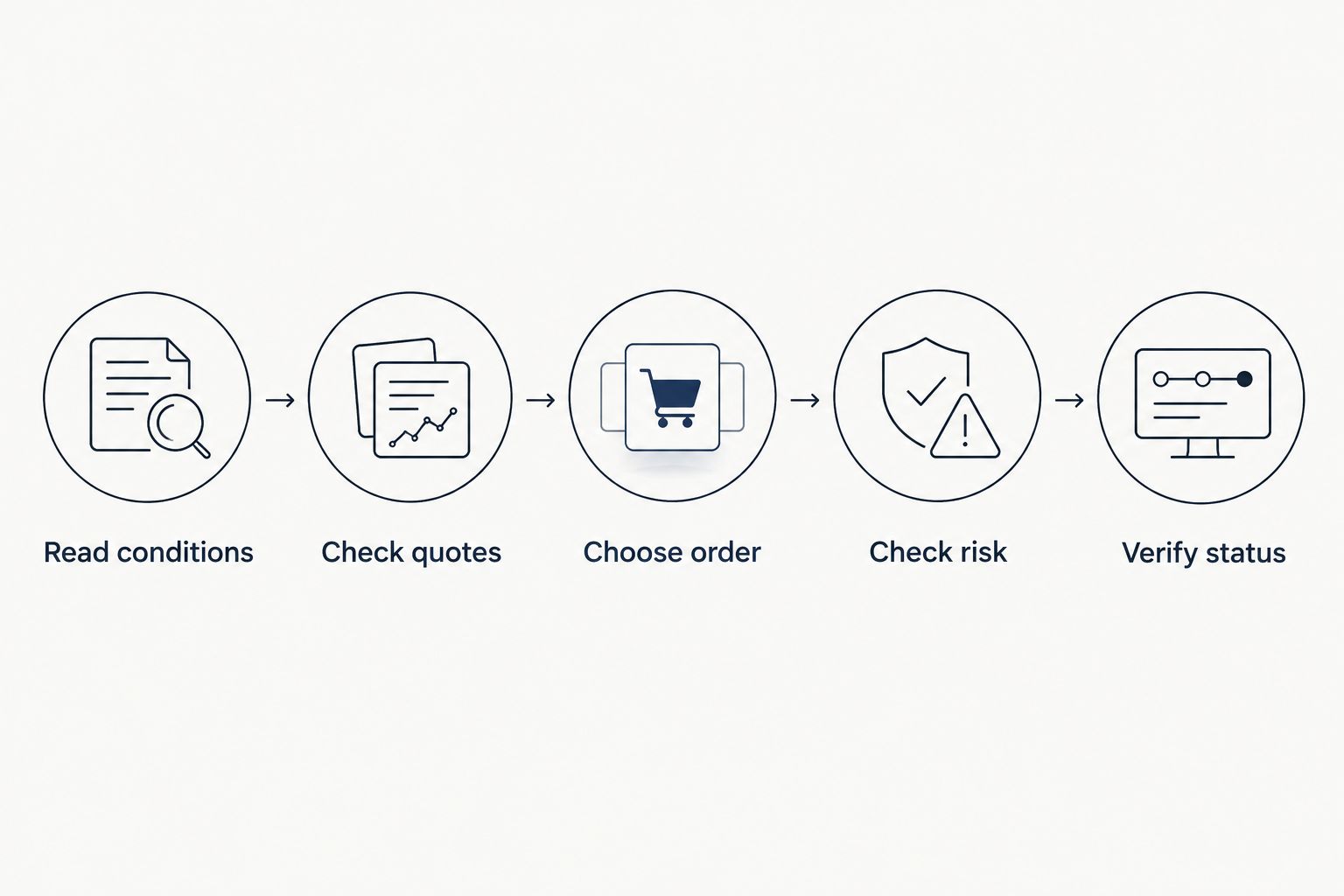
A tapped button is not proof of an open position. An order rejection leaves you without the intended entry, while a pending order can remain active after you stop watching the app.
Practice the full sequence in a demo environment before using real money. Demo practice teaches order handling, but it does not establish how reliably live orders will execute under different market conditions.
Keep the signal service separate from the broker app
Tradeforex is for beginners seeking forex signals in a web app, not a broker app for executing trades. Subscribers receive signals inside the Tradeforex web app; order submission and execution belong with the broker.
That separation gives you a clear responsibility: a trade idea still needs an execution decision. Receiving a signal does not establish that its entry remains valid, that your broker supports the required order, or that the trade will succeed.
Before subscribing through Tradeforex, examine whether you understand the service information and the limits of following signals. Do not assume automatic copying, broker integration, protective exits, or particular signal details without explicit confirmation.
A signals subscription does not remove trading risk. Your broker’s execution rules and your own order size remain relevant regardless of where the trade idea originated.
FAQ
What's the best forex trading app order type for a signal?
The best order type matches the signal’s entry condition: market for an immediate entry, limit for a specified pullback, and stop entry for a specified breakout. Check that the signal remains valid before submitting.
Is a limit order safer than a market order?
A limit order restricts the acceptable execution price, but it does not make the trade itself safe. It can remain unfilled, and a filled position can still lose money.
What's the difference between a buy stop and a buy limit?
A buy stop sits above the current ask and activates when its trigger is reached; a buy limit sits below the current ask and waits for an acceptable price. They express different entry conditions, not different levels of confidence.
Why didn't my forex order fill when the chart touched my entry?
A chart touching your entry does not prove the executable quote met your broker’s order conditions. Check the displayed quote side, the spread, order status, and your broker’s execution rules.
Can I enter a forex signal after its entry price has passed?
Enter after the original level only if the signal’s instructions permit the current entry. Otherwise, skip it rather than changing the trade’s risk and reward relationship.
Does a stop-loss guarantee the maximum amount I can lose?
A standard stop-loss does not guarantee its execution price. Slippage or a market gap can produce an exit beyond the trigger level.
Does Tradeforex execute trades from its signals?
Tradeforex provides forex signals inside its web app; it is not a broker trading app for executing trades. You need to handle order submission and execution through your broker.
One last thing
For your 2026 practice routine, rehearse canceling an unfilled order—not just placing one. A pending order can remain actionable after you mentally abandon the idea.
Treat cancellation as part of the trade plan. When the signal expires or its stated conditions fail, check the broker’s order status and confirm that the unwanted entry is no longer active.