Choose a forex trading app by checking the broker’s regulatory status, testing order controls, and confirming that you can manage a position before subscribing to signals. A signal is a trade idea, not a guaranteed outcome; your broker app handles execution, while a separate signals app supplies information you must evaluate yourself.
- Choose a forex trading app for reliable order control, not because a signals provider recommends it.
- Tradeforex delivers forex signals through its web app; it does not execute your trades.
- Check broker registration, practice with a demo account, and understand position sizing before subscribing to signals.
- Reject any signal you cannot understand or translate into a manageable trading decision.
Why this matters
An app can make placing a trade feel simple without making the trade safe. A prominent buy button tells you nothing about the broker’s registration, how an order works, or how much money a position puts at risk.
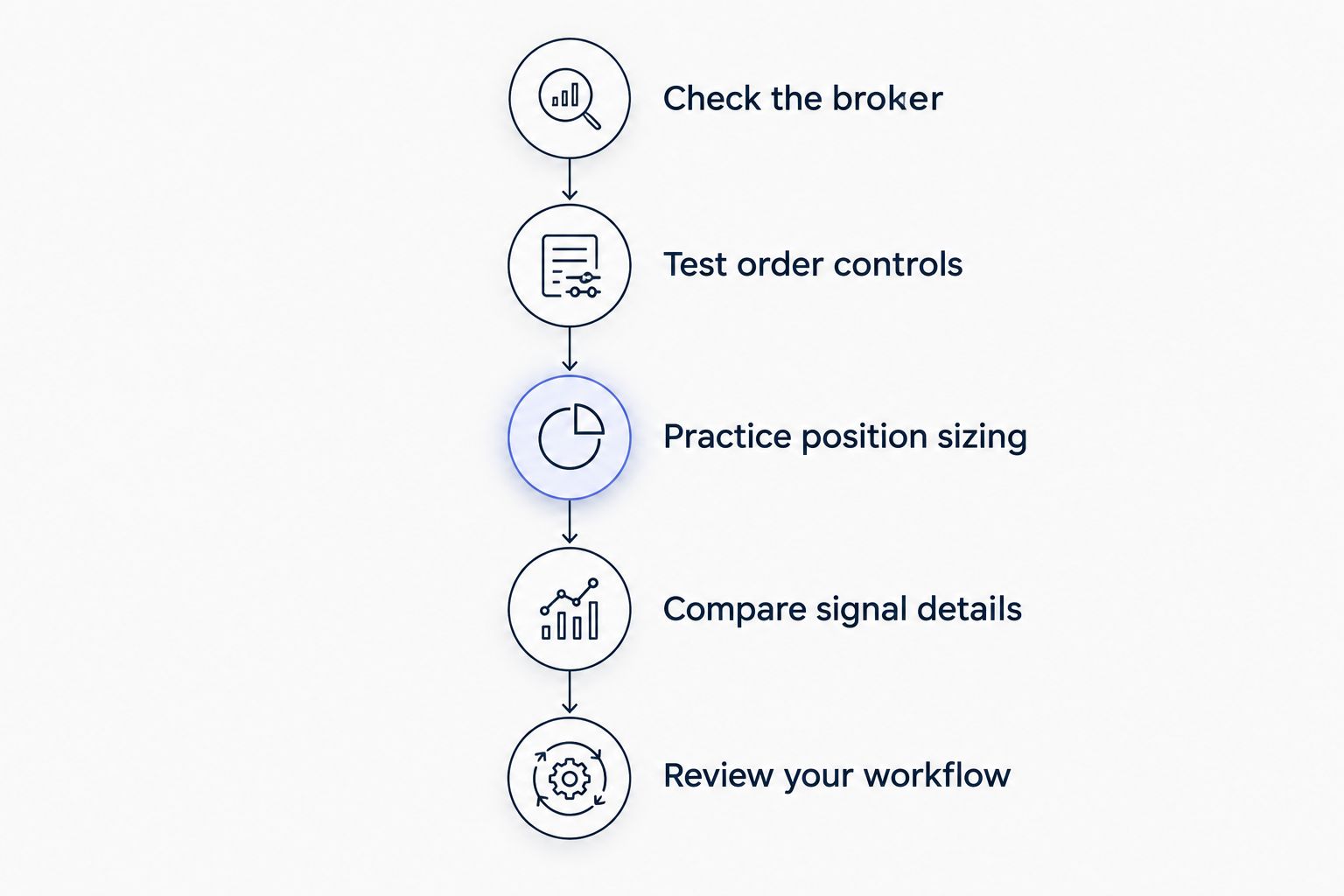
For a beginner choosing an app in 2026, the right sequence is broker checks first, order practice second, signals evaluation third. Reversing that order leaves you trying to learn execution while deciding whether to act on somebody else’s idea.
Tradeforex provides its own forex signals service, with signals delivered inside its web app. Keep that role separate from the broker account where you place and manage trades.
How do you choose a forex trading app before subscribing to signals?
Use the following sequence to separate the safety of the provider, the usability of the app, and the quality of your decision process. Do not treat a polished interface as evidence that the broker or a signal deserves your trust.
Check the broker
Identify the legal entity that would hold your trading account. An app name and a broker’s legal name are not always the same, so match the account agreement to the regulator’s records rather than searching only for the app’s display name.
For US retail forex in 2026, use the Commodity Futures Trading Commission and National Futures Association as the starting points for registration checks. The NFA’s BASIC database provides registration and disciplinary information; confirm that the entity’s status and permissions match the activity it proposes to offer.
Registration is not a promise of good trading results. It is a separate check on who you are dealing with, and a foreign license alone does not establish permission to serve US retail customers.
Test order controls
Find out how the app handles market orders, pending orders, position size, and protective orders. A market order seeks execution at the available market price; a pending order waits for specified conditions, with its behavior depending on the order type.
Practice opening, modifying, and closing a position without real money. Before moving on, you should be able to find your open positions and distinguish an order waiting to execute from a trade already in the market.
An app fails your shortlist if you cannot confidently close a position. Attractive charts do not compensate for confusing order controls.
Practice position sizing
Position size is the amount of currency exposure you take. Leverage lets you control exposure larger than the margin you provide, but it also magnifies the effect of market movements on your account.
Check how the app expresses trade size and how it displays margin requirements. A lot is a unit of trading volume; do not assume that a size field represents the amount of cash you are willing to lose.
Work through the relationship between position size, the distance to a protective exit, and potential loss. If you cannot explain that relationship, postpone live execution rather than letting a signal determine your exposure.
Compare signal details
Read a signal as a proposal that needs enough information for a decision. Look for the currency pair, direction, intended entry conditions, exit approach, and explanation of when the idea no longer applies.
These are evaluation criteria, not claims about what any particular service supplies. An entry price alone does not tell you how to respond if the market has already moved or the reason for the trade has changed.
For Tradeforex forex signals, delivery inside the web app is the confirmed service detail. Assess the actual information supplied before deciding whether it meets your needs; do not assume it includes automatic execution or account-specific risk guidance.
Review your workflow
Trace the full path from reading an idea to checking the market, entering an order, and monitoring the position. Identify which app performs each task and where you must make a decision yourself.
Manual transfer between a signals app and a broker app introduces opportunities for mistakes. Check the pair, direction, size, and order type before submission, especially when switching between screens.
Broker app or signals app: which job does each perform?
A broker trading app and a signals app answer different questions. The broker app is where you submit trading instructions; the signals app is where you receive ideas to consider.
The comparison below describes these categories, not verified features of a particular provider. Some platforms combine functions, so check the actual service rather than relying on the word app.
| Option | Best for | Main benefit | Main limitation |
|---|---|---|---|
| Broker trading app | Placing and managing trades | Provides access to the broker’s order controls and account information | Easy execution does not make a trade suitable or profitable |
| Signals app | Receiving trade ideas for evaluation | Separates idea delivery from your own market research | A signal does not guarantee an outcome or determine suitable position size |
| Broker demo account | Practicing the trading interface | Lets you rehearse order entry without committing real money | Demo results do not establish live execution quality or future returns |
Tradeforex is best for beginners seeking forex signals delivered through a web app, not a broker app that executes trades. That distinction tells you where the service fits; it is not a judgment about its trading performance.
Do not assume that subscribing connects the signal service to your broker account. Treat any execution connection as a separate feature requiring explicit confirmation, permissions, and an explanation of how it works.
What should you test in a demo account?
Use demo trading to test your handling of the app, not to prove that a strategy will make money. In 2026, an app-selection exercise should still focus on actions you can reproduce under pressure.
- Find the currency pair. Confirm the full symbol and understand which currency you are buying or selling relative to the other.
- Inspect the quote. Identify the bid and ask, the prices associated with selling and buying. Their difference is the spread.
- Prepare the order. Select the direction, order type, and size deliberately. Read the confirmation before submitting.
- Modify the position. Locate any supported protective-order controls and check whether your changes were accepted.
- Close the position. Verify that it is no longer open rather than assuming the button press completed the action.
- Read the history. Find the execution record and compare it with what you intended to submit.
A demo account’s useful result is procedural: you know where the controls are and how to verify an action. Simulated results do not establish how live orders will fill during changing market conditions.
Keep a short record of mistakes. If you repeatedly confuse size, direction, or order status, resolve that problem before adding signals to the process.
Why the right forex trading app varies
The right app depends on the trading tasks you understand and need to perform. These factors change the decision without requiring a ranking based on unsupported claims about individual providers.
- Your jurisdiction. Verify whether the account provider can serve you and which legal entity is responsible for your account.
- Your order requirements. Confirm that the app supports the order types you understand and intend to use.
- Your risk understanding. Favor controls and explanations you can interpret correctly, especially for size and margin.
- Your device workflow. Test whether switching between the signals source and broker interface leads to entry mistakes.
- Your monitoring needs. Check how you will locate open positions and verify changes while a trade remains active.
- Your learning stage. Prioritize a usable practice environment over features you cannot yet explain.
Choose for your workflow, not for the longest feature list. An advanced tool adds little value when you cannot use its controls correctly.
How do you evaluate forex signals before subscribing?
Judge whether you can understand and question the trade idea. A strong sales message does not substitute for information about the conditions under which a proposed trade makes sense.
Separate the idea from the result
An entry is a proposed starting point, not evidence of an eventual profit. An exit target is also a plan, not a promise that the market will reach it.
If a provider presents past results, examine how those results were recorded and what they represent. Distinguish executed trades from hypothetical examples, and check whether unsuccessful ideas appear alongside successful ones.
Do not infer future returns from a highlighted winning trade. A screenshot without the surrounding record does not establish consistency, account-level results, or suitability for you.
Check whether the idea is still current
The market can move between signal delivery and your decision to act. Compare the current quote with the proposed entry conditions rather than copying an instruction without checking its context.
If the conditions no longer apply, do not treat the original idea as a fresh recommendation. Chasing a moved price changes the trade you are considering, including the relationship between entry and exit.
Keep the risk decision yours
A signal does not know your financial circumstances unless the service explicitly establishes an account-specific advisory relationship. Do not assume that a suggested trade size suits your account or ability to absorb a loss.
Decide whether you understand the downside before you place the order. Skip a trade when you cannot explain its risk, even if the idea arrives from a service you subscribe to.
For a Tradeforex forex signals subscription in 2026, evaluate the actual signal content and keep trade execution separate. Web-app delivery confirms where subscribers receive signals; it does not establish profitability, automatic trading, or protective-order features.
Review the signals service
Tradeforex subscribers receive forex signals inside the web app. Evaluate the service before subscribing.
Can a forex signal replace learning the trading app?
A forex signal cannot replace learning your broker’s trading app. You still need to select the correct market, enter the intended order, and manage or close the resulting position.
Treat signal evaluation and app practice as separate skills. Understanding one does not establish competence in the other.
Is a stop-loss enough to make a signal safe?
A stop-loss does not make a forex signal safe or guarantee the final loss amount. Market gaps and execution conditions can produce a fill different from the price you specified.
Understand the broker’s order terms and your position size together. A protective order is part of risk management, not a substitute for it.
Should you subscribe before choosing a broker app?
Choose and practice with the broker app before relying on signals for live trading. That sequence lets you judge whether you can translate an idea into an order without guessing at the controls.
A subscription does not resolve broker suitability, regulatory checks, or execution mistakes. Complete those checks independently.
FAQ
What's the best forex trading app for a beginner in 2026?
The best forex trading app for a beginner is one from a verified account provider whose order controls you can use correctly. Test position sizing, order modification, and closing a trade before committing real money.
Does Tradeforex place trades for subscribers?
Tradeforex provides forex signals inside its web app; it does not act as the broker app that executes your trades. Keep the signal service separate from the account where you place and manage orders.
Can I use forex signals without understanding leverage?
Do not use forex signals for live leveraged trading until you understand leverage and position sizing. A signal's direction does not tell you how much exposure is suitable for your account.
Is a forex demo account proof that an app is safe?
A forex demo account is not proof that an app or account provider is safe. Use it to practice controls, and check the broker's legal identity and regulatory status separately.
What should I check before copying a forex signal?
Check the currency pair, direction, entry conditions, exit approach, and whether the idea still applies. Then make your own position-size decision and verify the order before submitting it.
Do forex signals guarantee profitable trades?
Forex signals do not guarantee profitable trades. They are ideas to evaluate, and following them can result in losses.
One last thing
The most useful final check in 2026 is not whether you can open a trade. It is whether you can verify what happened afterward: the correct pair, intended direction, accepted size, and current position status.
Before subscribing to signals, rehearse that verification process in your chosen app. Knowing how to confirm and close a position matters more than receiving another trade idea.