
With manually followed forex signals, you decide whether to place each order; with copy trading, you authorize a system to reproduce another trader’s activity under the platform’s rules. Neither approach gives you complete control over the execution price, and automated signal connections can remove the approval step that normally separates signals from copying.
- Forex signals vs copy trading comes down to order approval: manual signals require your decision; copying usually automates it.
- Tradeforex delivers forex signals inside its web app; it is not a broker trading app.
- Manual signals suit traders wanting trade-by-trade approval; copy trading suits traders accepting delegated decisions.
- Neither approach guarantees execution prices, effective loss limits, or profitable outcomes.
Forex signals vs copy trading: who controls your orders?
Manual signals leave individual trade approval with you. Copy trading delegates that approval within settings you authorize. Your broker still handles execution, and market conditions affect the result.
Before choosing either approach, separate the source of the idea from the place where you trade. This guide to choosing a forex trading app before subscribing to signals explains that distinction.
| Control question | Manually followed forex signals | Copy trading |
|---|---|---|
| Who proposes the trade? | The signal provider | The trader or strategy being copied |
| Who approves each order? | You, before submitting it | The copying system, under your authorization |
| Who chooses position size? | You enter the size | The system applies its sizing rules and your available settings |
| Can you skip an individual trade? | Yes, before submitting it | Check whether the platform permits selective copying |
| Main advantage | Direct approval of each trade | Less manual order entry |
| Main drawback | You must interpret and enter orders | Orders can open without individual review |
| Best for | Beginners wanting trade-by-trade decisions | Traders willing to delegate individual decisions |
These are operating models, not guarantees about every app. A signal connected to an execution tool belongs on the automated side of the comparison, even if its marketing calls it a signal service.
Why this matters in 2026
Choosing between signals and copying means choosing where permission sits. A notification asks you to act; an authorized connection can act without another confirmation.
That difference matters when you are away from your screen, when a provider changes direction, or when several positions are already open. Less manual work does not mean less financial risk. You remain responsible for deciding what access to grant and how much exposure to accept.
Choose the approval process before comparing convenience. An attractive dashboard does not tell you whether an app can submit orders, change positions, or keep trading after you stop watching.
Manually followed forex signals: you approve each trade
A forex signal is a trade idea rather than an instruction your broker must execute. With manual handling, you read the idea, decide whether it fits your plan, and submit any order yourself.
You control whether to participate, what size to enter, and whether to use different order instructions. That freedom has a cost: you must understand the trade well enough to accept or reject it. Copying a suggested size without checking your own account turns a deliberate approval step into guesswork.
Check what each idea actually explains. The currency pair identifies what you would trade; the direction indicates buying or selling; an entry condition describes when the idea applies. Exit instructions explain when to leave, while risk information helps you evaluate the potential loss. Do not assume every provider supplies those details.
- Best for: Beginners who want to review each trade before placing it.
- Advantage: You can reject an idea without changing an ongoing copying relationship.
- Drawback: Manual entry creates room for delays, typing errors, and misinterpretation.
Manual control also includes doing nothing. If the original entry condition has passed or the explanation is unclear, you do not need to place an order simply because a signal arrived.
Copy trading: you authorize a process
Copy trading generally connects your account to another trader’s activity through a copying system. Rather than reviewing each proposed trade, you authorize the connection and choose from the controls the platform provides.
Your decisions move to the setup stage: whom to follow, what allocation to commit, and which limits to apply. The copied trader makes trading decisions, the copying system translates them, and your broker processes the resulting orders.
That translation matters. A follower’s account can differ from the copied account in balance, available instruments, execution conditions, and position-sizing restrictions. Copying a strategy does not establish that your account will receive identical trades or results.
- Best for: Traders who understand the permissions and accept delegated trade decisions.
- Advantage: Automated order handling reduces the need to enter every copied trade manually.
- Drawback: Positions can open before you have assessed the individual idea.
Do not treat a copying allocation as a guaranteed loss limit. Check how the platform defines allocation, what stops new orders, and what happens to existing positions. Those are separate controls, not interchangeable terms.
Why order control varies between apps
The label on the service is less useful than its permissions and operating rules. Compare these controls before subscribing in 2026:
- Connection permissions: Determine whether the service only displays information or can send trading instructions to a connected account.
- Approval method: Identify whether you confirm every order, approve a batch, or authorize ongoing execution.
- Sizing rules: Check whether order size is entered manually, fixed, or calculated relative to another account.
- Exit handling: Establish who can close positions or change protective orders after a trade opens.
- Disconnect behavior: Find out whether stopping a connection only prevents new trades or also affects open positions.
- Broker execution: Review the order types, instrument specifications, and execution conditions that apply to your account.
A platform offering more settings still requires you to understand them. A limit with an unclear trigger is not a dependable basis for deciding how much money to expose.
How do you check order control before subscribing in 2026?
Follow the order from idea to execution. The useful question at each stage is not whether a feature exists, but whether you understand what it authorizes.
- Check permissions. Read the connection request and identify whether it permits information access, trading access, or both. Do not grant trading permission merely to read a signal.
- Check sizing. Find the actual order-volume setting. Distinguish the money assigned to a strategy from the size of each resulting position.
- Check exits. Determine whether exits depend on you, the provider, a copied trader, or an order already submitted to the broker. Check what happens if a connection fails.
- Check disconnection. Read how to stop future activity and how to handle trades already open. Do not assume one action performs both jobs.
- Practice first. Where a demo environment exists, rehearse the relevant steps without putting live funds at risk. Demo results do not establish live execution quality or future profitability.
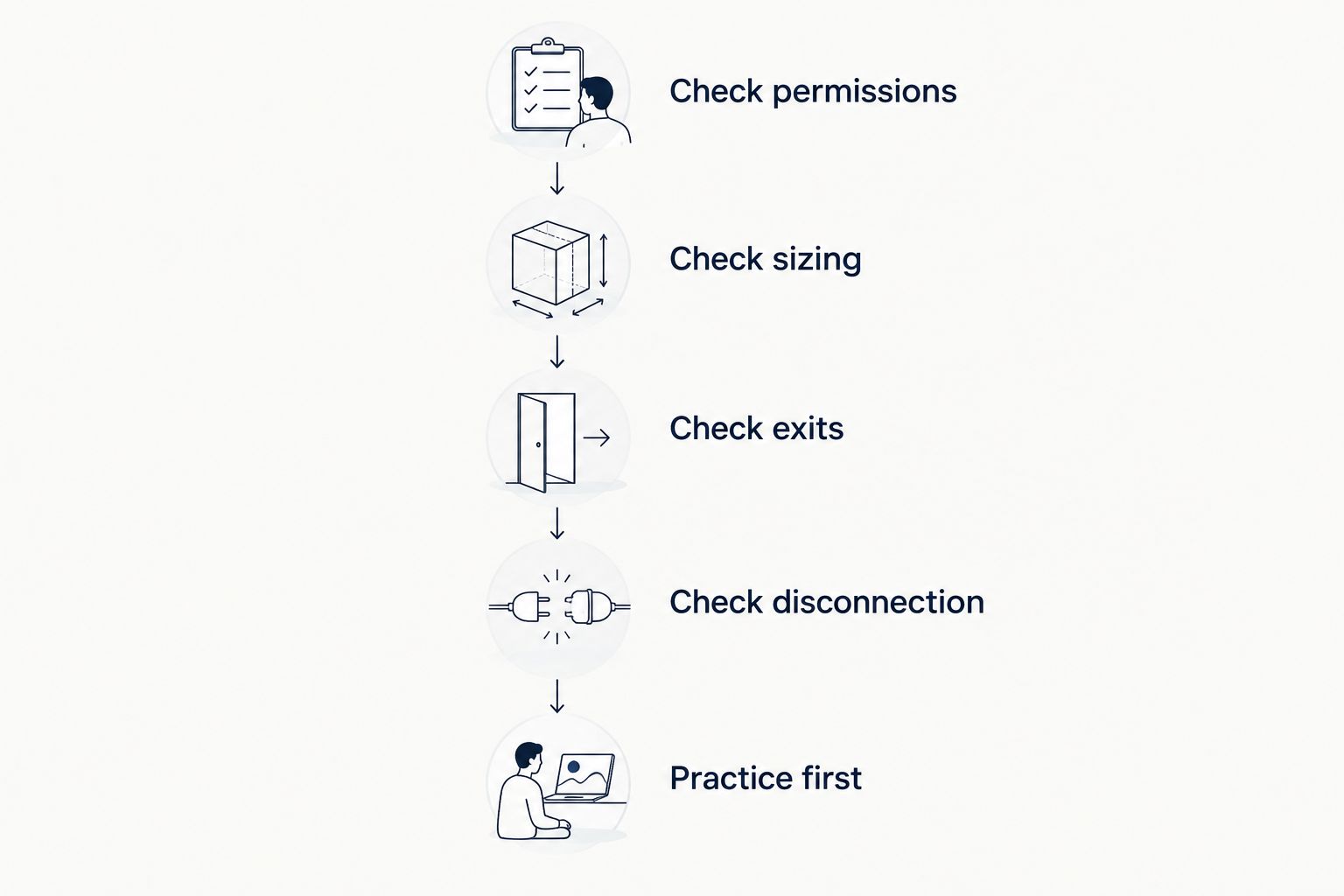
Keep a written answer to each check. If the documentation does not explain what happens to open positions when copying stops, resolve that question before connecting a funded account. A familiar-looking switch is not a substitute for its operating rules.
Position size matters more than the approval button
Approving an order does not make its size appropriate. Forex volume is commonly expressed in lots, which describe the amount of the base currency being traded. The base currency is the first currency named in a pair.
A standard lot conventionally represents 100,000 base-currency units. A mini lot represents 10,000 base-currency units, and a micro lot represents 1,000 base-currency units. Check the broker’s contract specifications rather than assuming every instrument uses the same convention.
These are position amounts, not the cash required to open the trade and not a forecast of loss. Margin is the collateral required to support a position; leverage allows exposure larger than that collateral and magnifies the effect of price movements on your account.
With manual signals, inspect the size you enter. With copying, inspect how the system calculates it. In both cases, consider the combined exposure of open positions rather than treating each approval or copied order as an isolated decision.
Can I stop copy trading without closing my trades?
Stopping copy trading and closing existing trades are separate actions unless the platform explicitly combines them. Read the disconnection rules before assuming that ending a copying relationship removes your market exposure.
If positions remain open, establish who manages their exits afterward. Also check whether protective orders remain in place and whether the former copying connection can still modify anything.
Does manual approval guarantee my entry or exit price?
Manual approval does not guarantee an execution price. The price available when you submit an order can differ from the price shown when a signal was published.
A market order seeks execution at available prices. A limit order restricts acceptable execution prices but does not guarantee a fill; an ordinary stop-loss order does not guarantee its trigger price during a gap or fast market. Understand the order type rather than assuming a signal’s stated level is the price you will receive.
Can a high win rate tell me which approach is safer?
A high win rate alone cannot establish safety because it does not describe the size of losses, total exposure, or how results were calculated. Frequent small gains do not rule out losses large enough to outweigh them.
When reviewing a 2026 performance record, distinguish live results from demonstrations or backtests. Examine the period covered, treatment of costs, open losses, and drawdown—the decline from an account’s previous peak. A performance claim does not replace checking the account permissions you are granting.
Where a web-app signals service fits
Tradeforex suits beginners seeking forex signals in a web app rather than a broker execution app. Subscribers receive signals inside the Tradeforex web app; that delivery method is distinct from placing trades through a broker.
If that arrangement matches how you want to review trade ideas, visit Tradeforex before deciding whether to subscribe. The delivery channel alone does not establish the contents of each signal, execution arrangements, or results. Assess the actual service information against the approval, sizing, and exit checks above.
Review the signals service
Subscribers receive forex signals inside the Tradeforex web app.
FAQ
What's the main difference between forex signals and copy trading?
Manually followed forex signals leave each trade approval with you, while copy trading authorizes a system to reproduce another trader’s activity. Signals connected to automated execution do not preserve that same manual approval step.
Are forex signals better for beginners than copy trading?
Manual forex signals are better suited to beginners who want to review each trade before submitting it. They still require you to understand position size, order types, and potential losses.
Does copy trading mean someone can trade without asking me each time?
Copy trading generally authorizes ongoing order activity without asking you to approve every trade. The scope depends on the connection permissions and platform rules you accept.
Can I lose money even if I use stop-loss orders?
Yes, stop-loss orders do not eliminate trading losses or guarantee an execution price. Gaps and fast price movements can produce execution beyond the trigger level.
Do I need to use the same position size as a signal provider?
No, a provider’s position size does not establish an appropriate size for your account. Check your own exposure, broker contract specifications, and potential loss before submitting an order.
Does turning off copy trading close all my positions?
Turning off copy trading does not necessarily close existing positions. Check whether the platform stops new trades, closes current trades, or requires separate instructions.
Does a forex signals web app replace my broker?
A signals web app does not replace your broker merely by displaying trade ideas. Your broker handles orders you submit through its trading facilities or an authorized connection.
One last thing
Test the stop procedure before focusing on the start button. For a 2026 app shortlist, write down how to prevent new orders, inspect open positions, and manage remaining exits. If you cannot explain those steps without guessing, do not authorize automated trading yet.