
Best overall for straightforward forex trading: MetaTrader 4. Best for multi-asset trading: MetaTrader 5. Best for chart-led research: TradingView. This 2026 guide compares execution platforms with Tradeforex’s separate signals service so you can choose tools without confusing a trade idea with a guaranteed outcome.
- MetaTrader 4 is the best forex trading app starting point for traders seeking a conventional forex platform.
- MetaTrader 5 suits traders who want forex and other markets through a supporting broker.
- TradingView suits chart-led research; supported broker connections determine whether you can execute trades.
- Tradeforex provides forex signals inside its web app, not a broker app that executes your trades.
- Choose your broker, practice order entry, and evaluate signals separately before risking money.
Why this matters
A trading app is not necessarily a broker. A broker handles your trading account and execution; a platform supplies the interface; a signals service supplies trade ideas. Some products combine roles, but you should never assume that a charting tool or signals subscription also lets you place orders.
Tradeforex is best for beginners seeking a separate forex signals service rather than a broker execution app. Subscribers receive signals inside the Tradeforex web app. You still need to understand how to evaluate an idea and, if you decide to trade, execute it through your chosen broker.
For a US reader comparing apps in 2026, broker eligibility comes before interface preference. Check the broker’s registration and disciplinary information through NFA BASIC, and confirm that the account accepts residents of your jurisdiction. A familiar platform name does not establish that its connected broker is appropriate for you.
What makes the best forex trading app?
Use these criteria before deciding which interface looks easiest:
- Broker eligibility: The broker must accept your jurisdiction and provide the forex account you need.
- Order clarity: You should understand the currency pair, direction, position size, and order type before submitting anything.
- Risk controls: Check how the platform handles stop-loss orders, margin information, and open positions. Controls do not eliminate losses.
- Practice access: A demo or paper-trading environment helps you learn the workflow without funding a live position.
- Research fit: Choose charts and indicators you can explain, rather than collecting features you cannot use.
- Role separation: Distinguish research, signals, and execution. Know which tool performs each job.
No app wins every criterion. A detailed charting interface adds little value if you cannot identify your position size or cancel a pending order.
Forex trading apps at a glance
This 2026 comparison ranks tools by their role, not by claimed profitability. The signals service appears separately because it does not replace an execution platform.
| Rank | Option | Best for | Standout capability | Key limitation |
|---|---|---|---|---|
| 1 | MetaTrader 4 | Straightforward forex trading | Forex-focused trading with charts and Expert Advisors | Instruments and account conditions depend on the broker |
| 2 | MetaTrader 5 | Multi-asset trading | Platform support for forex and other asset classes | Broker support determines which markets you can actually trade |
| 3 | TradingView | Chart-led research | Charting, alerts, and paper trading | Live execution requires a supported broker connection |
| 4 | cTrader | Detailed order controls | Order tools and depth-of-market views | Depth information does not represent the entire forex market |
| 5 | Tradeforex | Separate forex signals | Subscribers receive signals inside its web app | Signals are not trade execution or guaranteed outcomes |
1. MetaTrader 4: best forex trading app for straightforward trading
MetaTrader 4 is a trading platform used through participating brokers. It combines price charts, technical indicators, order entry, and support for Expert Advisors, which are programs that automate trading logic.
For beginners, the useful question is not whether automation exists. It is whether you can read a quote, enter an order, and check your exposure without relying on a program you do not understand.
MetaTrader 4 pros:
- Combines chart analysis and order entry in one platform.
- Supports market and pending orders, including stop-loss and take-profit instructions.
- Provides technical indicators for studying price behavior.
- Supports Expert Advisors for traders who understand and validate automated rules.
MetaTrader 4 cons:
- Broker-specific instruments, account settings, and execution conditions still require separate checks.
- Automated strategies add risks that beginners must evaluate rather than assume away.
- Familiarity with the platform does not establish the quality of a particular broker.
Best for: Beginners who have selected an eligible broker and want a conventional forex trading workflow.
Before funding an account, practice opening, modifying, and closing a position in a broker-provided demo environment. Check the difference between closing a live position and deleting a pending order; those actions solve different problems.
Verdict: Buy into the MetaTrader 4 workflow for straightforward forex trading; skip unverified automation.
2. MetaTrader 5: best trading app for multi-asset learning
MetaTrader 5 supports forex and other asset classes, with the actual instrument list determined by the broker. It also supports different account-position systems: netting combines exposure in an instrument, while hedging allows separate positions where the account supports it.
That distinction matters when you follow several trade ideas. Two orders on the same currency pair do not necessarily appear or behave as independent positions on every account.
MetaTrader 5 pros:
- Supports multiple asset classes within the platform architecture.
- Includes charting, technical indicators, and order-management tools.
- Offers a strategy-testing environment for automated trading rules.
- Supports netting and hedging account configurations.
MetaTrader 5 cons:
- A broker’s product range limits the platform’s practical multi-asset usefulness.
- Additional markets and position settings introduce concepts a beginner must learn.
- Existing MetaTrader 4 automation is not automatically interchangeable with MetaTrader 5 automation.
Best for: Traders who want to learn forex alongside other markets through a broker that supports them.
For your 2026 shortlist, compare the account configuration as carefully as the app. Ask how opposing orders behave and which instruments the broker makes accessible to your account.
Verdict: Buy into MetaTrader 5 when multi-asset access serves a specific need; hold if you only need a simpler forex workflow.
3. TradingView: best forex trading app for chart-led research
TradingView is a charting and analysis platform with alerts and paper trading. It also supports live trading through connected brokers, but a chart on the screen does not mean you can trade that instrument through your particular connection.
Its clearest role in this comparison is research. You can study a currency pair and develop a written trade thesis before deciding whether a broker order belongs in the market.
TradingView pros:
- Provides charts and drawing tools for organizing a trade thesis.
- Supports alerts tied to conditions you define.
- Includes paper trading for practicing a trading workflow.
- Connects research and execution where the broker integration supports your needs.
TradingView cons:
- Broker integrations restrict which live accounts and instruments you can trade.
- Community scripts and published ideas require independent evaluation.
- A research chart’s data feed can differ from your execution broker’s quotes.
Best for: Beginners who want to understand charts before placing trades.
Use alerts as reminders to review a setup, not as instructions to enter automatically. If your trading decision starts on one data feed and ends on another, check the executable quote before submitting the order.
Verdict: Buy into TradingView for chart-led research; hold live execution until you confirm the broker connection.
4. cTrader: best forex trading app for detailed order controls
cTrader provides charting, order entry, and depth-of-market tools through supporting brokers. Depth of market displays liquidity information supplied through the trading arrangement; it is not a complete view of the global forex market.
This makes cTrader a fit for readers who want to examine order behavior closely. The extra detail is useful only when you understand what the information represents.
cTrader pros:
- Brings charting and order management into the trading interface.
- Supports stop-loss and take-profit instructions.
- Offers depth-of-market views for examining supplied liquidity information.
- Supports automated trading for users prepared to evaluate programmed strategies.
cTrader cons:
- Broker support and jurisdictional eligibility determine whether it is a practical choice.
- Depth-of-market detail can invite false confidence if you mistake it for market-wide liquidity.
- Advanced order tools do not remove slippage or execution risk.
Best for: Traders who prioritize understanding order controls and available liquidity information.
Practice changing an order before trying to trade quickly. Being able to identify the selected order, its status, and its risk settings matters more than reducing the number of taps.
Verdict: Buy into cTrader when order detail is your priority; skip it if the extra information distracts from basic risk checks.
5. Tradeforex: best companion for separate forex signals
Tradeforex provides its own forex signals service, and subscribers receive those signals inside its web app. It is not presented here as a broker execution app or as a substitute for choosing a broker.
Treat a signal as a trade idea requiring your judgment. A subscription does not establish that a trade suits your account, your experience, or your tolerance for loss.
Tradeforex pros:
- Provides a dedicated forex signals service.
- Delivers subscriber signals inside its web app.
- Offers a separate signals option to evaluate alongside your execution setup.
Tradeforex cons:
- Does not replace a broker trading account or execution platform.
- Signals do not guarantee profitable outcomes.
- Receiving an idea does not establish whether you can execute it at a suitable quote or position size.
Best for: Beginners comparing a separate signals subscription after learning their broker’s trading workflow.
Evaluate the actual service before subscribing. Look for explanations you can understand, and assess whether each idea gives you enough information to make an independent decision; do not assume specific signal details or performance from the category alone.
Verdict: Hold until you understand execution and can evaluate signals independently; consider subscribing only after that check.
Review the signals service
Assess whether a separate signals subscription fits your trading workflow before subscribing.
Check the trade before following a signal
In 2026, app selection and signals evaluation remain separate decisions. A suitable interface can execute an unsuitable idea, and a clearly expressed idea can still lose money.
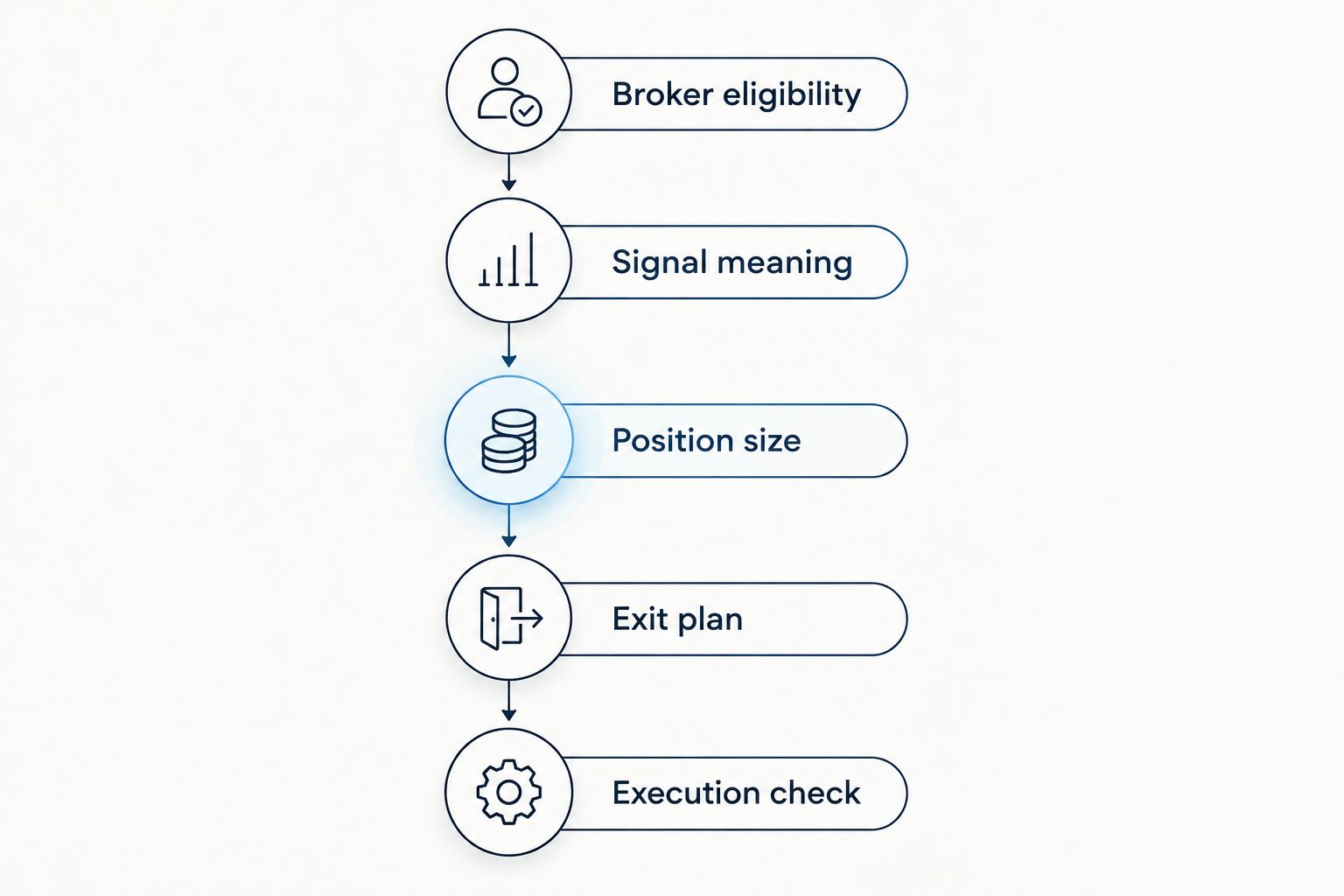
Use this sequence before acting:
- Broker eligibility: Confirm that the account and instrument are appropriate for your jurisdiction.
- Signal meaning: Understand the proposed currency pair, direction, and conditions before deciding whether to act.
- Position size: Check how much currency the order represents, not just the size of the button or ticket.
- Exit plan: Decide how you will handle both an unfavorable move and a favorable move.
- Execution check: Review the current quote, spread, order type, and existing exposure before submitting.
Position-size terminology deserves special attention. In standard forex lot terminology, a standard lot represents 100,000 units of the base currency, a mini lot represents 10,000 units, and a micro lot represents 1,000 units. Check your broker’s contract specifications and order-ticket units rather than assuming every instrument follows that convention.
The base currency is the first currency named in a pair. Margin is the amount required to support a position; it is not a statement of the most you can lose. A stop-loss order also does not guarantee execution at its specified price under every market condition.
How we ranked these options
The ranking prioritizes a clear beginner workflow, then assigns each option a distinct role: conventional forex execution, multi-asset access, chart research, order detail, or separate signals. It is not a profitability ranking or a claim of hands-on performance testing.
Feature distinctions follow the platforms’ publicly documented functions. Broker eligibility, account configuration, and the services you actually receive must be checked separately when choosing in 2026.
Which forex trading app should you choose?
Choose MetaTrader 4 as the default starting point if your eligible broker supports it and straightforward forex execution is your goal. Choose MetaTrader 5 for a specific multi-asset need, TradingView for chart-led research, or cTrader when detailed order controls matter most.
Do not force a signals service into the execution-platform decision. Learn your broker workflow first, then evaluate whether a separate subscription adds information you can understand and assess independently.
FAQ
What's the best forex trading app for beginners in 2026?
MetaTrader 4 is this guide’s default for beginners seeking a conventional forex trading platform. Your broker must support it, accept your jurisdiction, and provide an account you understand.
Is MetaTrader 5 better than MetaTrader 4?
MetaTrader 5 is the better fit when you need its multi-asset platform capabilities through a supporting broker. MetaTrader 4 remains the simpler category choice here for a straightforward forex-focused workflow.
Can I trade forex directly on TradingView?
You can trade through TradingView when a supported broker connection provides the relevant account and instrument. Chart access alone does not establish live trading access.
Does a forex signals subscription place trades for me?
A signals subscription is not inherently a trade-execution service. In this comparison, the signals service supplies ideas separately from the broker platform you use to place orders.
Can forex signals guarantee profits?
Forex signals cannot guarantee profits. Market movements, execution conditions, position size, and your decisions all affect the outcome of a trade.
Should I practice before trading with real money?
Yes, practice order entry and position management in a demo or paper-trading environment before risking money. Practice helps you learn the interface, but simulated results do not establish future live performance.
What should US beginners check before choosing a forex app?
US beginners should check the broker’s eligibility, registration, and disciplinary information before choosing an interface. NFA BASIC provides registration and background information; platform branding alone is not a broker check.
One last thing
A familiar chart and your broker’s executable quote are not necessarily identical. Before following any signal, check the price you can actually trade and whether your planned position still makes sense. Skipping a trade you cannot explain is a valid decision.