Test a forex trading app demo account by placing simulated orders, checking position sizing and exits, and recording whether you can repeat each task without confusion. A successful demo test shows that you understand the app; it does not prove that live execution will match the simulation or that a trading signal will make money.
- Use a forex trading app demo account to test order handling, not to prove future profitability.
- Practice opening, changing, and closing trades before acting on forex signals.
- Tradeforex delivers subscribers’ forex signals inside its web app; it is not a broker execution app.
- Reject any setup you cannot explain, size, or exit without guessing.
How do you test a forex trading app with a demo account?
Test the complete trading workflow, not just the chart. You need to understand what happens between reading a trade idea and closing the resulting position. The forex trading apps for beginners practice guide provides related reading for that process.
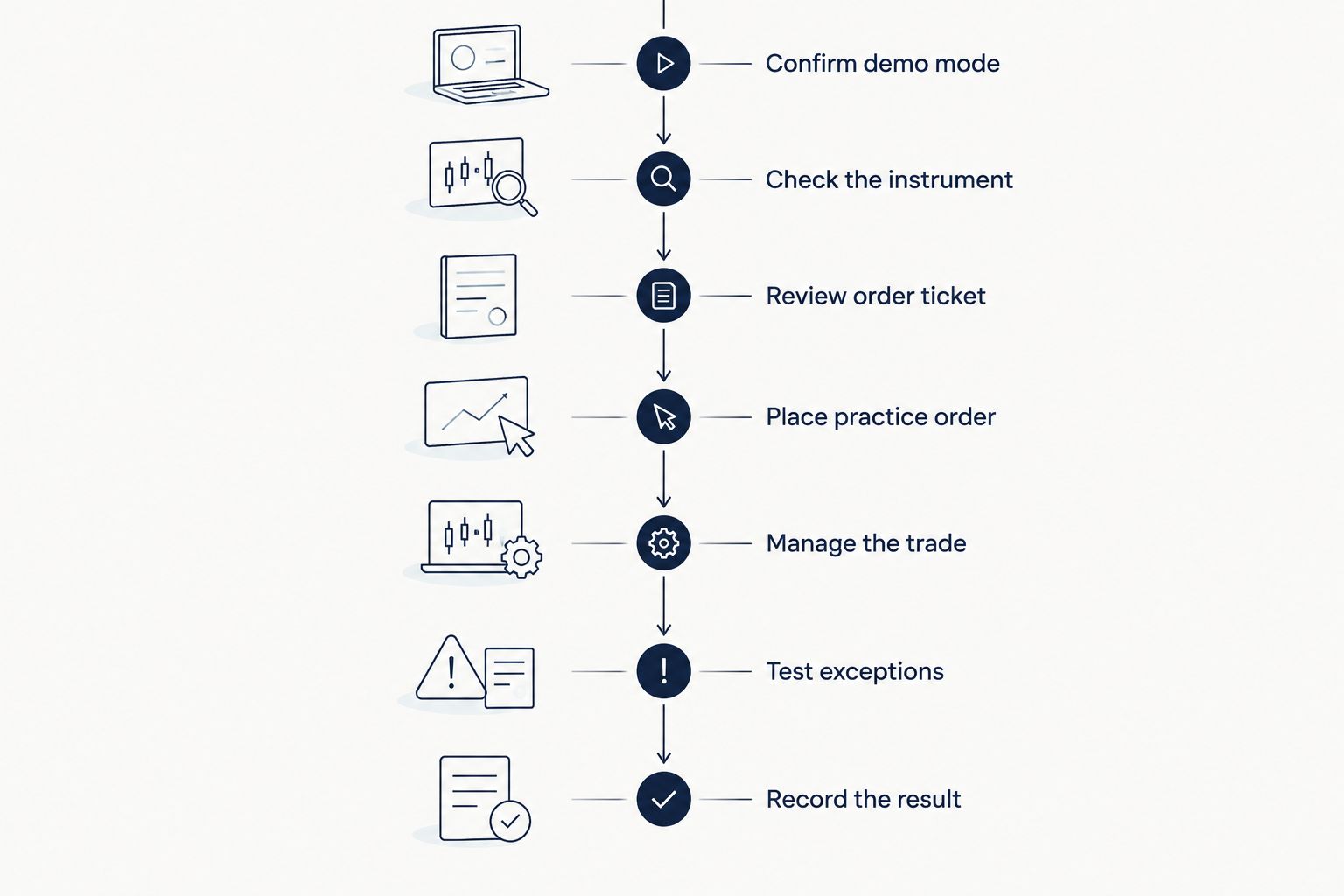
Use this 2026 demo-testing checklist:
- Confirm demo mode. Check that the account uses simulated funds before submitting an order.
- Check the instrument. Identify the currency pair and confirm which currency you are buying or selling.
- Review the order ticket. Find direction, order type, position size, and available exit controls.
- Place a practice order. Read the confirmation and locate the resulting order or position.
- Manage the trade. Practice changing an exit instruction and closing the position.
- Test exceptions. Cancel an unfilled order and inspect any rejection message.
- Record the result. Note what worked, what confused you, and what needs another attempt.
Repeat confusing tasks before adding more tools. A chart full of indicators does not compensate for uncertainty about which button closes your position.
Why this matters
A forex app can feel simple while hiding decisions you do not yet understand. An order ticket asks you to choose direction, size, and execution instructions; a mistake in any of those changes the trade you intended to place.
For your 2026 app comparison, separate usability from trading results. A winning simulated trade does not establish that the app suits you, and a losing simulated trade does not establish that the app is defective. Judge whether the instructions and results match.
Your most useful outcome is a repeatable process. You should be able to explain what you submitted, what the app accepted, and how you would exit.
Set up a demo that tests your actual decisions
Choose a simulated balance that resembles the amount you are considering allocating, if the app lets you adjust it. An oversized practice balance can make position sizes feel harmless even when the same decisions would be uncomfortable with real money.
Check the account currency, instrument description, and trading hours shown by the provider. Forex-related products differ in structure, so do not assume every instrument with a currency-pair label has identical contract terms.
Keep 1 trading journal throughout the test. Record the pair, direction, order type, size, intended exit, and reason for entering; then add the actual simulated outcome and any operational mistake.
Avoid resetting the balance immediately after a loss. Keeping the original record helps you distinguish a planned losing trade from an order-entry error, instead of erasing both with a fresh account.
Test market, limit, and stop orders separately
Practice 3 order workflows: a market order, a pending order, and a cancellation. These are recommended checks, not a minimum trading requirement or evidence that you are ready for live trading.
A market order requests execution at the available market price. A limit order sets a price boundary, while a stop-entry order activates when its trigger condition is reached; check the provider’s exact rules before using either.
| Order or action | Best for testing | Benefit | Limitation |
|---|---|---|---|
| Market order | Opening a position immediately | Shows the basic submission and confirmation process | Does not guarantee a specific execution price |
| Limit-entry order | Waiting for a specified price or better | Makes the entry-price condition explicit | Can remain unfilled |
| Stop-entry order | Entering after a trigger is reached | Tests conditional entry instructions | Triggering does not guarantee the eventual fill price |
| Cancel pending order | Removing an instruction you no longer want | Tests whether you can stop an unfilled instruction | Cancellation does not close an already filled position |
Do not confuse a stop-entry order with a stop-loss instruction. The first opens a position when its condition is met; the second is intended to exit an existing position when its condition is met.
After each submission, check the order status rather than relying on the button animation. Accepted, pending, filled, canceled, and rejected describe different outcomes.
Check position size before focusing on profit
Position size determines how much exposure you take. Apps can express size in units, lots, or another contract measure, so read the instrument details instead of assuming that the same displayed quantity means the same exposure everywhere.
Before confirming a simulated order, answer these questions:
- What amount of the underlying currency does this size represent?
- What loss does the app estimate at the intended stop, if it provides that estimate?
- Which account currency does the estimate use?
- Does the estimate include transaction charges?
- What happens if the exit executes beyond the intended level?
Borrowed exposure magnifies gains and losses. Margin is the amount required to support a position, not a cap on what the position can lose.
Do not treat the available margin as a recommended trade size. If you cannot explain the exposure, reduce the complexity of the practice task before proceeding.
Test exits before trusting entries
Find the controls for closing the full position and, where supported, reducing part of it. Check whether changing an exit instruction affects the existing position or creates a separate order.
A stop-loss is an instruction intended to limit a loss; an ordinary stop does not guarantee the final execution price. A take-profit instruction seeks to close at a favorable target under the provider’s execution rules.
Save 2 screenshots per practice trade: the order details before submission and the position details afterward. Compare direction, size, and exit instructions to catch differences between what you intended and what you entered.
Then close a position manually and check the history. Confirm that the position is closed rather than assuming that removing a chart marker or canceling an unrelated order ended the exposure.
Why demo results vary
Your 2026 demo results depend on more than the app interface. Check these factors before comparing accounts or treating a simulated return as evidence:
- Position size: Different exposure changes both gains and losses, even for the same market move.
- Testing period: Different market conditions produce different opportunities and outcomes.
- Transaction charges: Spreads, commissions, and overnight financing affect results; inspect what the simulation includes.
- Execution assumptions: Simulated fills do not establish how live orders will execute.
- Account settings: Account currency and contract specifications affect how results appear.
- Your behavior: Virtual losses do not reproduce the financial consequences of losing your own money.
Keep the comparison consistent wherever possible. Otherwise, you risk choosing an app because its demonstration settings produced a more flattering balance rather than because its controls worked better for you.
How should you test forex signals in a demo account?
Treat a signal as a trade idea that still requires evaluation. Before entering anything, identify the instrument, direction, timing, intended entry, and any exit or risk instructions actually supplied.
Do not invent missing instructions and then attribute the result to the signal provider. If an idea lacks information you need, record the gap and skip the practice trade until you understand it.
For signals you do understand, record when you received the idea and when you acted. A delayed entry is a different execution decision, especially if the market has already moved away from the stated setup.
Tradeforex is best for readers seeking its forex signals in a web app, not a broker execution app. Subscribers receive signals inside the Tradeforex web app; you still need to evaluate the idea and understand the separate broker workflow before placing an order.
That delivery method does not establish performance or suitability for your circumstances. Before subscribing, examine the service information and decide whether you can evaluate its trade ideas without treating them as guaranteed outcomes.
Review the signals service
Review Tradeforex before deciding whether to subscribe to signals delivered through its web app.
How do you know whether the app passed your test?
An app passes your usability test when you can complete your intended workflow accurately and explain the outcome. Your 2026 decision should rest on recorded tasks, not an attractive simulated return.
Use these checks:
- Keep testing if you confuse pending orders with open positions.
- Pause if you cannot translate the size field into exposure.
- Reject the workflow if essential instructions remain unclear after checking the provider’s documentation.
- Consider the next step only when order entry, monitoring, exits, and history are understandable.
A demo pass is not approval to risk money. Separately check the provider’s legal entity, relevant regulatory registration, product terms, and live-account charges before deciding whether to open or fund an account.
Do not assume that a familiar app name identifies the legal business holding your account. Verify the entity named in the agreement against the relevant regulator’s official records.
FAQ
What is the best way to use a forex trading app demo account?
Use a forex trading app demo account to test order entry, position sizing, monitoring, and exits. Record mistakes separately from planned losing trades so you can judge usability without confusing it with profitability.
How long should I test a forex app before using real money?
There is no universal testing duration that proves readiness for live trading. Continue until you can repeat the intended workflow, explain exposure, and handle exits without guessing; that still does not guarantee profitable trading.
Does making money in a forex demo mean I will make money live?
No, simulated profits do not establish future live profitability. Execution conditions, transaction charges, market conditions, and your response to real financial losses can differ.
Can I practice forex signals in a demo account?
Yes, you can practice a signal in a compatible demo account when you understand the trade instructions. Record the instructions and your actual execution separately, and do not fill gaps with assumptions.
Is Tradeforex the app that executes my trades?
No, Tradeforex provides subscribers with forex signals inside its web app rather than acting as a broker execution app. Treat the signals as ideas to evaluate, not guaranteed outcomes.
Should I choose the forex app with the highest demo return?
No, the highest demo return does not establish which app has the clearest controls or suits your needs. Compare the same tasks, inspect account settings, and check live-account terms separately.
One last thing
Practice choosing not to trade. Cancel a pending instruction you no longer understand, leave an unclear signal untouched, and record why you stopped. These decisions test control more directly than repeatedly opening positions.
For your final 2026 review, read the journal before the balance. A useful demo test leaves you with fewer unanswered operational questions, not a promise about future returns.