Size a forex signal by setting your maximum planned loss, measuring the distance from your intended entry to the stop-loss, and dividing that loss budget by the risk per unit or lot. Round the result down to a size your broker accepts; spreads, commissions, currency conversion, and execution slippage can increase the loss beyond your initial calculation.
- Forex signals risk management starts with your loss budget, not the lot size suggested by someone else.
- Calculate position size from stop distance and pip value, then round down to an accepted trading increment.
- Tradeforex suits readers seeking forex signals through a web app; it does not replace a broker.
- A stop-loss limits planned risk but does not guarantee the final execution rate.
How do you size a position before following forex signals?
Follow this sequence before submitting an order. If you are still choosing where to place trades, review how to choose a forex trading app before subscribing to signals separately from evaluating the signal itself.
- Set your loss budget. Decide how much account equity you are prepared to lose on this trade. Account equity includes the effect of open positions, rather than just the cash balance shown before those positions change value.
- Identify the intended entry and stop. Use the entry you can actually obtain, not an earlier level shown in an alert. The distance between entry and stop determines how much market movement the trade is exposed to.
- Check the pip value. Establish what that movement means in your account currency for the broker's stated contract size. A pip measures a currency pair's movement; its cash value depends on the pair and position size.
- Calculate the position. Divide your loss budget by the estimated loss for a reference size at the stop, allowing for relevant charges. Round down rather than up.
- Check the whole account. Confirm that existing trades, available margin, and overlapping currency exposure leave room for the new position. Skip the trade if the smallest permitted size exceeds your budget.
Why this matters
A signal describes a trade idea; position sizing determines how much of your account that idea puts at risk. Copying another trader's lot size transfers their exposure without transferring their account balance, financial circumstances, or tolerance for loss.
For a beginner following signals in 2026, this separation is essential. A convenient alert and a simple order ticket do not remove the need to calculate risk before placing a trade.
Use a loss-budget formula, not a copied lot size
The basic relationship is:
Position size in lots = loss budget ÷ estimated loss per lot at the stop.
For a forex contract quoted using pips:
Estimated loss per lot = stop distance in pips × pip value per lot, plus applicable charges.
Keep every part of the calculation in the same account currency. Dividing a dollar loss budget by a pip value expressed in another currency produces the wrong position size unless you convert that value first.
Treat this as a planning calculation, not a guaranteed maximum loss. Slippage means the execution rate differs from the requested rate, while a market gap can leave no tradable rate at your intended stop.
Use your broker's contract specifications or a position-size calculator that accepts the correct instrument and account currency. Check the inputs yourself: a calculator cannot correct an outdated entry, the wrong stop distance, or a mistaken contract size.
If charges depend on position size, include them in the estimate and check the rounded result again. The accepted order size must fit the loss budget after rounding and relevant charges, not just before them.
Understand standard, mini, and micro lots
In conventional retail forex terminology, a standard lot represents 100,000 units of the base currency, a mini lot represents 10,000 units, and a micro lot represents 1,000 units. The base currency is the currency named first in the pair.
These labels describe trade size, not safety. A smaller lot reduces exposure relative to a larger lot on the same instrument, but a wide stop or several open trades can still create substantial account risk.
| Conventional size | Base-currency units | Best for | Limitation |
|---|---|---|---|
| Standard lot | 100,000 units | Expressing a full conventional lot in calculations | Too large whenever its estimated loss exceeds your budget |
| Mini lot | 10,000 units | Finer sizing than a standard lot | Still unsuitable if the stop creates excessive exposure |
| Micro lot | 1,000 units | Finer sizing than a mini lot | Not a guarantee that the position fits your account |
Verify what your broker actually offers. Some order tickets use lots, others use units, and currency-related derivatives can have different contract specifications.
For your 2026 app comparison, check the minimum order size and permitted size increments before assessing convenience features. An app that cannot express your calculated position forces a choice between skipping the trade and exceeding your planned risk; skip the trade.
Measure the stop from your actual entry
The stop distance must reflect the entry available when you act. If the market has moved since the signal was issued, the original calculation no longer describes your order.
For most currency pairs, a pip conventionally represents 0.0001 of the quoted exchange rate. For many yen pairs, it represents 0.01; brokers also display fractional pips, so counting visible decimal places without checking the instrument can produce a sizing error.
Check which quoted rate triggers the broker's stop for the position you intend to open. The spread—the difference between the buying and selling quotes—affects entry and exit conditions.
Do not tighten a stop simply to make an oversized position fit your budget. That changes the trade idea: a stop should represent the point where you intend to abandon the position, not a convenient distance chosen after selecting a lot size.
If a signal lacks a usable exit condition, you cannot calculate a defined loss budget from that signal alone. Establish a justified exit before trading, or leave the trade unplaced.
Why position size varies between forex signals
Different signals can require different position sizes even when you keep the same loss budget. These are the inputs to check:
- Account equity: The funds supporting your risk decision change as open positions gain or lose value. A balance-only calculation can overlook those changes.
- Stop distance: A wider stop increases the loss per unit of exposure. Keeping the same loss budget therefore requires a smaller position, all else equal.
- Pip value: Currency pair, contract size, and conversion into your account currency determine the cash effect of a pip.
- Trading charges: Spreads and commissions affect the estimated result. Overnight financing also matters when the position remains open across the broker's applicable financing period.
- Order increments: Your broker's minimum size and permitted steps determine which calculated sizes you can actually submit.
- Existing exposure: Trades that share currency exposure can lose together. A position that fits an isolated trade budget can still push account-wide exposure beyond your plan.
These inputs deserve the same attention in 2026 as the signal's proposed direction. A buy or sell instruction is only part of an executable trading decision.
Check margin separately from the money at risk
Margin is the amount your broker requires to support a leveraged position. It is not the amount you have decided to lose at the stop.
Leverage lets you control exposure larger than the funds committed as margin. That increases the effect of market movement on those funds; it does not improve the reliability of a signal.
Size the position from your loss budget first, then check whether you have enough margin. Reversing that sequence—opening whatever the available margin permits—makes the broker's borrowing limit your risk policy.
Read the broker's margin-closeout rules as well. A margin closeout and your planned stop are different mechanisms, and other open positions can affect available margin before the new trade reaches its exit.
Leave room for account conditions to change rather than treating all available margin as spending capacity. If you cannot explain how the position affects both planned loss and margin, practice the order process before committing real money.
Review shared exposure before adding another signal
Separate alerts do not necessarily create separate risks. Buying EUR/USD and buying GBP/USD both include exposure to a weakening US dollar, even though the currency pairs differ.
The positions are not identical, and their relationship can change. Nevertheless, counting each alert in isolation overlooks the currency exposure they share.
Before adding a position, list the currencies you are buying and selling across your open trades. Check whether the new signal adds to an existing view rather than assuming a different pair provides diversification.
Also total the planned losses at the stops across open positions. That sum is a useful exposure check, but it is not a guaranteed worst-case loss because execution conditions can worsen and several stops can be reached during the same market move.
For a 2026 trading plan, write down when overlapping exposure requires reducing a new position or declining it. Make that decision before the alert arrives, when urgency is not influencing the calculation.
Use a pre-order check inside your trading workflow
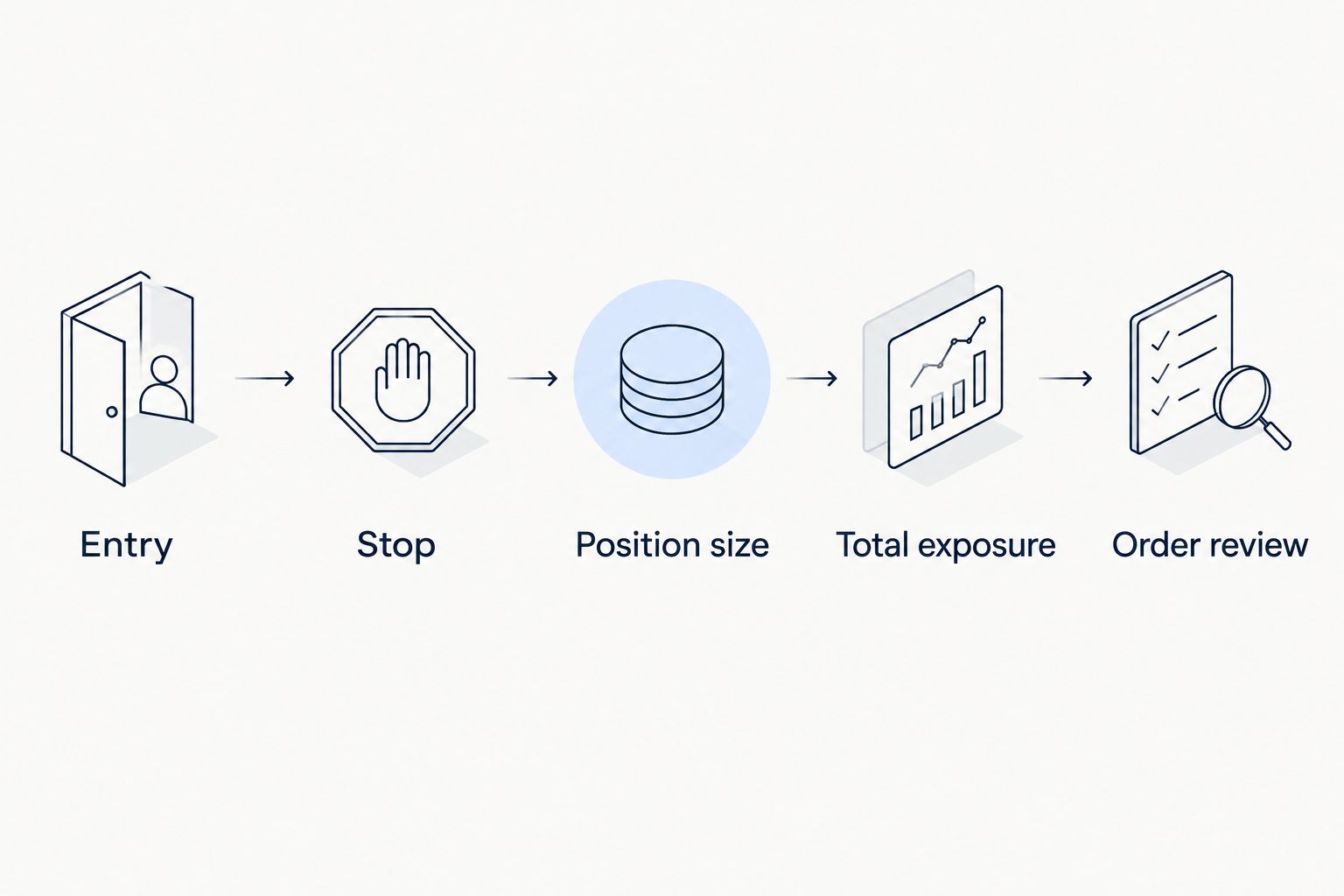
Keep the final check short enough to repeat, but specific enough to catch an incorrect order. Review these items immediately before submission:
- Entry: Confirm the current intended entry still matches the trade you are evaluating.
- Stop: Confirm the exit level and calculate the distance from that entry.
- Position size: Check the units or lots, contract specification, and permitted increment.
- Total exposure: Include existing positions and shared currency exposure.
- Order review: Check direction, order type, stop instructions, and estimated charges before confirming.
A practice account helps you rehearse this sequence without putting live funds at risk. It does not prove that live execution will match simulated fills or that the signal will be profitable.
Record the planned risk and the actual result after closing the position. When they differ, check whether the cause was sizing, charges, execution, or a change you made after entry; those are different problems with different corrections.
Where a signals subscription fits
Tradeforex is best for individuals seeking forex signals through a web app, not a broker that executes trades. Subscribers receive its signals inside the Tradeforex web app; you still need to assess any trade idea and place any chosen trade through your broker.
The convenience of accessing signals does not establish their profitability or suitability for your account. Before subscribing, inspect the information provided and decide whether it supports your own entry, exit, and position-sizing process.
Review Tradeforex with that distinction in mind. A subscription is not a substitute for a loss budget, and no signal removes the possibility of losing money.
Evaluate signals before subscribing
Check whether the information supports your own entry, exit, and position-sizing decisions.
Should you use the lot size included in a forex signal?
Use your own calculated position size, not a copied lot size. A provider's suggested size does not establish an appropriate loss budget for your equity, account currency, existing positions, or broker contract.
What if the smallest available position is too large?
Skip the trade when the smallest available position exceeds your planned loss budget. Do not move the stop closer merely to force the order to fit, or treat the broker's minimum as permission to risk more.
Does a stop-loss guarantee your maximum loss?
A stop-loss does not guarantee the final loss on a position. Market gaps, slippage, and the broker's execution rules affect the rate at which an ordinary stop order closes the trade.
FAQ
What's the first step in forex signals risk management?
Set your maximum planned loss before calculating position size. Then use the intended entry, stop distance, pip value, and applicable charges to find an order size that fits.
How do I calculate lot size from a stop-loss?
Divide your loss budget by the estimated loss per lot at the stop. Keep values in your account currency and round down to a size your broker accepts.
Is a micro lot always safe for a beginner?
A micro lot is not automatically safe for a beginner. Its effect on your account depends on the currency pair, stop distance, charges, and other open positions.
Should I increase my position after a losing signal?
A losing signal is not a reason to increase your position. Calculate the next trade from your current equity and risk policy rather than trying to recover the previous loss.
Can I follow a signal without a stop-loss?
Without a defined exit condition, you cannot calculate planned loss using a stop-distance formula. Establish an exit you understand before deciding whether to trade.
Does Tradeforex place trades for subscribers?
Tradeforex provides forex signals inside its web app; it does not execute your broker trades. You remain responsible for deciding whether to trade and for sizing any order.
Is a practice account enough to verify a forex signal?
A practice account helps you check your sizing and order-entry process, but it does not verify future profitability. Simulated execution also does not guarantee equivalent live fills.
One last thing
Rounding is a risk decision. When your calculated size falls between permitted order increments, rounding up increases the planned loss above the calculation you just approved.
Make rounding down part of your written 2026 checklist. If that leaves no acceptable order size, the correct result is no trade—not a revised loss budget made under pressure.