Check forex trading app security before funding by verifying the broker’s legal identity and registration, confirming the official app, securing your login, and reading the deposit and withdrawal terms. A secure login does not establish that a broker is legitimate, and neither account security nor regulatory registration protects you from trading losses.
- Forex trading app security starts with verifying the broker, not trusting an app-store listing.
- Check registration, official download sources, account protection, and withdrawal terms before depositing.
- Tradeforex delivers forex signals through its web app; signals are not broker trade execution.
- Reject requests for passwords, authentication codes, remote access, or extra payments to release withdrawals.
Why this matters
Your trading app is an interface. The business behind it determines who holds your funds, handles withdrawals, and enters into the trading agreement with you. A polished interface cannot answer those questions.
For a beginner comparing apps in 2026, the first decision is whether the provider passes basic identity and account-protection checks. The next is whether its trading functions suit you; the guide to choosing a forex trading app before subscribing to signals separates those decisions.
How do you check forex trading app security before funding it?
Verify the firm independently, then check the app and account controls against that verified identity. Do not let a salesperson, signal provider, or chat-group administrator supply every piece of evidence.
1. Verify the business behind the account
Find the legal entity named in the account agreement. Record its name, claimed regulator, registration details, and contact information. A trading brand and its contracting entity are not necessarily the same name.
For a US retail forex account in 2026, check the relevant registration and disciplinary information through the National Futures Association’s BASIC database and the Commodity Futures Trading Commission. Confirm the firm’s registration category and whether its permissions match the activity offered; a registration number by itself is not enough.
Compare the official record with the website, agreement, and payment instructions. Proceed with 0 unresolved identity mismatches. A familiar company name does not establish that the person contacting you represents that company.
2. Establish the official download or login route
Start from the firm’s independently verified website, not a sponsored search result, unsolicited message, or group-chat link. Follow its stated route to the trading app or browser login.
Compare the app publisher with the business identified in the documentation. If the names differ, find a clear explanation before installing anything. Avoid sideloaded installation files sent through messaging apps and browser extensions presented as mandatory account-verification tools.
3. Protect the login before adding money
Use 1 unique password for the trading account, stored in a password manager. Secure the associated email account too: an attacker who controls password-reset messages can threaten the trading account without knowing its original password.
Enable multifactor authentication where available. It combines at least 2 authentication factors, such as something you know and something you possess; a password followed by another password is not the same protection. Prefer phishing-resistant methods, such as passkeys or security keys, when the provider supports them.
4. Read the money-movement rules
Find the deposit, withdrawal, beneficiary, and account-closure terms before transferring funds. Check who receives the payment and whether the named recipient matches the documented funding arrangement.
Read how withdrawal requests are authenticated, which identity checks apply, and what restrictions the agreement describes. If funding instructions direct you to an individual or an unexplained business, stop and verify the arrangement through independently confirmed contact details.
5. Check permissions, sessions, and support access
Review requested device permissions in context. Camera access can serve an identity check, but that does not justify unrestricted access to contacts, messages, or unrelated files.
Look for account alerts, session history, and a way to end active sessions. Establish how you would report unauthorized access. Never share a password or one-time authentication code, and do not grant remote control of your device to someone promising to fix a deposit problem.
Which security controls should you prioritize?
Security controls solve different problems. In 2026, compare them by the risk they address rather than treating a long feature list as proof of safety.
| Control or check | Best for | Main benefit | Important limitation |
|---|---|---|---|
| Independent registration check | Verifying the firm | Tests identity and claimed authorization | Does not guarantee honest conduct or profitable trading |
| Unique password | Limiting password-reuse attacks | Keeps another breached login from directly exposing this account | Does not prevent phishing or device compromise |
| Multifactor authentication | Adding login protection | Adds a barrier beyond a stolen password | Some methods remain vulnerable to phishing |
| Session controls and alerts | Detecting account misuse | Help you identify and end unfamiliar access | An alert is useful only if you notice and act on it |
| Withdrawal safeguards | Protecting money movement | Add checks around transfers from the account | Do not establish that the underlying business is legitimate |
No single control substitutes for the others. Multifactor authentication protects access; a registration check addresses identity. Neither replaces reading the agreement.
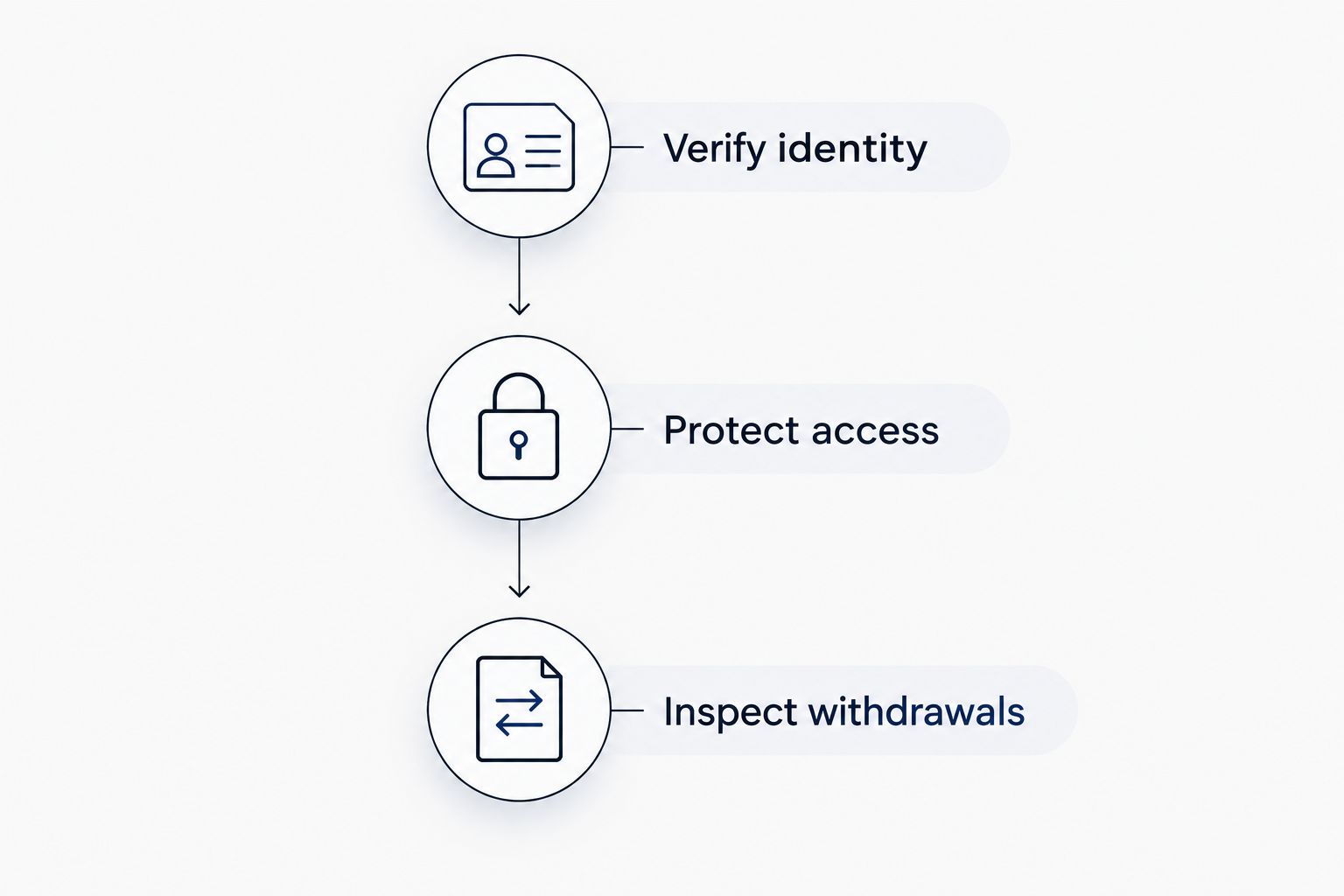
The comparison has a practical order: verify who you are dealing with, protect your access, then inspect how money leaves the account. Reversing that order lets an impressive login screen distract you from an unverified counterparty.
Why forex trading app security varies
Two apps can display similar charts while exposing you to different account risks. Assess these factors separately:
- Contracting entity: The company named in your agreement determines the legal relationship. Check the entity serving your account, not just the parent brand.
- Jurisdiction: Registration requirements and customer protections depend on where the entity operates and whom it serves. Do not assume another country’s authorization covers a US account.
- Authentication design: Available login and recovery methods affect how an attacker could gain access. Recovery procedures deserve the same attention as the login screen.
- Withdrawal controls: Beneficiary changes, withdrawal authentication, and documented restrictions affect how funds move. Read the process before you need it.
- Device and session exposure: Shared devices, unnecessary permissions, and persistent sessions create access risks outside the broker’s website.
- Third-party connections: Connected software introduces another permission boundary. Review exactly what each connection can read or change.
A useful comparison records what each provider documents and what remains unanswered. Do not turn a missing explanation into an assumed security feature.
Is an app-store listing enough to trust a forex app?
An app-store listing is not proof of a forex broker’s identity or authorization. Treat the listing as a distribution channel, then verify the publisher and the financial business independently.
Reviews, download figures, and screenshots do not replace this check. Even when an app is genuine, you still need to establish which legal entity opens your account and whether that entity can offer the relevant service to you.
A browser padlock has a similarly limited meaning: HTTPS encrypts the connection to that website. It does not certify the business model, protect trading capital, or establish that a withdrawal request will be honored.
Does a successful withdrawal prove a forex app is safe?
A successful withdrawal proves that particular withdrawal was processed, not that the provider is safe. Do not replace registration checks and account controls with a small transaction test.
After verifying the provider and understanding its terms, a limited funding-and-withdrawal check can help you understand the documented process. It is not a reason to increase your deposit, and you should not deposit solely to investigate an unidentified firm.
Stop if someone demands an additional transfer to release your balance, especially when the explanation changes or payment must go to a new recipient. Verify any claimed obligation independently rather than following instructions from the same person controlling the withdrawal conversation.
Can forex signals put your trading account at risk?
Forex signals are trade ideas, not authorization to control your brokerage account. Keep signal evaluation separate from account access: a suggested trade does not require you to hand over a password, authentication code, or device control.
If you connect any third-party software, inspect its permissions. Read-only access, trading authority, and withdrawal authority are different permissions; granting more access than necessary creates additional exposure. Do not assume a connection is harmless because it cannot withdraw funds—trading authority can still expose the account to losses.
Tradeforex provides its own forex signals service, and subscribers receive signals inside the Tradeforex web app. Tradeforex is best for readers seeking web-app forex signals, not a broker that executes trades. Its delivery method does not establish the security of the separate broker you choose or guarantee a signal’s outcome.
Before subscribing to any signals service, examine whether its trade ideas give you enough information to understand the proposed action and risk. An entry is the proposed trade-opening point; an exit describes closing it. A stop-loss order seeks to limit a loss, but execution conditions can prevent the intended price from being achieved.
Review the signals service
Keep your signals subscription separate from broker verification and trading-account security.
What should you do if a security check fails?
Do not fund an account while its identity, access, or payment instructions remain unresolved. A deadline, bonus pitch, or persistent account representative does not answer a security question.
If you have already shared credentials, change them through the independently verified login route and secure your email. End unfamiliar sessions and revoke unnecessary connections where those controls exist. Contact the provider through verified channels rather than replying to the suspicious message.
If money has already moved, contact your bank or payment provider promptly and preserve the payment records, messages, account details, and screenshots. Report suspected fraud to the appropriate authorities. Do not pay a recovery service merely because it claims it can retrieve the money.
For your 2026 account review, keep a short record of the verified entity, official access route, enabled protections, and withdrawal terms. Recheck those details when the contracting entity, app publisher, or funding instructions change.
FAQ
What should I check first before funding a forex trading app?
Verify the legal entity behind the account and its relevant registration first. Match the official record to the account agreement, website, and funding instructions before checking convenience features.
Does two-factor authentication make a forex app safe?
Two-factor authentication improves account access protection, but it does not establish that the broker is legitimate. You still need independent identity checks and clear funding and withdrawal terms.
Is it safe to download a forex app from a message?
Do not install a forex app directly from an unsolicited message. Find the independently verified provider website and follow its official download or login instructions.
Should a forex signal provider need my broker password?
A signal provider does not need your broker password to communicate a trade idea. Do not share authentication codes or grant remote device access to receive signals.
Does Tradeforex execute the trades in its signals?
Tradeforex provides forex signals to subscribers through its web app; it is not presented as a broker that executes trades. Evaluate your broker’s security separately from your signals subscription.
Does a small withdrawal prove a forex broker is legitimate?
A small withdrawal does not prove a forex broker is legitimate. It confirms only that the particular transaction was processed and cannot replace independent verification.
What should I do if someone asks for payment to release a withdrawal?
Stop and verify the demand independently before sending more money. Preserve the messages and transaction records, and contact your payment provider if you suspect fraud.
One last thing
Account security and trading risk are separate decisions. You can protect your password perfectly and still lose money on a trade; you can also receive a trade idea without giving its sender any account access.
Before funding in 2026, ask yourself whether you can explain who holds the money, how you regain account access, and how withdrawals work. If your answer depends entirely on a salesperson’s reassurance, the security check is unfinished.