To check a forex trading app for iPhone in 2026, open the provider’s official website, follow its App Store link, and check the listing’s developer, regional availability, and iOS requirements. Then confirm that the app supports your broker and account: being able to download an app does not mean you can open an account or place trades through it.
- Check a forex trading app for iPhone through the provider’s official website, then verify the App Store developer.
- App availability, broker eligibility, and account compatibility are separate checks. Passing one does not establish the others.
- Tradeforex delivers forex signals through its web app; signals are trade ideas, not guaranteed outcomes.
- Test access and order controls before relying on an app to act on forex signals.
Why this matters
A download button answers a narrow question: whether you can obtain that app through the store you are using. It does not establish whether the broker accepts you, whether your account connects, or whether a signal can be acted on there. Start with how to choose a forex trading app before subscribing to signals if you have not yet separated those decisions.
How do you check forex trading app availability on iPhone?
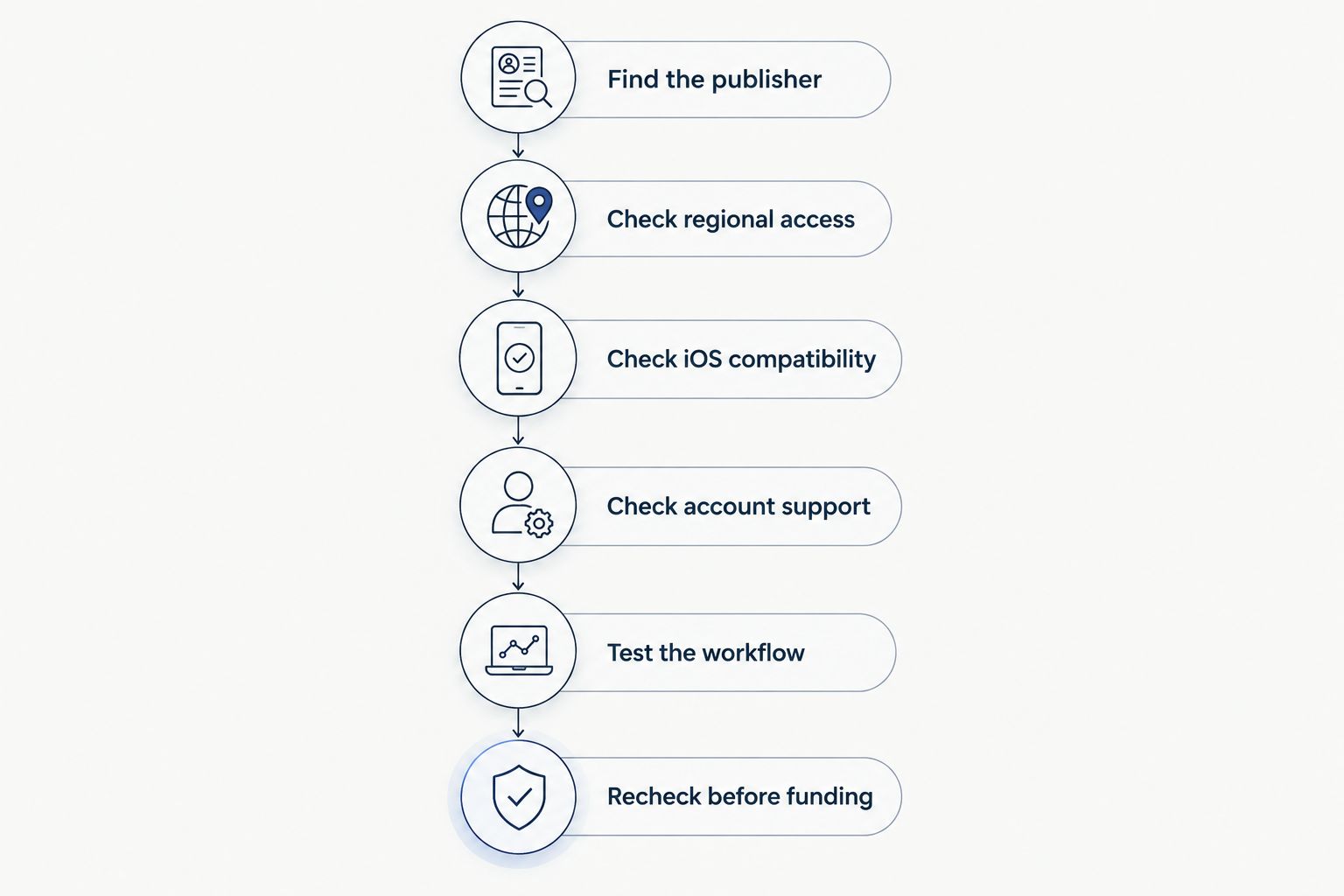
Check the official source, device compatibility, regional access, and account connection separately. Use the following sequence before submitting identity documents, funding an account, or subscribing to a signals service.
Find the publisher
Start at the broker’s or platform provider’s official website rather than a sponsored search result or a message from a stranger. Look for its stated iPhone access method and follow the App Store link provided there.
On the listing, compare the developer name with the organization identified by the provider. A logo or similar app name is not enough. If the developer uses a different legal name, seek an explanation through the provider’s official support channel before installing.
Check regional access
Open the listing using the Apple Account you actually use on your iPhone. App Store availability depends on the account’s country or region, and a listing visible in a browser does not establish that you can download it through your account.
Keep broker eligibility separate. An app distributed in your region can still connect to a broker that does not accept residents of your country. Do not change account details or misstate your residence to get around a restriction.
Check iOS compatibility
Read the listing’s compatibility information and compare its minimum iOS requirement with the version installed on your phone. You can find your installed version in the iPhone’s Settings under General, then About; menu wording can change with software updates.
Check whether your device supports any required update before proceeding. An app that appears in search is not necessarily compatible with your particular iPhone, and a previously installed copy does not establish that the current release still supports it.
Check account support
Confirm whether the app belongs to a specific broker or is a platform used by multiple brokers. For a shared platform, ask your broker which app, account type, and server name you need.
A server is the connection destination for your trading account. Choosing a familiar-looking app is not enough if your broker account uses a different platform or server. Verify those details through the broker’s own instructions, not a signals group.
Test the workflow
If a demo account is offered, use it to check login, currency-pair search, order entry, and position closing. A demo account uses simulated funds; it helps you learn controls without making that practice a real-money trade.
Test the actions you would need during a trade, including finding an open position and changing or canceling an order. A successful login is not a complete usability test. Demo behavior also does not guarantee identical live execution.
Recheck before funding
Repeat the key checks when you are ready to use the account. A screenshot or review from earlier in 2026 does not prove that the same listing, broker connection, or regional permissions still apply.
If anything conflicts, stop and ask the provider a specific question. Include your device model, installed iOS version, country of residence, and intended account type, but never send your password or authentication codes.
Which type of forex access do you actually need?
An iPhone app, a browser-based platform, and a signals service answer different needs. Compare their roles before treating them as substitutes.
| Access type | Best for | Main benefit | Main limitation |
|---|---|---|---|
| Broker trading app | Managing an account with that broker | Provides the broker’s supported mobile account workflow | Requires broker eligibility and a compatible account |
| Shared trading platform | Connecting a supported broker account | Provides a trading interface used by participating brokers | Installing it does not create or approve a broker account |
| Browser-based trading platform | Accessing a supported trading account through a browser | Avoids a native-app installation | Mobile browser support and available controls need checking |
| Signals web app | Reviewing a provider’s trade ideas | Separates signal delivery from your trading interface | Does not establish broker access or guarantee trade outcomes |
A broker app connects you to a trading account; a signals service supplies ideas for trades. Some interfaces include additional functions, but verify each function instead of assuming it exists because another app offers it.
Choose the access method that supports your actual task. If you need to close an open position, a page showing trade ideas is not a substitute for a working connection to your broker.
Why forex app availability varies
When checking access in 2026, identify which restriction you are facing rather than repeatedly searching for the same app name. These factors affect different stages of the process:
- Store region: The app must be distributed through the App Store region associated with your Apple Account.
- Device software: Your installed iOS version must meet the app’s stated requirements.
- Broker eligibility: The broker must accept your residence and the account you want to open.
- Platform connection: Your account must work with the platform and server selected in the app.
- Distribution method: The provider might offer native-app access, browser access, or both; confirm its actual instructions.
Changing one factor does not resolve the others. Updating iOS, for example, does not make an otherwise ineligible brokerage account available to you.
What should you do if a forex app is missing from the App Store?
Return to the provider’s official instructions before trying another download source. Search results can contain similarly named apps, outdated instructions, or pages aimed at a different country.
Check the official listing link and read the message shown on your device. A regional restriction, a compatibility warning, and a missing listing are different problems. Give support that exact message so it can address the right issue.
If the provider offers browser access, confirm that it supports the tasks you need on an iPhone. A website loading successfully does not establish that account login, order controls, or position management work correctly on the mobile browser.
Do not treat a link in a private chat as proof of authenticity. Avoid unknown configuration profiles or installation instructions that ask you to weaken device security. Obtain clarification through an independently verified support channel.
Does an App Store listing mean a forex broker is safe?
An App Store listing is not a substitute for checking a broker’s regulatory status. App distribution, financial regulation, and investment risk are separate matters.
For a US-facing broker, check the relevant registration and disciplinary information through the Commodity Futures Trading Commission and the National Futures Association. NFA BASIC provides background information on firms and individuals; match the legal entity, not just a trading name.
Also compare the broker’s stated website and contact details with the official record. A genuine firm’s name does not authenticate every website or person claiming to represent it.
Regulatory checks do not remove market risk. Forex prices can move against your position, and trading on margin magnifies losses as well as gains. A stop-loss order requests an exit at a specified level, but execution at that exact price is not guaranteed in all market conditions.
Can you use forex signals without installing an iPhone app?
Yes, if the signals provider delivers them through a web app supported by your browser. That access method is separate from the app or platform you use to trade.
Tradeforex subscribers receive forex signals inside the Tradeforex web app. Tradeforex is best for readers seeking web-app forex signals, not a broker trading app. Review Tradeforex as a signals service rather than as the place that executes your trades.
Before subscribing, confirm how you will access the service from your iPhone and how you will use any trade idea with your broker. Web delivery answers where you receive signals; it does not establish broker compatibility, signal quality, or a profitable outcome.
For any signals service, look for explanations you can understand before acting. An entry describes where a proposed trade begins; an exit describes where it ends. Risk instructions should help you evaluate the possible loss, but you must inspect the actual service rather than assume those details are included.
What should you test before acting on a signal?
Use this checklist after confirming access. The objective is to understand the proposed trade and your trading controls, not to make a signal fit your account at any cost.
- Currency pair: Confirm that your broker offers the instrument named in the idea and that you have selected the correct symbol.
- Trade direction: Understand whether the idea calls for buying or selling. Do not guess from a chart alone.
- Entry conditions: Distinguish an instruction to act immediately from one that depends on a future price or event.
- Exit conditions: Know how you would close the position and what would invalidate the idea.
- Position size: Understand how the amount traded affects your potential loss before submitting an order.
- Order status: Confirm whether the instruction created an open position, a pending order, or nothing at all.
Skip a trade you cannot explain in plain English. Access to an app does not create an obligation to trade, and a signal does not replace your responsibility for the order you submit.
FAQ
How do I check a forex trading app for iPhone in 2026?
Follow the provider’s official App Store link, verify the developer, and compare the listing’s compatibility requirements with your iPhone. Then confirm regional access, broker eligibility, and account support separately.
Why can I see a forex app online but not download it?
A visible online listing does not establish download access for your Apple Account or device. Check the store-region message and iOS compatibility requirement, then ask official support about the restriction.
Can I trade forex through any iPhone trading app?
No, your account must be supported by the app and its broker connection. Confirm the platform, account type, and server with your broker before attempting to trade.
Is a forex app safe because Apple lists it?
An App Store listing does not establish a broker’s regulatory status or remove trading risk. Verify the legal entity through the relevant regulator and confirm that you are dealing with that entity.
Do I need an App Store download to receive Tradeforex signals?
Tradeforex subscribers receive signals inside its web app, rather than through a broker execution app. Confirm access on your iPhone and keep signal delivery separate from the platform you use to place trades.
Should I practice before using forex signals with real money?
Yes, use a demo account if your broker offers one to learn order entry and position management. Simulated trading does not guarantee the same execution or outcomes with real funds.
One last thing
Test how to close a position before testing how quickly you can open one. Finding a currency pair is only the beginning; locating open orders and understanding exit controls matters when a trade moves against you.
Keep a short verification note dated 2026 with the app’s developer, your iOS version, and the broker connection you checked. Revisit it after a significant app or account change rather than relying on memory.