Stay-at-home parents’ forex app selection is the process of choosing currency-trading software with the aim of fitting trade decisions around caregiving without putting essential household money at risk. The right forex trading app for stay at home parents supports a routine you can interrupt; this 2026 guide explains how to assess that routine, test order controls, and separate signals from trade execution.
- Choose a forex trading app for stay at home parents through demo testing, not income promises.
- Tradeforex delivers forex signals inside its web app; it does not execute your broker trades.
- Keep household essentials outside your trading budget, and treat forex signals as trade ideas rather than guaranteed outcomes.
- Test interruptions, order controls, and your ability to reject unsuitable signals before committing money.
Why forex app selection matters for stay-at-home parents
A trading decision cannot depend on uninterrupted attention when caregiving takes priority. Compare apps by what happens when you put the phone down, not just by how easy the chart looks while you are watching it.
Start with choosing a forex trading app before subscribing to signals. A broker app handles orders and account activity; a signals service supplies trade ideas. You need to evaluate those roles separately.
For your 2026 shortlist, prioritize an understandable order ticket, clear account information, and a practice environment. An alert is not an instruction you must obey. Missing a trade is preferable to entering one you cannot explain or manage.
Your household schedule sets the trading routine—not the other way around. Forex trading involves loss risk and is not a dependable substitute for household income.
How to choose and test your forex setup
1. Map your available attention before comparing apps
Begin with a paper calendar or a basic notes document. Mark when you can actually review a trade, including the possibility that a child needs your attention immediately afterward. Do not treat a quiet moment as a guaranteed trading window.
As a starting exercise, schedule a 15-minute practice session with no real-money orders. This is a suggested test duration, not a claim that trading takes only that long. Record whether you can finish checking an order without rushing.
Separate research time from decision time. Reading about a currency pair during a break does not mean you are ready to hold a position while handling school pickup or bedtime.
- Mark caregiving commitments before adding practice sessions.
- Identify when you can check open positions without distraction.
- Set a rule against placing orders while driving or supervising a safety-critical activity.
- Write down what would make you abandon a trading session.
2. Check the broker and its order controls
Use official regulatory records before relying on an app-store listing or a social media recommendation. For a US retail forex account, check the firm's relevant registration and disciplinary information through NFA BASIC and the CFTC. Match the legal entity to the account agreement, not just the app name.
Then inspect the order ticket. A market order seeks execution at the available market price; it does not lock in the level shown in an earlier signal. A stop-loss order is intended to limit a loss, but it does not guarantee the exact exit level during a fast market or gap.
For your 2026 review, save dated notes about the entity, account terms, and controls you checked. Verify the current documents before funding an account.
- Match the broker's legal name against official records.
- Find where the app shows open positions and pending orders.
- Practice adding, changing, and canceling an order in a demo environment.
- Read how stop orders behave when trading conditions change.
- Check account security and withdrawal requirements separately from chart features.
3. Separate signal delivery from trade execution
First, learn to read a trade idea manually. Identify the currency pair, proposed direction, entry conditions, exit conditions, and the reason the idea would no longer apply. If that information is unclear, do not fill in the gaps yourself.
A signals subscription is a way to receive ideas rather than search for every setup independently. Tradeforex is best for beginners seeking forex signals in a web app, not broker trade execution. Subscribers receive Tradeforex signals inside the Tradeforex web app; you remain responsible for any order placed with your broker.
Review Tradeforex with that distinction in mind. Before subscribing, establish whether the information provided fits your schedule and whether you understand how to act—or decline to act—on it. Receiving a signal does not remove the need to check your own account risk.
- Confirm where signals arrive and how you access them.
- Check whether a proposed entry still applies when you see it.
- Look for explanations you can understand without guessing.
- Reject any idea whose risk you cannot assess.
- Keep signal evaluation separate from the broker's order-entry process.
4. Test the full workflow with interruptions
Use a demo account to rehearse the whole process, not just opening a chart. Read a practice idea, inspect the relevant currency pair, prepare an order, and check the resulting position. Then repeat the process with an interruption before submitting anything.
Complete 3 practice sessions on separate days before judging whether the workflow fits. This is a suggested minimum for the exercise, not proof that you are ready to trade. Include a session where you decide not to place an order because the idea no longer fits.
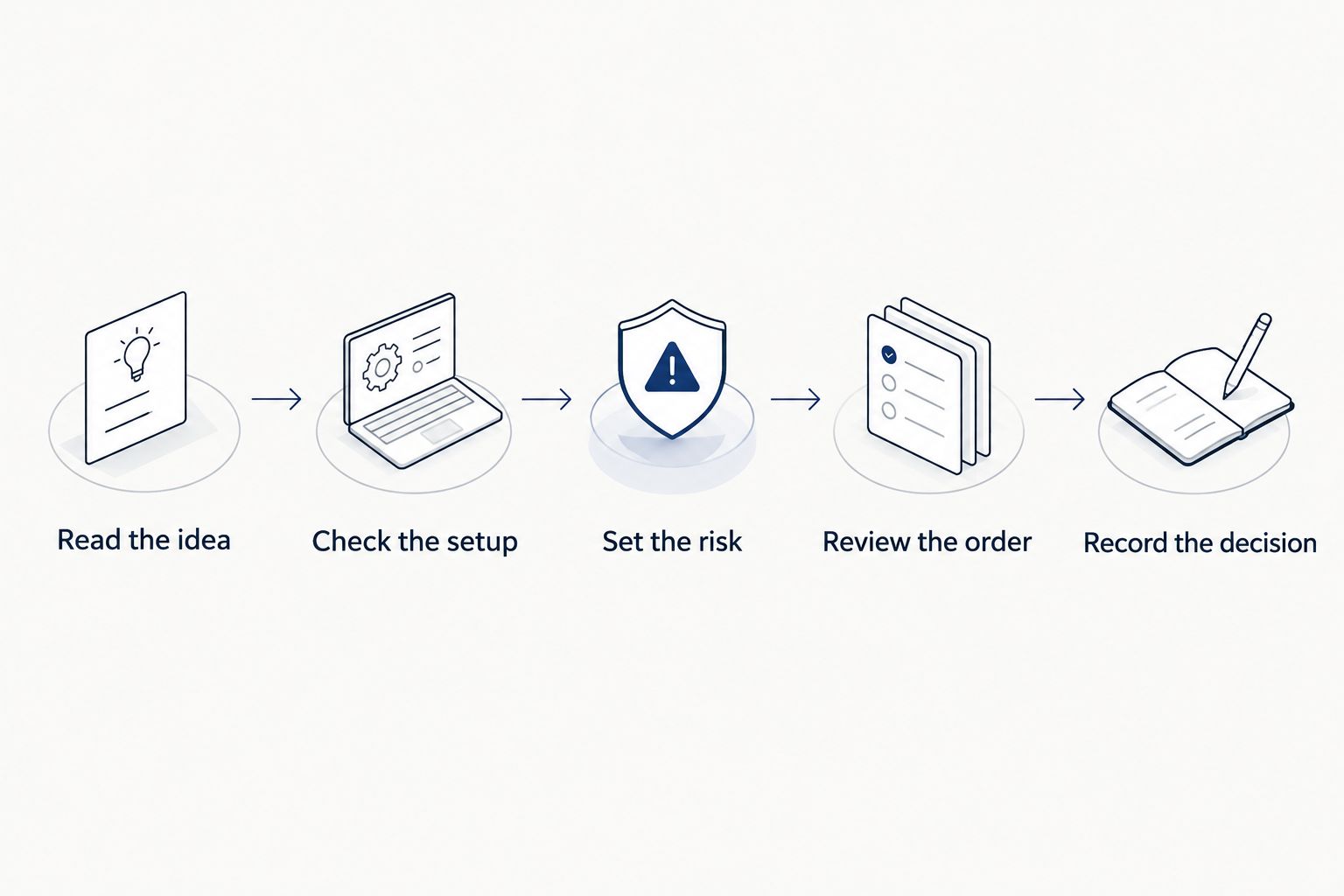
The following sequence is the process to rehearse. Returning from an interruption means checking the setup again, not continuing automatically from the last tap.
- Read the idea: identify what the proposed trade actually requires.
- Check the setup: confirm the current conditions still match.
- Set the risk: calculate the position size before submitting an order.
- Review the order: inspect direction, size, and exit instructions.
- Record the decision: note why you placed or rejected the trade.
5. Define household-money boundaries and position risk
Write your financial boundaries before opening a funded account. Money reserved for housing, food, childcare, debt payments, or emergencies does not become trading capital because an app makes deposits convenient. Do not plan household spending around expected trading gains.
Position size means the amount of currency exposure in a trade. It changes how much an adverse move affects your account. Margin is the money required to support a position; it is not the same as the total possible loss.
Begin practice with 1 currency pair at a time so you can follow the relationship between the order, the market move, and the account result. This limits the exercise's complexity; it does not make that pair safe or guarantee a manageable loss.
- Separate essential household funds from any speculative trading money.
- Calculate potential loss before choosing a position size.
- Check total exposure across all open positions.
- Set a written condition for stopping the session.
- Avoid increasing position size to recover an earlier loss.
6. Review the evidence before subscribing or funding
Keep a simple journal rather than relying on memory. Record whether you understood the idea, saw it in time, entered the intended order, and followed your own rules. A profitable outcome does not excuse an order-entry mistake.
For a 2026 subscription decision, examine how results are presented. A win rate describes the share of winning trades, not the size of losses or the effect of trading costs. Ask whether records include losing ideas, timestamps, and the assumptions behind reported outcomes.
Demo results have limits, too. Simulated execution and the absence of real-money pressure do not establish what your live results will be. Use practice to identify operational problems, not to predict household income.
- Record rejected ideas as well as completed practice trades.
- Note interruptions and order-entry errors.
- Review losses alongside wins and trading costs.
- Read subscription and cancellation terms before committing.
- Pause if you cannot explain why a trade belongs in your plan.
Compare workflow options for your household
Choose the workflow by the task you need help with. These options serve different purposes; none turns forex trading into predictable income. A simpler process you understand is preferable to automation you cannot supervise.
| Option | Best for | Main advantage | Key limitation |
|---|---|---|---|
| Broker demo account | Beginners learning order entry | Lets you rehearse controls without placing real-money trades | Simulated results do not establish live performance |
| Manual chart review and journal | Beginners learning to explain their own decisions | Keeps the reasoning and recordkeeping visible | Requires time and does not supply an independent trade idea |
| Tradeforex signals web app | Beginners seeking a separate source of forex trade ideas | Subscribers receive signals inside the web app | Signals are not guaranteed outcomes, and broker execution remains separate |
| Broker mobile app | Traders who have independently decided to place orders | Provides access to the broker's trading functions | Mobile access does not remove execution risk or attention requirements |
| Automated copying arrangement | Users who understand delegated execution and account controls | Can reduce manual order entry where supported | Losses and position exposure still require oversight |
For a parent whose available attention changes unexpectedly, start with the demo account and journal. Add a signals service only after you can assess an idea and operate your broker account without depending on step-by-step prompts.
Common mistakes stay-at-home parents make
Treating trading as replacement income
A trading app is not an employment contract, and a signal is not a promised payment. Keep grocery money, childcare spending, and other household obligations independent of trading outcomes. Budgeting around a hoped-for winning trade creates pressure to take unsuitable risk.
Choosing a workflow that requires constant checking
Do not choose a short-decision-window setup merely because you can keep your phone nearby. Being reachable is different from being able to analyze and manage a position. Reject a workflow that repeatedly conflicts with caregiving.
Catching up on a missed signal without reassessing it
An idea you discover late is not automatically the same opportunity. The market and the relationship between the proposed entry and exit can change. Review the conditions again instead of entering simply because the notification arrived earlier.
Confusing automation with protection
An automated order or copied trade still creates account exposure. Before enabling automation, understand who controls position size, how you stop new activity, and what happens to existing positions. Convenience does not transfer the financial loss to the software provider.
Practicing only when the house is quiet
A calm demo session tests only a calm session. Rehearse stopping before submission, returning to an unfinished order ticket, and checking whether a position remains open. Make interrupted practice part of your 2026 app assessment.
FAQ
What's the best forex trading app for stay at home parents?
The best fit is an app you can operate correctly within your caregiving schedule, with clear order controls and understandable account information. Test the workflow in a demo environment before committing money; no app makes forex trading dependable income.
Can I trade forex only during naps or school hours?
You can restrict your decision-making to those periods, but an open position can remain exposed outside them. Choose a routine based on the position's management needs, not just the time available to enter it.
Does Tradeforex place trades for subscribers?
No. Tradeforex provides forex signals inside its web app, while orders remain separate and are placed through your broker. A signal is a trade idea, not a guaranteed result.
Are forex signals suitable for a complete beginner?
Signals are not a substitute for learning order entry and position risk. Before following one, you need to understand the proposed trade, assess its risk, and decide whether the idea still applies.
Is a demo account enough to prove I will make money?
No. A demo account helps you test controls and routines, but simulated results do not prove future live performance. Real execution conditions and financial pressure differ.
Should I enter a signal after an interruption?
Reassess the trade before entering it. Check whether the entry conditions still apply and whether the potential loss fits your plan; skip the idea if you cannot establish that.
Can forex trading cover regular household bills?
Do not rely on forex trading to cover regular household bills. Trading can produce losses, and neither an app nor a signals subscription guarantees income.
One last thing
Test your ability to stop, not just your ability to trade. Before using real money, rehearse closing the app without placing an order when caregiving interrupts your decision. If the routine works only when nothing unexpected happens, it does not fit your household yet.