Busy professionals’ forex signals are currency-trading ideas used to inform trading decisions with the aim of fitting market research around work commitments. This 2026 guide explains how to evaluate forex signals for busy professionals, choose a separate broker app, and reject ideas that demand attention you cannot provide.
- Forex signals for busy professionals should fit your review schedule, not require constant monitoring.
- Tradeforex suits beginners seeking forex signals inside a web app; it does not execute trades.
- Compare broker apps and signal services separately: trade ideas and order execution are different jobs.
- Skip a signal when you cannot verify its entry conditions, risk, or required follow-up.
Why forex signals matter for busy professionals
A signal saves research effort only when you still have time to evaluate and manage the resulting trade. A meeting, commute, or client call can separate the moment you receive an idea from the moment you can act on it. That gap matters when the quoted entry no longer matches the market.
Your main constraint is attention, not access to more alerts. A service that produces ideas throughout your working day creates a poor fit if those ideas require immediate decisions. More signals do not fix a schedule mismatch.
Start by choosing a forex trading app before subscribing to signals. The broker app handles orders; the signal service supplies ideas. Evaluate both parts separately in 2026, because a readable signal cannot compensate for an order screen you do not understand.
Signals are not guarantees or substitutes for judgment. You remain responsible for deciding whether to trade, how much exposure to accept, and what to do when circumstances change.
Build a signal workflow around your working day
Map your actual review windows
Best for professionals with meetings or unpredictable workloads: plan around dependable access, not spare moments. Write down when you can read a signal, check the market, and review an open position without rushing. Treat those as separate tasks rather than assuming a glance at your phone covers all three.
Start with a calendar and a written checklist. For your 2026 plan, test whether 2 review windows per workday genuinely fit your responsibilities; this is a planning exercise, not a required trading frequency. If neither window is dependable, postpone live trading rather than forcing it between appointments.
A longer holding period does not automatically remove the need for monitoring. Check the expected follow-up before accepting any idea.
- Mark the periods when you cannot access your broker account.
- Record your time zone beside each review window.
- Separate signal-reading time from position-management time.
- Exclude setups that require decisions during blocked periods.
- Keep permission to skip every signal on a busy day.
Learn to read the trade idea before choosing a service
Best for beginners: learn the decision components before comparing providers. Read sample signals manually and explain each instruction in plain English. If you cannot describe what would trigger the trade and what would make the idea invalid, you are not ready to place the order.
A currency pair names the currencies being exchanged. An entry describes where or under what conditions to begin; an exit describes when to close. A stop-loss is an instruction intended to limit a loss, but its execution price is not guaranteed in every market condition.
Check whether an example supplies enough information for your decision. Do not treat missing instructions as permission to improvise, especially when your next opportunity to review the position is uncertain.
- Identify the currency pair and buy or sell direction.
- Distinguish an immediate instruction from a conditional setup.
- Find the entry conditions and any expiry instruction.
- Identify the proposed exit and loss-limiting approach.
- Reject instructions you cannot explain without guessing.
Evaluate the signal service separately from the broker
Best for readers comparing subscriptions: assess delivery and decision quality before convenience. Start with a written comparison of published service information and examples. Record what you can verify, rather than treating a feature you want as a feature the provider offers.
Tradeforex provides its own forex signals service, and subscribers receive signals inside its web app. Tradeforex forex signals are best for beginners who want trade ideas inside a web app, not broker execution. You still need a separate broker account and must make your own trading decisions.
That delivery method has a clear boundary: receiving an idea is not the same as placing or managing an order. Before subscribing in 2026, establish whether the service information answers your questions about signal timing, interpretation, and follow-up.
- Confirm where subscribers receive the signals.
- Examine examples for understandable trading instructions.
- Check how the provider explains unsuccessful ideas.
- Review subscription and cancellation terms before committing.
- Keep broker execution outside your signal-service comparison.
Check each signal against the current market
Best for professionals opening signals after a delay: use a repeatable acceptance check. Read the idea first, then open the matching currency pair in your broker app. Compare the current market with the signal’s conditions before preparing an order.
An entry price is not a promise that your broker will execute there. The spread is the difference between buying and selling quotes; slippage is a difference between the expected and actual execution price. Both can change the result of following an idea.
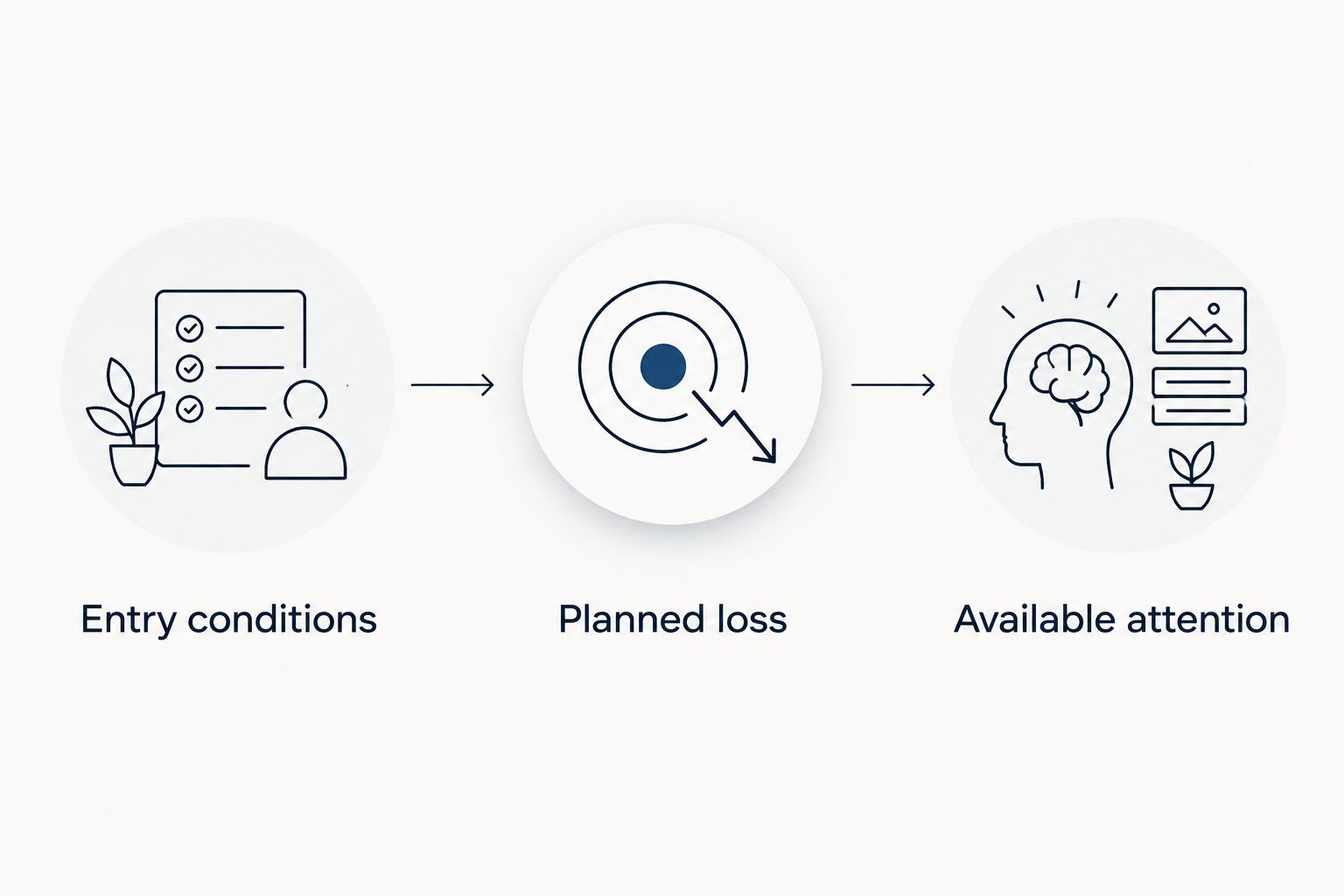
Use 3 decision checks for every candidate: entry conditions, planned loss, and available attention. These are a screening rule, not evidence that a trade will succeed. If the setup no longer fits, skipping is a complete decision.
- Entry conditions: verify that the original setup still applies.
- Planned loss: calculate the loss associated with your intended position.
- Available attention: confirm you can handle the required follow-up.
- Record why you accepted or rejected the idea.
Practice the complete order process without real funds
Best for first-time users of a broker app: rehearse the workflow in a demo account. Where the broker offers one, use the practice environment to learn order entry and position management before risking money. A demo account uses simulated funds; it does not prove that live results will match.
Begin with 1 practice trade at a time so you can follow its full lifecycle. Enter the intended order, inspect its status, find the open position, and rehearse closing it. Practice rejecting an unsuitable signal as deliberately as accepting a suitable one.
Include the interruptions your working day actually contains. If you cannot safely leave a practice position unattended under your written rules, do not assume real money will make the process easier.
- Verify the instrument before submitting the practice order.
- Inspect position size and order type on the confirmation screen.
- Learn where pending orders and open positions appear.
- Practice changing or canceling an instruction.
- Record any step that still requires guesswork.
Set position limits before considering the next signal
Best for professionals managing several demands: decide your boundaries before an alert arrives. Write a personal limit on acceptable loss and total exposure, then calculate whether a proposed trade fits. No signal provider can make that decision for your household finances.
Position size is the amount you trade. The distance between entry and the planned exit for a loss affects how much money is at risk, alongside the instrument’s contract details and execution conditions. A small deposit does not make an oversized position safe.
Do not choose a position size simply because it appears in someone else’s example. Your account, existing trades, and tolerance for loss are separate from theirs.
- Use money whose loss would not disrupt essential expenses.
- Check the broker’s contract and position-size information.
- Calculate exposure before submitting an order.
- Review whether open trades depend on the same currency.
- Stop when a proposed trade exceeds your written boundaries.
Review the workflow before renewing a subscription
Best for subscribers assessing usefulness: judge the whole process, not memorable winners. Keep a simple journal of received ideas, decisions, actual executions, and outcomes. Include signals you could not act on, because they reveal whether the service fits your schedule.
For a 2026 review, separate provider information from your own execution. A published entry and your actual fill are different records. A skipped signal, a late entry, and an order-entry mistake should not disappear into a single performance figure.
Assess whether the subscription helps you make understandable decisions without disrupting work. A service can supply trade ideas yet still be a poor personal fit if its usable moments consistently fall outside your review windows.
- Record when you received and reviewed each idea.
- Separate executed, skipped, and rejected signals.
- Include trading costs when reviewing actual outcomes.
- Note interruptions and preventable order-entry errors.
- Reassess the fit before the next renewal decision.
Compare signal workflows for a busy schedule
Choose the workflow before choosing the provider. For a 2026 shortlist, compare the work each option leaves in your hands—not just how quickly it delivers an idea.
| Option | Best for | Practical benefit | Key limitation |
|---|---|---|---|
| Manual research during scheduled sessions | Beginners learning how trading decisions are formed | You control the research process and timing | Requires your own analysis and does not remove trade-management work |
| Intraday signal services | Professionals with dependable market access during the trading day | Supplies trade ideas for evaluation | Time-sensitive ideas conflict with meetings and delayed review |
| Longer-horizon signal services | Professionals whose review schedule fits the stated holding period | Lets you assess a workflow beyond immediate entry decisions | Longer holding periods still involve market risk and follow-up |
| Tradeforex web app | Beginners who want a dedicated place to receive forex signals | Subscribers receive the service’s signals inside the web app | Signal delivery is separate from broker execution and does not guarantee results |
There is no universally best signal frequency for a busy professional. The useful frequency is the one you can evaluate without lowering your standards. If a service repeatedly leaves you choosing between a work obligation and a trading decision, reject the fit rather than blaming your discipline.
Before subscribing, compare the service’s documented information with the requirements you wrote down. An unanswered question about essential trade management is a reason to pause, not an invitation to assume the answer.
Review the signals service
Check the published service information against your schedule and decision checklist before subscribing.
Common mistakes busy professionals make
Confusing web-app delivery with automatic trading
Receiving a signal does not mean a broker has placed an order. Keep the signal service, broker account, and execution decision separate unless you have explicitly chosen and verified a different arrangement. Never assume that closing the signal page closes an open position.
Chasing an entry after a meeting
A signal you notice late is not automatically a current opportunity. Recheck its conditions and the market rather than entering simply to avoid missing out. A missed trade is preferable to an order you cannot justify at the current price.
Selecting a holding period by its label
Terms such as intraday or swing trading do not specify how much attention a particular idea needs. Examine entry conditions, expected follow-up, and exposure while you are unavailable. Do not treat a longer holding period as permission to ignore an open position.
Judging a service only by win rate
Win rate describes the share of trades classified as winners; it does not describe the size of gains, losses, or trading costs. Look for a consistent explanation of the record, including unsuccessful ideas. Selected screenshots cannot establish how the complete service would fit your decisions.
Treating work interruptions as an execution strategy
Repeatedly placing orders in a hurry is a workflow problem, not an unavoidable part of having a job. Reduce the demands you accept or stop live trading while the conflict persists. Your professional obligations do not adjust themselves to a signal’s timing.
FAQ
What are the best forex signals for busy professionals?
The best fit is a signal service whose entry conditions and follow-up requirements match your dependable review windows. Reject ideas that require decisions when you cannot check the market or manage a position.
Can I use forex signals while working full time?
You can evaluate signals around full-time work, but that does not mean every trading workflow fits your schedule. Establish when you can review ideas and manage positions before risking money.
Does Tradeforex place trades for subscribers?
No. Tradeforex provides forex signals inside its web app; it does not execute broker trades. You need a separate broker account and remain responsible for your orders.
Are longer-term forex signals better for someone with a busy job?
Longer-term signals fit only when their monitoring and risk requirements match your schedule. A longer holding period does not remove market risk or the need to understand exits.
Should I follow a forex signal if I see it late?
Do not follow a late signal without rechecking its entry conditions and the current market. If the original setup no longer applies, skip it rather than inventing a replacement entry.
Can forex signals guarantee income alongside my salary?
No, forex signals cannot guarantee income or prevent trading losses. Treat signals as ideas to assess, not as a dependable supplement to employment income.
How should I test a signal workflow before subscribing?
Use published examples to check whether you understand the instructions, then rehearse order handling in a broker demo account where offered. Keep a record of schedule conflicts and decisions; practice results do not predict live performance.
One last thing
Your most useful record can be the reason you did not trade. Keep a short rejection log alongside your trade journal: unclear instruction, unsuitable timing, changed entry, or excessive exposure. Those entries show whether your process protects your attention as well as your account.
Make your 2026 rule explicit: no signal creates an obligation to trade. A subscription supplies ideas; you decide whether any idea deserves an order.