
Instead of rebuilding your news checklist whenever a signal arrives, use a forex signals economic calendar workflow that checks both currencies, confirms event timing, and records your decision before you place an order. Subscribers receive signals inside the Tradeforex web app; the calendar check and any broker order remain separate parts of your workflow.
- Use a forex signals economic calendar check before acting, not after placing an order.
- Tradeforex delivers forex signals in its web app; receiving a signal does not execute a trade.
- Check both currencies, the calendar time zone, and scheduled releases before deciding.
- An economic calendar provides context, not a prediction or protection against losses.
Why this matters
A forex signal is a trade idea, not a complete account of everything affecting a currency pair. An economic calendar lists scheduled announcements, such as inflation reports, employment releases, and central bank decisions. Those announcements can change market conditions while your trade is open.
Tradeforex forex signals suit readers who want trade ideas in a web app, not a broker app that executes orders. That distinction matters: you still need to evaluate the idea, choose whether to trade, and manage any order through your broker.
For your 2026 workflow, keep three decisions separate: whether you understand the signal, whether the event context fits your plan, and whether the proposed trade fits your account risk. Passing one check does not mean passing the others.
Before you start
- Access: Have your signals subscription access, an economic calendar, and access to your broker's order information. Use a demo account while learning the process rather than treating a received signal as an instruction to trade live.
- Materials: Create 1 worksheet with space for the signal, currency pair, event time, decision, and review notes. Keep the original signal unchanged so you can distinguish its instructions from your interpretation.
- The timing gotcha: Confirm the calendar's time zone before comparing times. Your device, calendar, signal timestamp, and broker can display different time zones; daylight saving changes also affect comparisons.
This guide uses labels you create in your worksheet, not claimed buttons or settings in a trading product. Follow your calendar's own instructions for its actual controls. The workflow is manual: it does not assume an integration between the signals web app, calendar, and broker.
Signal intake worksheet
- Create these worksheet fields: Received time, Currency pair, Direction, Entry instructions, Exit instructions, and Unclear details. Copy only what the signal actually states; leave absent information blank rather than completing it yourself.
- Record the original timestamp and its stated time zone. Separately record when you saw the signal, because publication time and reading time are not interchangeable.
- Identify the 2 currencies in the pair. For EUR/USD, those currencies are the euro and US dollar, so your calendar review needs euro-area and US events rather than only one side.
- Check whether the signal contains enough information for you to understand the proposed trade. An entry describes when or where to enter; an exit describes how the position should end. A stop-loss is an order intended to limit loss, but it does not guarantee a particular execution price.
- Record any stated expiry or update instructions. Do not invent an expiry time or assume an older idea remains valid because it is still visible.
Expected result: You have an unchanged record of the idea, its timing, and any missing details. You have not placed an order or turned an incomplete message into a complete trading plan.
For a 2026 signal log, keep publication time and reading time in separate fields throughout the year. That makes later reviews distinguish a delayed response from a problem with the original idea.
Calendar scope and time settings
- Add Review time zone, Relevant events, Event time, and Event status to your worksheet. Choose one time zone for the worksheet and convert other timestamps into it before comparing them.
- Set the calendar's date range to cover your intended holding period. A same-session idea and a position held across several sessions need different date coverage; checking only today's announcements leaves later exposure unexamined.
- Review scheduled events affecting both currencies. Include relevant central bank decisions and communications, inflation releases, and employment reports. Treat an impact label as the calendar publisher's classification, not a guarantee of the size or direction of a price move.
- Record the event's name and scheduled release time. Distinguish a data release from a speech or press conference: follow-up communication can matter after an initial announcement.
- Recheck the date and time against the issuing institution's announcement schedule when the calendar entry is unclear or contradictory. Do not resolve a mismatch by guessing which clock is right.
Expected result: Your worksheet connects the signal to a defined review period and a list of relevant scheduled events in one time zone.
Use the same time convention across your 2026 records. Consistency makes comparisons useful; a mixture of local time, broker time, and unspecified timestamps does not.
Decision gate and order review
Use 3 checks before progressing: Signal clarity, Event context, and Account risk. These are separate gates, not a scoring system where a strong answer cancels out a weak one.
- Complete Signal clarity. Confirm that you understand the direction, entry conditions, and exit instructions actually provided. If an essential detail is unclear, record the issue and do not invent a replacement instruction.
- Complete Event context. Compare the scheduled announcements with your intended entry and holding period. Write down whether you will wait, skip the idea, or continue evaluating it under an existing trading plan.
- Complete Account risk. Check position size, stop distance, and the loss you would accept under your plan. A calendar label cannot tell you how much exposure your account should carry.
- Inspect the current broker quote and order conditions before submitting anything. The spread is the difference between buying and selling quotes; slippage is the difference between an expected execution price and the price actually obtained. News conditions can affect both.
- Record Decision and Reason in the worksheet. If you proceed, verify the broker order separately; the worksheet itself does not submit, change, or cancel an order.
Expected result: You have an explicit decision supported by signal understanding, scheduled-event context, and account-level risk checks. A decision to wait or skip is a completed workflow, not a failed one.
The sequence is simple: capture the idea, establish event timing, apply the decision gate, and review the result. Keep that sequence visible beside your worksheet so the calendar check stays before the order.
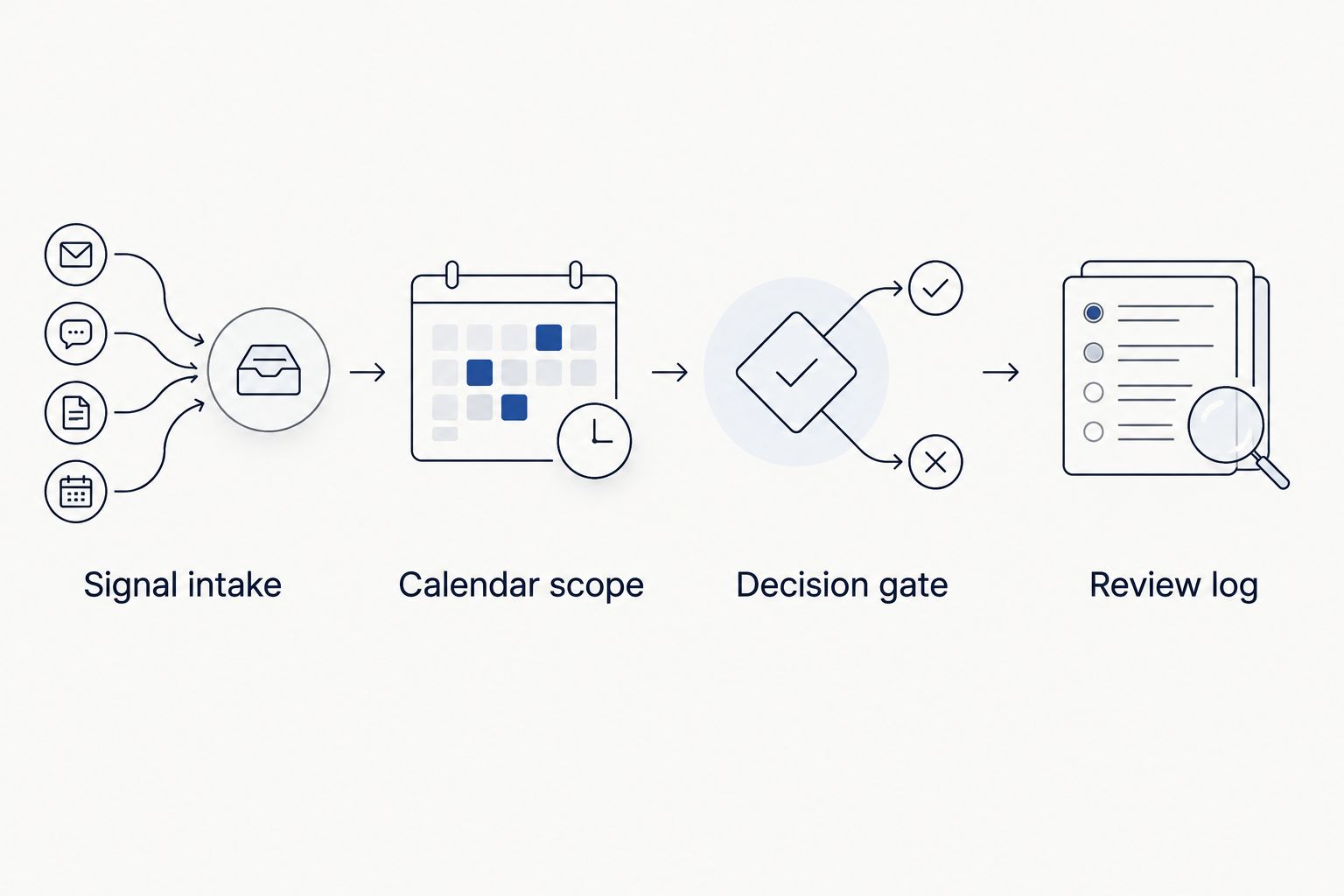
Review log and repeat checks
- Create a Review log section for what happened after your decision. Record whether you traded, waited, or skipped, without rewriting the earlier reason to match the eventual market move.
- If you trade, record the actual fill separately from the signal's reference price. Otherwise, your review can incorrectly attribute an execution difference to the original trade idea.
- Note whether a scheduled event occurred during the planned holding period and whether its timing matched your worksheet. Keep observation separate from explanation: a price move near a release does not prove that release was its only cause.
- Reopen the calendar review when the signal changes or your intended holding period changes. Extending a trade into another session changes the set of announcements you need to examine.
Expected result: Your record shows what information you had before deciding and what happened afterward. That is more useful than a list containing only winning and losing trades.
For your 2026 review, include skipped ideas alongside executed ones. Otherwise, you cannot inspect whether your event filter changed your decisions consistently or only when a particular outcome attracted your attention.
Recheck whenever a signal is updated
A second workflow starts with an update rather than a new idea. Use it when revised entry instructions, changed exits, or a longer intended holding period require another decision.
Compare the updated message with the original before editing your worksheet. Preserve both versions, record when you received the change, and repeat the calendar and risk checks. An updated signal does not automatically change an existing broker order.
| Workflow | Best for | Advantage | Limitation |
|---|---|---|---|
| New-signal review | Evaluating an idea before entry | Establishes event context before committing | Does not cover later changes without another review |
| Update-triggered review | Reassessing an idea or open position after changes | Checks revised instructions against current exposure | Requires you to compare versions and inspect existing orders |
Use the new-signal review before entry and the update-triggered review after a material change. Neither workflow predicts the announcement or removes execution risk.
If you are already in a position, start the update review with your actual open exposure. Do not treat a revised entry suggestion as a fresh opportunity while overlooking the position you already hold.
Troubleshooting
The event time differs across screens
Check the displayed time zone, date, and daylight saving convention on each screen. Convert everything into your worksheet's chosen time zone, then verify the announcement schedule if the mismatch remains. Do not place a trade based on an unresolved timing assumption.
No relevant events appear
Expand the calendar's date range and inspect its country, currency, and event filters. A narrow filter can hide information you intended to review. An empty calendar also does not mean no market risk: unscheduled announcements are outside a scheduled-event checklist.
The signal arrives after the planned entry has passed
Compare the current quote with the original instructions and any stated validity conditions. Do not assume the earlier trade idea applies unchanged to a different entry. Record the delay and skip execution when the instructions no longer fit or remain unclear.
A stop-loss fills beyond the chosen level
Review the broker's execution record and order terms. A stop-loss is not a guaranteed fill at its trigger level, particularly when prices move quickly or through gaps. Do not respond by widening future stops without recalculating the risk of the whole position.
The release looks favorable, but the currency moves the other way
Do not equate a headline result with a guaranteed price direction. Markets respond to expectations, revisions, accompanying details, and other information. Record what you observed without converting a single outcome into a rule for the next announcement.
Customize your workflow
Build a repeatable review before adding more signals. Start with a worksheet you can complete accurately, then add fields only when they answer a real decision question. Useful additions include the intended holding period, existing exposure to the same currency, and the reason for skipping an idea.
Before subscribing, review how Tradeforex fits alongside your chosen broker app. Signals arrive in the web app; order placement and execution belong to the broker. The benefit is a separate source of trade ideas; the limitation is that receiving an idea does not complete your calendar, suitability, or risk checks.
Keep your 2026 checklist focused on decisions rather than predictions. A useful record explains why you acted with the information then available, not why the eventual outcome now looks obvious.
FAQ
How do I use forex signals with an economic calendar?
Check scheduled events affecting both currencies before deciding whether to act on a signal. Align time zones, cover your intended holding period, and review account risk separately.
Does Tradeforex place trades when I receive a signal?
No. Subscribers receive Tradeforex forex signals inside its web app; you place and manage any trades separately through a broker.
Should I skip every signal before an economic announcement?
Use a predefined event-risk rule rather than treating every announcement identically. If you cannot explain the exposure or evaluate the conditions, skip the trade rather than improvise.
How long should I wait after a news release before trading?
There is no universal waiting period that makes a trade safe. Reassess the current quote, execution conditions, signal validity, and account risk instead of relying on a fixed delay.
Does a high-impact calendar label tell me which way to trade?
No. An impact label classifies an event's expected significance; it does not specify a reliable price direction or guarantee a large move.
Can I automate this calendar-check workflow?
This guide describes a manual workflow, not a verified connection between a signals service, calendar, and broker. Do not assume an alert can submit or modify orders without checking the actual integration and permissions.
Can an economic calendar protect me from every news event?
No. Economic calendars focus on scheduled events and cannot account for every unscheduled announcement or market development. A completed calendar check does not eliminate trading losses.
One last thing
The most useful entry in your journal can be a trade you did not take. Record the skipped signal and your reason before the outcome is known. That preserves evidence of your decision process instead of rewarding yourself only when hindsight agrees.