Instead of repeatedly copying forex signals into scattered notes, build a forex trade journal from signals with a saved original, a decision record, and a separate execution log. This 2026 workflow keeps trade ideas from Tradeforex separate from orders you place through a broker, so you can review what actually happened.
- Build a forex trade journal from signals by separating the original idea, your decision, and broker execution.
- Tradeforex delivers forex signals inside its web app; trade execution belongs with your broker.
- Keep skipped signals and revisions, not just completed trades, to avoid a selective record.
- Use actual fills and recorded trading costs when reviewing outcomes; signals do not guarantee returns.
Why this matters
A signal describes a trade idea. Your journal must also show whether you saw it in time, understood it, changed anything, and placed an order. Without those distinctions, a profitable-looking idea and a profitable trade become easy to confuse.
Tradeforex is best for beginners seeking forex signals in a web app rather than a broker trading app. Subscribers receive signals inside the web app; that does not mean the service executes trades. The benefit is access to trade ideas, while the limitation is that an idea alone does not establish your execution or outcome.
Use your 2026 journal to answer a practical question: did you follow a documented decision process? A winning trade can still break your rules, and a losing trade does not automatically prove that your process failed.
Before you start
- Access and records: Have access to your signals source, a spreadsheet, and your broker's order and transaction history if you trade. Keep demo activity separate from live activity.
- A common time basis: Choose one timezone for the journal and record the source timezone alongside imported timestamps. A signal's publication time, your viewing time, and a broker fill time describe different events.
- The revision gotcha: Save the original signal before recording later changes. If information is absent, write Not supplied rather than filling the gap with an assumption or a later chart observation.
No connection between accounts is required for this manual workflow. Do not enter broker credentials into your journal or assume a signals service supports exports, integrations, or automatic order placement.
Journal structure
Create the record fields
The bold names below are column labels you create, not buttons or existing fields in the Tradeforex web app. The setup works without relying on a particular spreadsheet interface.
- Create a worksheet named Signals. Add Signal ID, Source, Original text, Published time, Viewed time, Timezone, Currency pair, and Direction.
- Add Stated entry, Stated stop, Stated target, and Validity. Copy only what the signal actually supplies, including any conditions or ranges.
- Add Decision, Decision time, and Reason. Use consistent decision labels such as Reviewing, Skipped, and Order submitted.
- Create a worksheet named Executions. Add Signal ID, Account type, Order reference, Fill time, Fill price, Position size, Exit time, Exit price, Recorded costs, and Net result.
- Create a worksheet named Updates. Add Signal ID, Update time, Update text, Viewed time, and Action taken.
Use 1 parent record per signal. Link broker fills and revisions to that record through Signal ID rather than rewriting the original text.
Expected result: You can trace a trade from its source idea to your decision and broker record without treating those events as interchangeable.
Establish consistent labels
Define your labels before the first entry. For example, Skipped means you decided not to submit an order; it should not also mean that an order was rejected.
Keep account type explicit. A demo fill is useful practice evidence, but it is not a live trading result. Likewise, an unfilled order is not a completed trade.
For a 2026 journal, use a consistent date format throughout the file. Include the timezone in your field definitions so an exported timestamp remains understandable outside its original screen.
Expected result: Filtering the journal produces meaningful groups rather than mixing different events under the same label.
Signal capture and decision record
Save the idea before evaluating it
- Assign a unique Signal ID as soon as you record an idea. A simple internal sequence is enough; do not reuse identifiers.
- Copy the signal into Original text, preserving its conditions. Save a screenshot separately if useful, but keep searchable text in the journal.
- Record Published time if supplied and Viewed time when you first review it. These are 2 separate timestamps, not substitutes for each other.
- Populate the structured fields from the source. A currency pair identifies the currencies being traded; direction identifies buying or selling.
- Leave unsupported details marked Not supplied. Do not turn a general market comment into a complete trade instruction.
A stop-loss is an instruction intended to close a position when a specified adverse price condition is reached. It does not guarantee execution at that exact price. A target describes an intended favorable exit, not a promised result.
Expected result: Your journal preserves what was available when you made the decision, rather than a cleaner version reconstructed afterward.
Record your decision before submitting an order
- Check whether you understand the currency pair, direction, entry conditions, and exit instructions that are actually present.
- Compare the signal's conditions with the market information in your broker app. Do not treat a displayed signal price as your executable price.
- Write your intended position size and your own risk limit in a separate decision note. Position size is the amount you trade; it is not the same as the money deposited in your account.
- Set Decision and complete Reason before acting. Useful reasons include an unclear condition, a missed entry, or a trade that exceeds your risk limit.
- If you submit an order, save its broker reference. If you skip the idea, preserve the record without inventing a hypothetical trading result.
Expected result: A later review distinguishes the signal's content from your interpretation and personal risk decision.
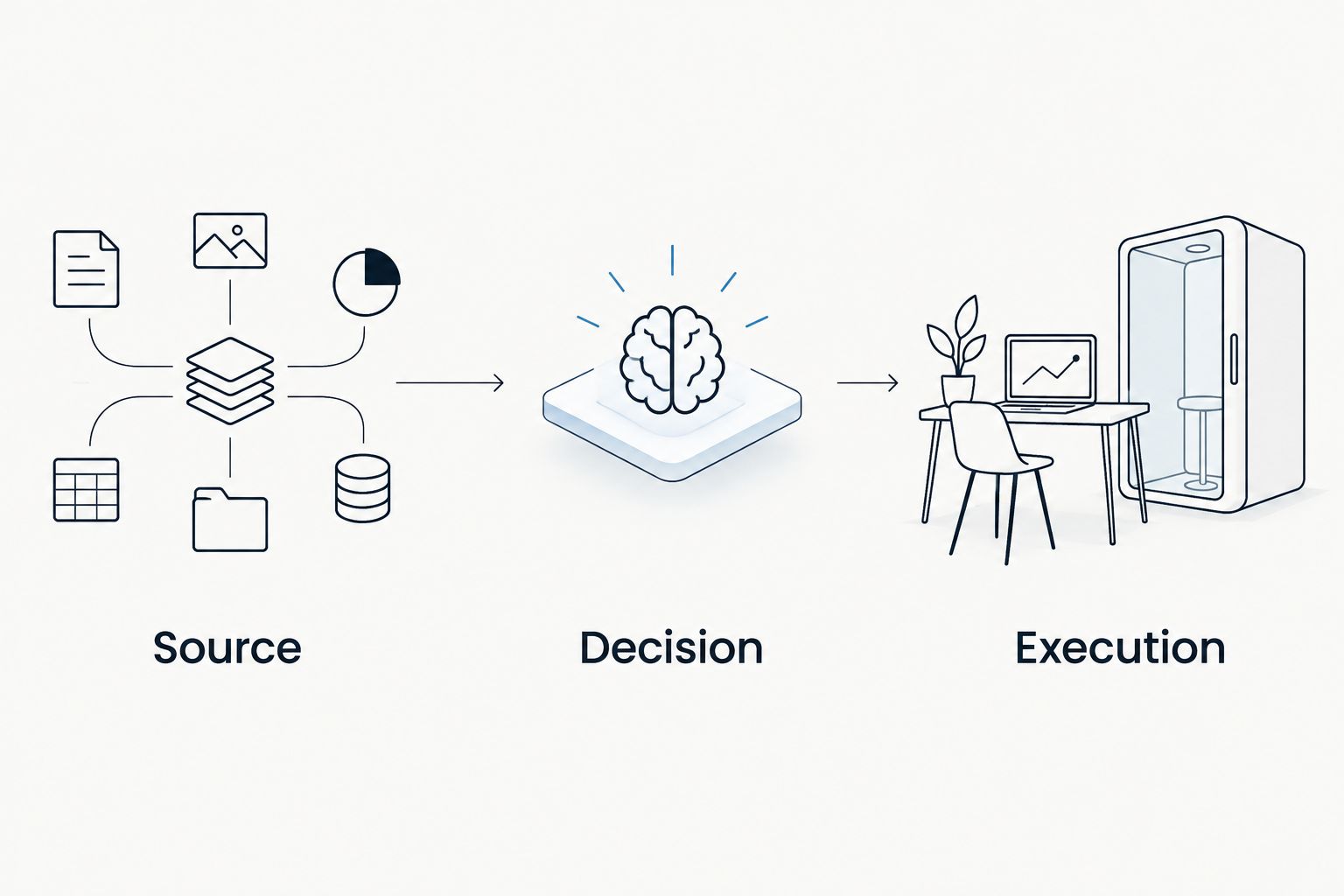
Use 3 review checkpoints: source, decision, and execution. Each checkpoint answers a different question, and none replaces the others.
Execution and review records
Reconcile with the broker history
- Locate the order in your broker's history using Order reference. Record whether it was filled, rejected, canceled, or remained unfilled.
- Enter the actual Fill time, Fill price, and Position size for filled orders. An order submission time is not a fill time.
- Record each exit from the broker history. If you close a position in parts, preserve those separate executions under the same Signal ID.
- Copy disclosed trading costs and the broker's reported result. Check whether the reported result already includes those costs before making any adjustment.
- Add a short process note explaining departures from your plan, without changing the original signal or decision record.
Slippage is the difference between an expected execution price and the actual fill. The spread is the difference between buying and selling quotes. Both help explain why your broker result differs from a signal's reference prices.
For a closer review, use the guide to why a forex trading app fill differs from a signal price. Your journal should preserve those differences, not hide them.
Expected result: Each completed trade has broker-supported execution information, and unfilled orders remain distinguishable from trading losses.
Review process separately from outcome
Ask whether you recorded the idea before acting, respected your risk limit, and understood the instructions. Then review the financial outcome separately.
A 2026 review period should include skipped ideas and unfilled orders alongside completed trades. That prevents the journal from becoming only a collection of memorable winners or frustrating losses.
Do not label a skipped signal a personal win because a chart later moved favorably. You had no broker fill, and a retrospective price observation does not establish an executable outcome.
Expected result: Your review identifies repeatable process problems without turning incomplete observations into performance claims.
When a signal is updated
Use the same journal when a source publishes a revision. The change belongs in Updates, while the original record stays intact.
| Workflow | Best for | Advantage | Limitation |
|---|---|---|---|
| Original-signal capture | Recording a new trade idea | Preserves what you first received | Does not capture later instructions by itself |
| Linked-update capture | Recording a revised trade idea | Keeps changes tied to the original | Requires matching each update to the correct signal |
- Find the existing Signal ID before adding a revision. Do not create an unrelated new signal unless the source clearly presents a separate idea.
- Copy the revision into Update text and record its publication time if supplied.
- Record when you viewed the change. An update published before an exit but seen afterward was not information you acted on.
- Describe your response in Action taken. If you changed an order, preserve the broker's confirmation or order history.
- Retain the original entry, stop, target, and validity information as originally recorded.
Expected result: Your journal shows the sequence of information and action without rewriting history.
Do not assume that Tradeforex signals include revisions, particular fields, or a fixed publication schedule. Apply this variant only when an update actually appears in the material you receive.
Troubleshooting
A signal appears twice
Compare the source text, publication time, currency pair, and direction before merging anything. Similar ideas can be separate signals. If the entry is a true duplicate, retain one parent record and preserve any notes already attached to it.
Timestamps appear out of order
Check timezone differences and whether a field represents publication, viewing, submission, or execution. Preserve the original timestamp, then add a normalized journal time rather than silently replacing the source value.
The journal result differs from the broker statement
Check partial exits, omitted executions, account currency, and whether costs were deducted twice. Reconcile against the broker's transaction history; do not force the journal to match a signal provider's stated outcome.
A signal lacks an entry or exit condition
Mark the missing information Not supplied. If you cannot explain the proposed trade and its risk in plain English, leave the decision as Reviewing or Skipped rather than inventing instructions.
An update has overwritten the original
Restore the original from your saved text or screenshot when available, then move the revision into Updates. If the original cannot be recovered, mark the record incomplete instead of reconstructing it from memory.
Customize your workflow
Start with manual capture so you understand each field before adding automation. If you later evaluate an export or integration, verify that it preserves timestamps, revisions, and stable identifiers. Do not assume those capabilities exist.
Keep screenshots and account statements private. Remove account identifiers before sharing a journal for feedback, and never store passwords or access codes alongside trade records.
Before subscribing to any signals service, decide how you will evaluate the ideas you receive. Tradeforex delivers forex signals in its web app, but you still need a separate record of your decisions and broker execution. Subscription access is not evidence of profitability.
Keep the same field definitions throughout your 2026 evaluation. If you change a definition, record the change date so older and newer entries remain interpretable.
FAQ
How do I build a forex trade journal from signals?
Save the original signal, record your decision, and link any broker execution using a unique signal identifier. Keep revisions separate so later information does not replace what you originally received.
Does Tradeforex place trades for subscribers?
Tradeforex provides forex signals inside its web app, not a broker trading app that executes your orders. Keep signal records separate from your broker's order and execution history.
Can I journal forex signals without trading real money?
Yes, you can record signal interpretation and decisions without placing live trades. Clearly label demo executions and observations so they are never presented as live trading results.
Should I record signals that I skip?
Yes, record skipped signals and the reason you did not trade. Do not assign a personal profit or loss to an idea that produced no execution.
What if my entry price differs from the signal?
Record the signal's stated entry and your actual broker fill in separate fields. Differences can reflect timing, bid and ask quotes, order conditions, or slippage; use the broker record to establish your execution.
How should I record an updated forex signal?
Add the revision to an update log linked to the original signal identifier. Preserve both the publication time, if supplied, and the time you viewed it, then document any action you took.
Can a trading journal prove a signals service will be profitable?
No, a journal documents observations and outcomes; it does not guarantee future returns. Incomplete records, trading costs, and differences between published ideas and actual execution limit performance conclusions.
One last thing
The most useful journal entry can be a trade you chose not to place. A documented decision to skip unclear instructions or excessive risk shows that you followed a process; it does not need a hypothetical profit attached to it.
Before your next signal, create the fields and test the recordkeeping sequence without submitting an order. A journal should make your decisions easier to inspect, not pressure you to trade.