Best overall: a position-size calculator. Best for exit planning: broker stop-loss controls. Best simple option: an exposure worksheet. This 2026 guide ranks the best forex trading tools for risk management by the decisions they help you make before following a trade idea.
- The best forex trading tools for risk management start with position sizing, not predictions.
- Broker stop-loss controls support exit planning but cannot guarantee an execution price.
- An exposure worksheet helps identify currency bets shared across different positions.
- Tradeforex delivers forex signals inside its web app; signals do not replace your risk controls.
Why this matters
A forex signal is a trade idea, not a limit on your losses. You still choose whether to trade, how large the position should be, and which orders to place with your broker.
Tradeforex provides its own forex signals service, with subscriber signals delivered inside its web app. That role is separate from a broker trading app: receiving a signal does not place or manage your orders.
Tradeforex is for readers seeking forex signals in a web app, not a replacement for broker-side risk controls. Start with the checks in How to Size a Position Before Following Forex Signals, then choose tools that make those checks repeatable.
What makes the best forex risk-management tools?
For a beginner choosing tools in 2026, these criteria matter more than the number of indicators on a chart:
- Visible assumptions: You can identify the account currency, currency pair, position size, and intended exit used in a calculation.
- Decision relevance: The output answers a practical question, such as how much currency you are trading or where an exit order belongs.
- Broker compatibility: Order types, volume increments, and instrument specifications match the account where you place trades.
- Combined exposure: You can examine open positions together rather than treating each signal as an isolated bet.
- Reviewability: You can record the plan and compare it with the actual execution afterward.
- Clear limitations: The tool distinguishes an estimate, an alert, or a simulated result from an executable order.
No tool passes these criteria merely because its interface looks precise. Incorrect inputs still produce incorrect decisions.
Best forex risk-management tools at a glance
These are tool categories, not claims that a particular app includes every function. Check your broker's documentation before relying on an order control.
| Rank | Tool | Best for | Standout function | Key limitation |
|---|---|---|---|---|
| 1 | Position-size calculator | Sizing a proposed trade | Connects stop distance with position size | Depends on correct instrument and currency inputs |
| 2 | Broker stop-loss controls | Planning an exit | Places an exit instruction with the broker | Execution price is not guaranteed |
| 3 | Exposure worksheet | Checking overlapping positions | Groups trades by shared currency exposure | Requires accurate updates |
| 4 | Economic calendar | Identifying scheduled event risk | Shows release times and affected currencies | Cannot predict the market reaction |
| 5 | Trading journal | Reviewing execution decisions | Compares the original plan with actual orders | Does not prevent a live trading mistake |
| 6 | Demo account | Rehearsing the workflow | Lets you practice order handling without live funds | Simulation does not reproduce every live condition |
1. Position-size calculator: best for sizing a proposed trade
A position-size calculator connects your planned loss amount, entry-to-stop distance, and trade volume. Use it before submitting an order, not after a position has already moved against you.
Best for: Beginners who understand a signal's proposed entry and exit but need to translate them into an appropriate order size.
Position-size calculator pros
- Makes the relationship between position size and stop distance explicit.
- Helps separate a trade's apparent attractiveness from the amount you put at risk.
- Provides a repeatable sizing step when evaluating different currency pairs.
Position-size calculator cons
- Wrong account currency, contract size, or stop inputs invalidate the result.
- A planned loss estimate does not guarantee the final loss after execution differences and charges.
Standard forex lot conventions are 100,000 currency units for a standard lot, 10,000 currency units for a mini lot, and 1,000 currency units for a micro lot. Check the broker's instrument specification rather than assuming every contract follows those conventions.
Also inspect the order ticket's volume increment. A calculator output is not usable until it matches an order size your broker accepts.
Verdict: Buy—choose a calculator whose inputs you can verify against your broker's contract details.
2. Broker stop-loss controls: best for planning an exit
A stop-loss order tells your broker to initiate an exit when the relevant trigger condition is met. It turns an intended exit into an order instruction, but it does not guarantee that the trade closes at the trigger price.
Best for: Traders who need an exit instruction attached to a live position rather than a reminder on a separate screen.
Broker stop-loss controls pros
- Put the exit instruction in the system handling the trade.
- Make the planned exit visible alongside the position.
- Let you rehearse order placement and modification before trading live.
Broker stop-loss controls cons
- Market gaps and execution conditions can produce a different exit price.
- Trigger rules and supported order combinations depend on the broker and instrument.
For your 2026 app shortlist, inspect the order ticket rather than relying on a feature checklist. Confirm how to enter, review, modify, and cancel an exit instruction—and how the app confirms that the broker accepted it.
An alert is not the same thing as an order. A notification requires a response; a broker order is an instruction already submitted for execution under its terms.
Verdict: Buy—prioritize understandable exit controls over extra chart indicators.
3. Exposure worksheet: best for checking overlapping positions
An exposure worksheet lists open and proposed trades together. Its job is to reveal shared currency bets that separate order tickets conceal.
Best for: Beginners considering several signals or holding more than one currency pair.
Exposure worksheet pros
- Shows which currencies appear repeatedly across your positions.
- Separates the number of trades from the number of underlying currency views.
- Creates a place to record planned risk across the account.
Exposure worksheet cons
- Manual entries become unreliable when positions change without an update.
- Shared currency exposure does not fully describe changing relationships between markets.
Buying EUR/USD and buying GBP/USD both involve selling the US dollar. Different pair names do not automatically mean different sources of risk.
Record the pair, direction, position size, intended exit, and planned loss estimate. Then group positions by the currency bought and the currency sold. Assess the combined account before adding another signal.
Verdict: Buy—use an exposure worksheet before adding trades that share a currency.
4. Economic calendar: best for identifying scheduled event risk
An economic calendar organizes scheduled announcements such as central-bank decisions and economic releases. It helps you identify when relevant information is due, not what the next price move will be.
Best for: Traders checking whether a proposed entry or holding period overlaps a scheduled announcement.
Economic calendar pros
- Connects scheduled releases with the currencies involved.
- Gives you a time reference for pre-trade planning.
- Supports a consistent decision about trading around announcements.
Economic calendar cons
- Unscheduled news remains outside the calendar.
- Event labels and forecasts do not determine the direction or size of a market move.
Before relying on a calendar in 2026, verify its displayed time zone. A correct release time interpreted in the wrong zone is still a planning error.
Check both currencies in the pair. Then decide whether the trade fits your event-risk rules; do not treat a calendar's importance label as permission to trade.
Verdict: Buy—use the calendar for preparation, not as a directional signal.
5. Trading journal: best for reviewing execution decisions
A trading journal records what you intended to do and what you actually did. The distinction matters when a signal, your entry, and your broker's fill do not match.
Best for: Beginners who need to identify recurring sizing, timing, or order-entry mistakes.
Trading journal pros
- Separates signal selection from your execution decisions.
- Preserves the original plan for comparison with the completed trade.
- Makes rule-breaking visible even when the trade ends positively.
Trading journal cons
- Incomplete or selectively entered trades distort the record.
- Reviewing past trades does not establish that a strategy will succeed in the future.
Record the signal as received, your decision time, submitted orders, actual fills, and any changes to the plan. Include skipped signals if you want to understand your selection decisions rather than only completed trades.
A profitable outcome does not prove that the decision was sound. Judge whether you followed a defined process separately from whether the position gained or lost.
Verdict: Buy—choose a journal you will maintain consistently rather than one with unused reporting features.
6. Demo account: best for rehearsing order handling
A demo account provides a simulated environment for practicing a trading platform. Use it to learn order entry and review without putting live trading funds at risk.
Best for: Beginners learning how to translate a trade idea into an order ticket.
Demo account pros
- Lets you practice volume entry and exit-order placement.
- Helps you locate order confirmations and position records.
- Provides a rehearsal space for the complete pre-trade checklist.
Demo account cons
- Simulated fills do not establish what live execution will deliver.
- Trading without real financial consequences does not reproduce the emotional pressure of losses.
During a 2026 app comparison, rehearse the same workflow on each candidate. Enter a proposed trade, inspect its details, modify the exit, and locate the resulting order record.
Treat a successful rehearsal as evidence that you understand the controls—not evidence that you are ready to make money.
Verdict: Buy—use simulation to check operational understanding, not to validate profit expectations.
How to combine these tools before following signals
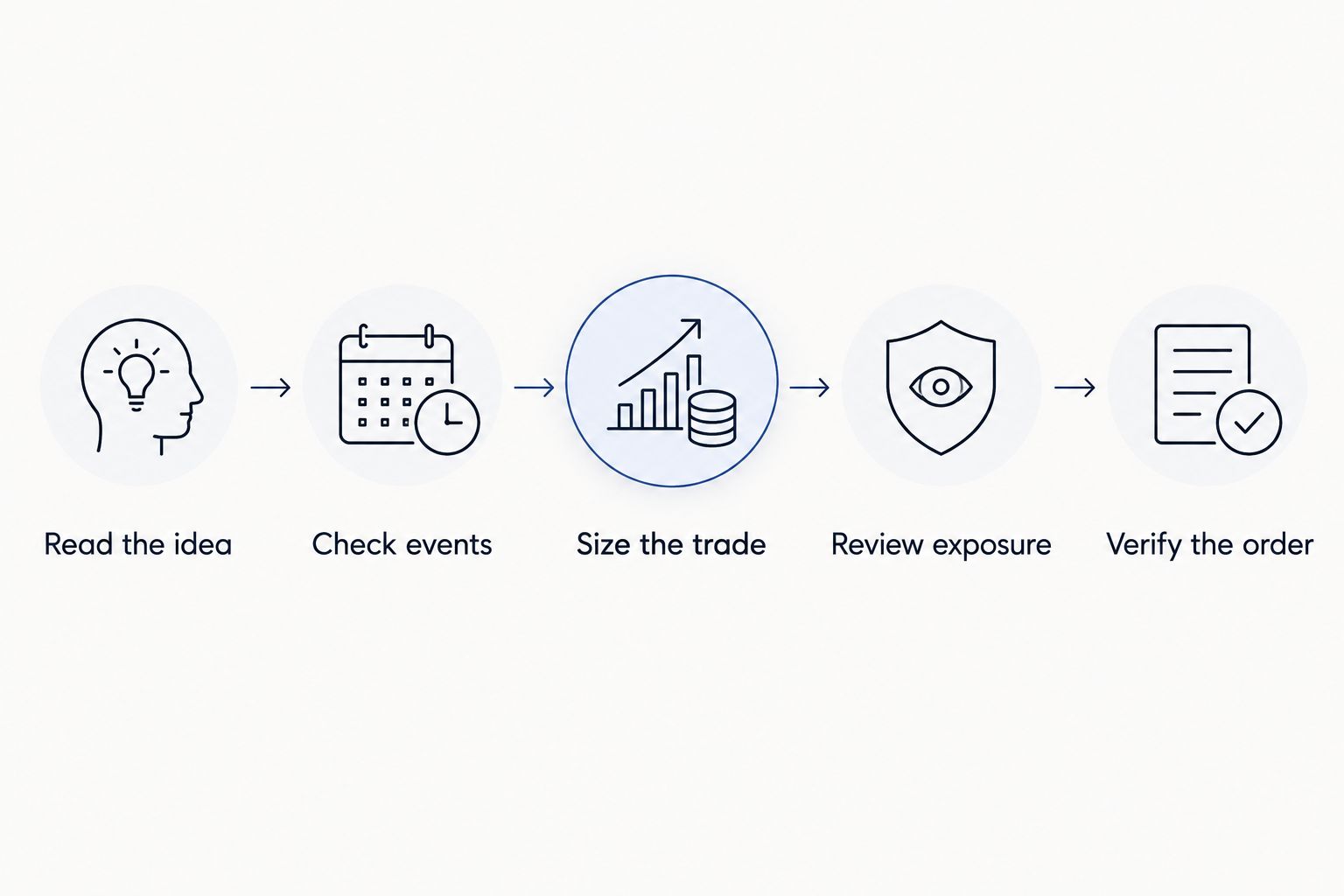
Use the same sequence for an independently researched trade or a signal received through Tradeforex. A signal source does not remove the need for your own checks.
- Read the idea: Identify the currency pair, direction, and proposed conditions. Do not invent an exit explanation that the signal does not provide.
- Check events: Review scheduled announcements affecting either currency during the intended trade.
- Size the trade: Verify the intended exit distance and instrument inputs before calculating volume.
- Review exposure: Compare the proposed trade with positions already open.
- Verify the order: Inspect the broker ticket and accepted instructions before recording the plan.
If you cannot explain an input or an order instruction, stop the process and resolve it. Adding another indicator does not fix an unclear exit or an incorrectly sized position.
How we ranked these tool categories
This ranking prioritizes decisions closest to controlling a proposed trade: size first, exit instructions next, and account-level exposure after that. Calendars support preparation; journals support review; demo accounts support rehearsal.
The ranking compares functions, not measured product performance. No position in the list means a tool prevents losses or makes a signal reliable.
Which forex risk-management tools should you choose?
For a beginner in 2026, start with a position-size calculator and understandable broker exit controls. Add an exposure worksheet before taking overlapping positions, then use a calendar, journal, and demo account to support the workflow.
Before subscribing to Tradeforex signals, separate the subscription decision from the execution decision. Evaluate the service's current information, then confirm that your broker app lets you place and review the orders you understand. Subscribers receive signals inside the web app; responsibility for accepting a trade remains yours.
FAQ
What's the best forex risk-management tool for a beginner?
A position-size calculator is the best starting point for translating a proposed trade into an order size. Check its account-currency, contract-size, and exit-distance inputs against your broker's specifications.
Does a stop-loss guarantee how much I can lose?
No, a stop-loss does not guarantee the final loss. Gaps, execution conditions, and trading charges can make the realized result different from the planned estimate.
Can I use forex signals instead of risk-management tools?
No, forex signals do not replace position sizing, exit planning, or exposure checks. Tradeforex delivers subscriber signals inside its web app; receiving a signal is separate from placing an order with a broker.
Is a price alert the same as a stop-loss order?
No, a price alert notifies you, while a stop-loss is an order instruction submitted to a broker. Verify the exact instruction and confirmation in your trading account.
Why check exposure when my trades use different currency pairs?
Different currency pairs can contain the same underlying currency bet. Buying EUR/USD and GBP/USD both involve selling the US dollar, so review those positions together.
Does success in a demo account prove a trading strategy works?
No, demo results do not prove future live performance. Use simulation to learn the controls and rehearse decisions, not to establish expected profits.
One last thing
A winning trade can still reveal a risk-management failure. If you entered the wrong volume or omitted the planned exit, record the error even when the result is positive. Your next decision needs a repeatable process, not reassurance from the last outcome.
This guide is educational information, not personalized investment advice. Forex trading involves the risk of financial loss.