Best overall: MetaTrader 5 for a broker-connected swing-trading workflow. Best for chart-first planning: TradingView. Best for an existing MetaTrader account: MetaTrader 4. Best alternative to the MetaTrader workflow: cTrader. This 2026 guide compares the best forex trading apps for swing traders and explains where a signals subscription fits without confusing trade ideas with trade execution.
- MetaTrader 5 leads this best forex trading apps for swing traders shortlist when your chosen broker supports it.
- TradingView suits chart-first planning; broker connections determine whether you can place trades through it.
- Tradeforex delivers forex signals inside its web app; your broker remains responsible for executing your orders.
- Compare overnight financing, order controls, and account eligibility before choosing an app or subscribing to signals.
Why this matters
Swing trading means holding positions across sessions, often overnight. Your app therefore needs to support decisions made away from the screen, not just make a chart look clear while you watch it.
A trading platform, a broker, and a signals service perform different jobs. The platform displays information and accepts instructions; the broker handles your account and execution; a signals service supplies trade ideas. Tradeforex provides forex signals through its web app, not a broker-owned trading app or trade execution service.
Choose the broker and account conditions before choosing the interface. An attractive app does not settle questions about regulation, financing charges, withdrawal terms, or whether the account accepts customers where you live.
What makes the best forex trading apps for swing traders?
Use these criteria to compare your 2026 shortlist. A platform passes only when the relevant features work with your intended broker account and device.
- Account eligibility: Confirm the broker serves your country and offers the currency pairs you intend to trade.
- Readable charts: Check whether a 4-hour chart, a 1-day chart, and a 1-week chart remain readable on your actual screen.
- Order controls: Rehearse placing, changing, and canceling orders, including protective exits.
- Overnight costs: Find the account's financing rules before holding a position across sessions.
- Alert workflow: Check what triggers an alert, how it reaches you, and what action remains yours.
- Account security: Review sign-in protection and the procedure for recovering access before funding an account.
A stop-loss is an instruction intended to limit a loss by closing a position at a specified level. It is not a promise of that exact execution price: gaps and fast markets can produce a different fill.
Swing-trading apps at a glance
These recommendations describe workflow fit, not a measured performance ranking. Broker support and account terms remain separate checks in 2026.
| App | Best for | Standout feature | Key limitation |
|---|---|---|---|
| MetaTrader 5 | A broker-connected default workflow | Charts and trading orders in one platform | The broker determines account terms and supported markets |
| TradingView | Chart-first planning | Chart analysis and alerts | Trading through the platform requires a supported broker connection |
| MetaTrader 4 | Keeping an established account workflow | Familiar forex charting and order management | Existing familiarity does not prove the broker account still fits |
| cTrader | Comparing an alternative trading interface | A different layout for charts and order handling | It requires a broker that supports cTrader |
There is no universal winner on trading costs in this table. A platform name alone does not identify the spread, commission structure, or overnight financing attached to your account.
1. MetaTrader 5: best forex app for a connected workflow
MetaTrader 5 brings chart analysis and order management into a trading platform supported by participating brokers. It is the default recommendation here for beginners who want to plan a swing trade and manage the resulting position without making a separate charting service essential.
Start with your broker's account documentation. A MetaTrader 5 download does not establish who holds your funds, which instruments your account supports, or which trading conditions apply.
MetaTrader 5 pros:
- Combines chart review with order placement and position management.
- Supports a workflow built around checking different chart timeframes.
- Provides a familiar platform family if you later compare desktop and mobile use.
MetaTrader 5 cons:
- Requires a compatible broker account for trading.
- Platform features do not remove broker-specific costs or execution risks.
- Mobile and desktop layouts differ; practice your intended tasks on each device.
Best for: A beginner who wants a broker-connected platform as the center of the trading routine.
Before using real funds, open the intended account type in practice mode where offered. Find the open-position screen, check the order size, and rehearse changing a protective exit without opening an unintended new position.
Verdict: Buy into the workflow only after the broker and demo checks pass.
2. TradingView: best forex app for chart-first planning
TradingView centers on chart analysis and alerts, with trading available through supported broker connections. It suits a swing trader who wants to study market structure before moving to an order ticket.
Keep chart data and executable prices separate in your thinking. A chart's currency symbol and data source do not automatically represent the exact instrument and quote available through your broker.
TradingView pros:
- Gives chart review a dedicated workspace.
- Supports alerts that can draw attention to conditions you choose.
- Can support analysis separately from the app used for execution.
TradingView cons:
- Direct trading depends on a supported broker connection.
- A separate execution app adds another step between analysis and an order.
- Chart alerts are notifications, not guarantees that an order will fill.
Best for: A trader who wants to build and review a chart-based plan before entering an order.
Check the symbol and data source every time you compare a chart with an executable quote. If you use a separate broker app, write down which app is the source of truth for open positions and pending orders.
Verdict: Buy into TradingView for analysis; hold off on treating it as your execution app until compatibility is confirmed.
3. MetaTrader 4: best forex app for an existing account
MetaTrader 4 remains a recognizable forex platform for charting and managing orders through supporting brokers. Its strongest reason to stay on your shortlist is an established account and a workflow you already understand.
Switching platforms is not automatically an improvement. For a beginner, however, choosing an account solely because someone shared a MetaTrader 4 screenshot puts the decision in the wrong order.
MetaTrader 4 pros:
- Combines forex charting with order management.
- Lets an existing user retain a familiar trading routine.
- Supports reviewing positions without requiring a separate signals subscription.
MetaTrader 4 cons:
- Requires a broker that supports the platform.
- A familiar interface does not validate the broker's account conditions.
- Instructions written for another platform or device need checking before use.
Best for: Someone whose suitable broker account already uses MetaTrader 4.
Review your actual needs rather than comparing platform names alone. If you can inspect the chart, understand the order ticket, and manage exits reliably, a platform change needs a specific purpose.
Verdict: Hold an established MetaTrader 4 workflow when it fits; skip choosing a broker merely to obtain it.
4. cTrader: best forex app for an alternative interface
cTrader is another broker-connected platform for analyzing markets and managing trades. It belongs on this shortlist when you want to compare how a different interface presents orders and open positions.
Do the comparison with a supporting broker's practice account where offered. Screenshots cannot show whether you understand an order ticket while making a real decision.
cTrader pros:
- Offers an alternative to the MetaTrader interface.
- Combines charts with trading and position-management functions.
- Gives you another workflow to assess against the same practical checklist.
cTrader cons:
- Broker support is a prerequisite.
- Switching introduces a new layout and order-entry routine to learn.
- Interface preference does not establish lower costs or better execution.
Best for: A trader who finds the MetaTrader workflow unclear and wants a structured comparison.
Rehearse the same tasks on both platforms: inspect a position, locate its protective exit, and distinguish modifying an order from creating another one. Choose the interface you can explain accurately, not the one with the busiest screen.
Verdict: Wait until a side-by-side practice session shows a clear workflow benefit.
How this ranking works
The 2026 ranking prioritizes a connected trading workflow, readable analysis, understandable order controls, and practical account checks. It does not claim hands-on execution testing or rank brokers by returns.
MetaTrader 5 is the default because it brings analysis and order management together. TradingView has a distinct chart-first role; MetaTrader 4 serves an established workflow; cTrader provides an alternative interface. These are different reasons to choose, not promises about trading outcomes.
Test the workflow before subscribing to signals
An app comparison becomes useful when you can complete the same sequence without guessing. Use a practice account where available, and record what you actually see rather than assuming a feature behaves the same everywhere.
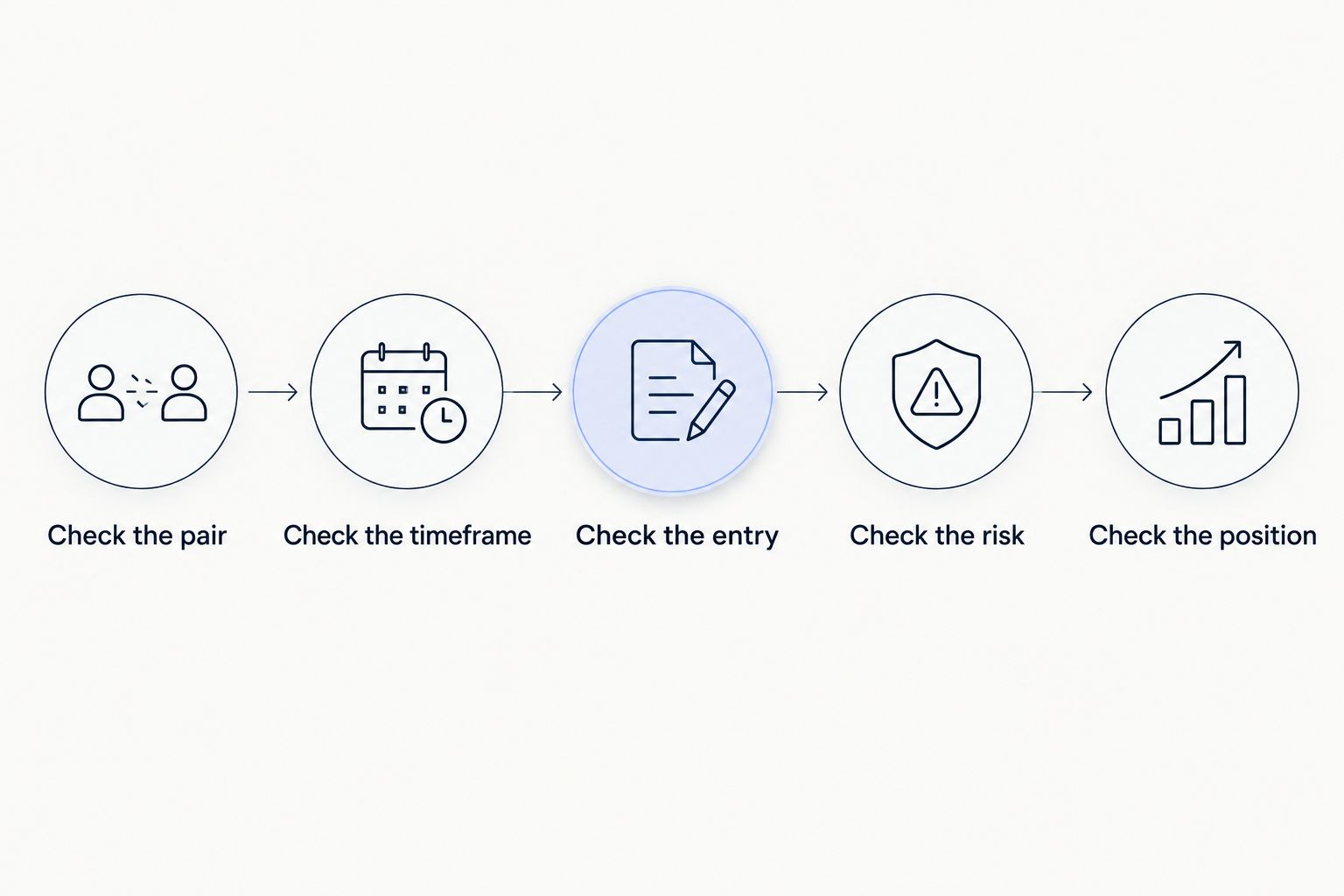
- Check the pair: Match the currency pair in the trade idea to the broker's instrument.
- Check the timeframe: Distinguish a 4-hour setup from a 1-day setup; they describe different planning intervals.
- Check the entry: Identify whether the idea requires an immediate order or a conditional order.
- Check the risk: Understand the position size, intended exit, and loss exposure before submitting anything.
- Check the position: Confirm what is open, what remains pending, and what happens if you close the app.
A signal is an input to this process, not a replacement for it. If you cannot explain the order you are about to place, stop before submitting it.
For a US resident, broker checks also include the relevant registration status. The CFTC and NFA provide official resources for checking firms involved in US retail forex. An app-store listing is not a substitute for those checks.
Where a signals subscription fits
Tradeforex is a forex signals service for readers who want trade ideas delivered inside the Tradeforex web app. It is separate from the broker account and execution platform you select.
Before subscribing, examine a sample signal and establish what information it contains. Look for an understandable explanation of the proposed trade, its timing, and its limits; do not assume any service supplies every detail your trading process requires.
Assess results with the same discipline. A win rate leaves out the size of losses, the size of gains, and trading costs. Use this guide to assessing a forex signals track record beyond win rate before treating a results summary as useful evidence.
The subscription decision and the trade decision remain separate. Receiving an idea does not oblige you to act, especially after the market has moved away from the proposed entry.
Review Tradeforex before subscribing
Explore the signals service; keep your broker and execution-platform checks separate.
Which forex trading app should you choose?
Choose MetaTrader 5 as the default shortlist candidate, not as permission to fund an unchecked broker. Choose TradingView when chart planning is the main gap; retain MetaTrader 4 when an existing suitable account already works; compare cTrader when interface clarity is the problem.
For your 2026 decision, complete the practice workflow before adding another subscription. Better notifications cannot repair an order ticket you do not understand.
FAQ
What's the best forex trading app for swing traders in 2026?
MetaTrader 5 is this guide's default recommendation for a broker-connected swing-trading workflow. TradingView is the chart-first alternative, while broker eligibility and account conditions must be checked separately.
Is TradingView better than MetaTrader 5 for swing trading?
TradingView is the better fit here for chart-first planning; MetaTrader 5 is the default for combining analysis with broker-connected order management. Trading through TradingView requires a supported broker connection.
Can I receive Tradeforex signals in a trading app?
Subscribers receive Tradeforex signals inside the Tradeforex web app. Do not assume those signals automatically place orders in a broker account.
What chart timeframe should a beginner check for swing trading?
A 4-hour chart and a 1-day chart provide different views to compare when reviewing a swing-trading idea. Match the timeframe to the idea's intended holding period rather than treating any timeframe as a reliable predictor.
Does a stop-loss guarantee my maximum loss?
A standard stop-loss does not guarantee an exact execution price. Market gaps and fast price changes can cause the position to close at a different level.
What costs matter when holding a forex trade overnight?
Overnight financing, spreads, and any applicable commissions affect the trade's result. Read the specific broker account terms rather than inferring costs from the platform name.
Should I subscribe to forex signals before choosing a broker?
Choose and check the broker workflow first. You need to understand the available instruments, order controls, and account conditions before deciding whether a signals subscription fits your process.
One last thing
Closing your phone app is not the same as closing your trade. Before ending a session, inspect open positions and pending orders in the broker-connected platform, then confirm the protective instructions you intended are actually recorded.
That final check matters more than another indicator. Swing trading carries exposure while you are away from the screen.