
Best overall: MetaTrader 5 through a regulated broker that serves your location. Best for chart study: TradingView. Best for an existing MetaTrader 4 account: MetaTrader 4. Best for readers specifically seeking Tradeforex signals: Tradeforex, a separate signals service rather than a broker trading app. This 2026 guide compares forex trading software for beginners by task: practicing orders, studying charts, managing an existing account, or evaluating trade ideas.
- MetaTrader 5 is the default forex trading software for beginners when a suitable regulated broker supports it.
- TradingView fits chart study; broker connections and order execution require separate checks.
- MetaTrader 4 fits beginners whose selected broker already uses it; changing platforms is not automatically an improvement.
- Tradeforex delivers forex signals inside its web app; signals are trade ideas, not guaranteed outcomes.
Why this matters
A charting platform, a broker account, and a signals subscription solve different problems. Your broker handles your trading account and execution; software gives you an interface; signals supply ideas you decide whether to follow. One screen does not necessarily perform all those jobs.
Choose the broker and practice workflow before adding signals. A useful trade idea still requires you to understand the currency pair, order instructions, position size, and potential loss. None of the software choices below removes market risk.
What makes the best forex trading software for beginners?
Use these criteria for your 2026 shortlist. A platform fails the beginner test when you cannot explain what will happen after you submit an order.
- Broker suitability: Confirm the broker's legal entity and registration with the relevant regulator. A familiar software name does not establish that the broker is legitimate.
- Practice access: Look for a demo environment where you can rehearse the same order workflow you intend to use with real money.
- Order clarity: You should understand the currency pair, direction, order type, position size, and exit settings before confirmation.
- Chart readability: Check whether you can identify the timeframe, displayed price, and existing orders without searching through menus.
- Risk visibility: Choose a setup that makes account exposure and order size understandable. Attractive charts do not compensate for confusing order controls.
- Signals separation: Know whether an alert is a notification, a trade suggestion, or an instruction that triggers an order. These are different responsibilities.
Beginner forex software at a glance
The order below reflects the sequence of beginner needs: trading practice first, chart study second, existing-account continuity third, and optional signals evaluation last. These are distinct use cases, not interchangeable services.
| Rank and option | Best for | Standout capability | Key limitation |
|---|---|---|---|
| 1. MetaTrader 5 | Starting a broker-supported practice workflow | Charts, order tools, and demo-account support | Broker selection remains a separate decision |
| 2. TradingView | Studying charts before placing orders | Browser-based charts and alerts | Trading connections depend on supported brokers |
| 3. MetaTrader 4 | Learning an existing broker's MT4 workflow | Established forex charts and order tools | Skills and tools do not transfer identically to MT5 |
| 4. Tradeforex | Receiving its forex signals | Signals delivered inside its web app | A signals subscription is not a broker account or execution platform |
1. MetaTrader 5: best beginner software for broker-based practice
MetaTrader 5 combines charts, trading orders, and account information in a trading platform. You connect through a broker, and the broker determines the instruments and account conditions you receive. A demo account gives you a place to learn the controls without placing real-money trades.
Best for: Beginners who want to practice in the platform their selected broker supports. MetaTrader 5 is the default choice here because the learning task stays close to the eventual trading task: reading a chart, preparing an order, and checking the account afterward.
MetaTrader 5 pros
- Charts and order tools sit within the same platform.
- Demo accounts support order-entry practice.
- Different order types let you learn immediate and conditional entries.
- Account and position information help you review what you actually submitted.
MetaTrader 5 cons
- The platform does not validate the broker's regulatory status for you.
- Numerous controls create extra learning work before your first trade.
- Demo execution does not establish the results you will receive in a live account.
What to test before choosing MetaTrader 5
Practice 3 order actions: opening a demo position, changing an exit instruction, and closing the position. After each action, locate the confirmation and explain the resulting exposure in plain English. These are suggested practice tasks, not a measure of trading readiness.
Check the broker independently before depositing money. For a US reader in 2026, that includes checking the relevant registration records rather than accepting a platform logo as proof of authorization.
Verdict: Choose MetaTrader 5 for practice when your independently checked broker supports it; wait on live trading until the controls make sense.
2. TradingView: best beginner software for chart study
TradingView provides charts, drawing tools, indicators, and alerts. Its trading connections work through supported brokers, so chart access alone does not establish that you can place your intended forex orders through your broker.
Best for: Beginners who want to study currency charts separately from account management. Keep the distinction clear: an alert tells you that a condition has occurred; it does not make the resulting trade appropriate for your account.
TradingView pros
- Browser-based charts support a chart-focused learning workflow.
- Drawing tools help you mark and revisit areas you are studying.
- Alerts let you monitor selected conditions without treating every chart movement as a trading instruction.
- Chart analysis can remain separate from the broker account where you execute orders.
TradingView cons
- A supported trading connection is not the same as universal broker compatibility.
- Prices can differ between chart feeds and your broker's executable quotes.
- Adding indicators can make a beginner's decision process harder to explain.
What to test before choosing TradingView
Compare 2 chart views of the same currency pair: your analysis chart and your broker's chart. Match the timeframe, inspect the price source, and identify whether the displayed quote is a bid, ask, or another representation. Do not assume two charts must show identical prices.
For your 2026 setup, write down where analysis ends and execution begins. If you must switch applications to submit an order, rehearse that transition before relying on a time-sensitive signal.
Verdict: Choose TradingView for chart study; wait on connected trading until you confirm the broker connection and order workflow.
3. MetaTrader 4: best beginner software for an existing MT4 account
MetaTrader 4 provides forex charting, order management, and support for automated trading programs called Expert Advisors. It remains a distinct platform from MetaTrader 5, not simply an alternative display setting inside the same application.
Best for: Beginners whose independently selected broker already provides an MT4 account. The strongest reason to choose MetaTrader 4 is a suitable existing account workflow, not the idea that older software is automatically easier.
MetaTrader 4 pros
- Charting and order management share the same trading environment.
- Demo practice lets you learn the broker's MT4 order workflow.
- Existing MT4 indicators or tools can support continuity when you already use them.
MetaTrader 4 cons
- MT4 and MT5 programs are not automatically interchangeable.
- Familiarity with the platform does not establish broker quality.
- Automated programs can place orders you do not understand if you enable them without checking their behavior.
What to test before choosing MetaTrader 4
Build 1 trade log that records the order you intended, the order you submitted, and the exit that actually occurred. This is a recommended learning record, not a performance claim. Use it to find mistakes in your process before judging your strategy.
You do not need an automated trading program to learn order entry. Leave automation disabled while learning manual controls, and do not treat historical results as a promise about future trades.
Verdict: Keep MetaTrader 4 when it fits your checked broker and learning workflow; skip unnecessary platform switching.
4. Tradeforex: best for readers seeking its forex signals
Tradeforex provides a forex signals service, and subscribers receive its signals inside the Tradeforex web app. The service is separate from a broker trading app: it does not replace the account and order controls you need to execute trades.
Best for: Readers who specifically want to evaluate Tradeforex forex signals alongside their own broker workflow. Treat each signal as a trade idea requiring your decision, not an assurance that an order will succeed.
Tradeforex pros
- Subscribers receive the service's signals inside its web app.
- A separate signals service keeps the source of trade ideas distinct from the broker account.
- The subscription addresses signals access rather than requiring you to mistake an information service for a broker.
Tradeforex cons
- The service does not replace broker selection or order execution.
- Following a signal still exposes you to market losses and execution differences.
- Receiving a signal does not establish that its timing or risk fits your account.
What to check before subscribing
Evaluate the actual signal information before relying on it. Look for understandable entry instructions, exit conditions, timing, and an explanation of risk; do not assume those details are included merely because a service uses the word signals.
Read the subscription terms and assess the evidence behind any performance claim. The guide to assessing a forex signals track record beyond win rate explains why a high winning percentage alone cannot establish a sound trading approach.
Verdict: Consider subscribing only after you understand the service terms and can independently assess and execute a trade idea.
How to connect software and signals without losing control
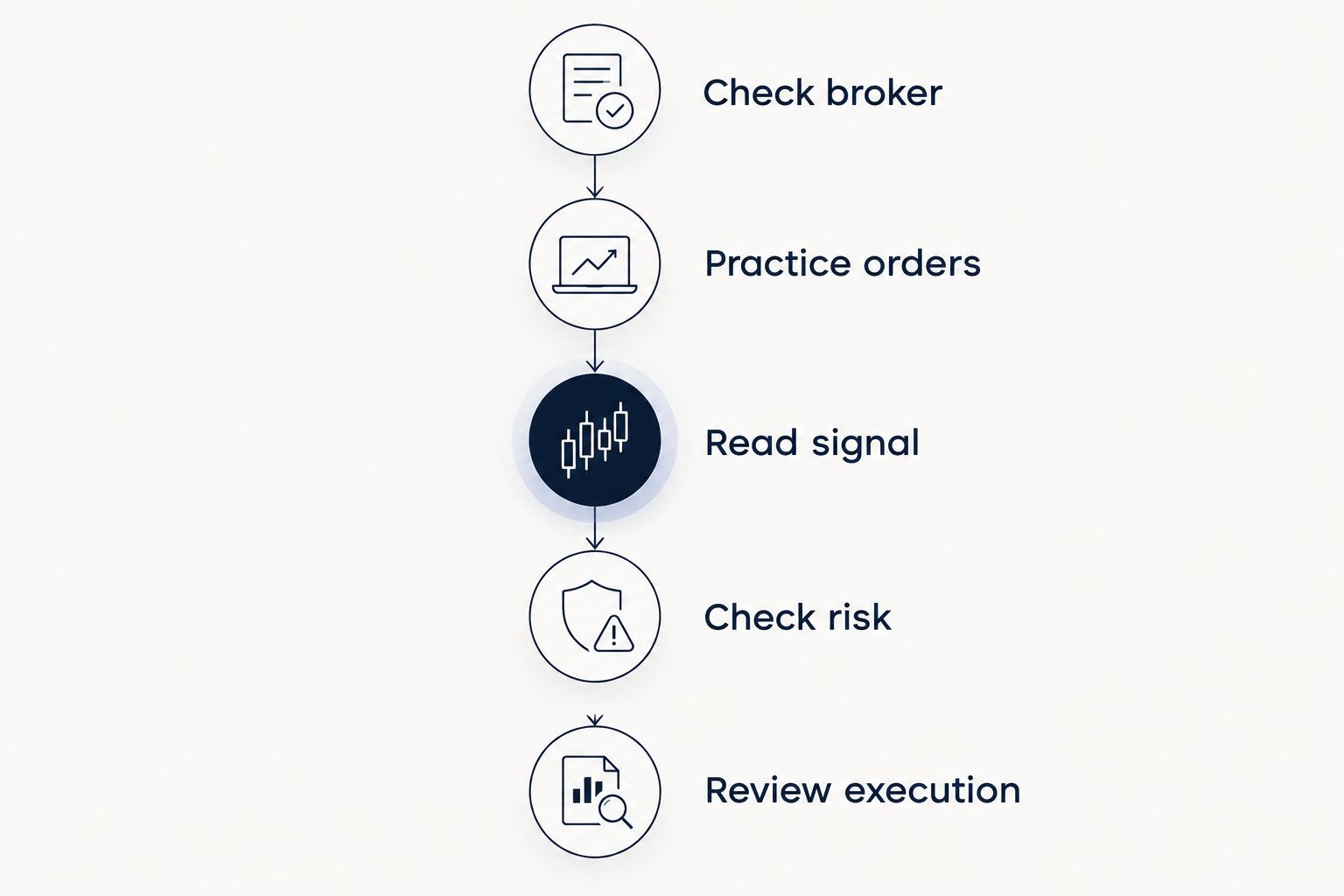
Use this sequence when building your 2026 workflow. Keep the decision stages separate so a notification never becomes an order by accident.
- Check broker: Verify the entity holding your account and the permissions relevant to your location.
- Practice orders: Rehearse entry, exit changes, and closing positions in a demo account.
- Read signal: Identify the proposed trade and any conditions attached to it. Skip ideas you cannot explain.
- Check risk: Decide whether the potential loss and total exposure fit your own limits.
- Review execution: Compare the submitted order and resulting fill with what you intended.
A stop-loss is an instruction intended to close a position when the market reaches a specified level. It does not guarantee that exact execution price under every market condition. Likewise, a demo result does not prove that a real-money trade will behave identically.
How the ranking works
This ranking prioritizes broker-supported practice, readable orders, chart clarity, and a clear separation between signals and execution. It is a task-based shortlist, not a claim that one application delivers better trading returns.
MetaTrader 5 takes the default slot for integrated practice. TradingView serves chart study, MetaTrader 4 serves an existing MT4 workflow, and the signals option serves readers evaluating a separate source of trade ideas.
Which forex trading software should you choose?
Choose a checked broker's MetaTrader 5 demo workflow if you are undecided. Learn to place, review, and close orders before adding more tools. Choose TradingView when chart study is your immediate need, or keep MetaTrader 4 when your suitable existing broker already uses it.
Add a signals subscription only after those basics are clear. For a beginner in 2026, understanding why you would reject a trade idea is more useful than receiving additional ideas you cannot assess.
FAQ
What's the best forex trading software for beginners in 2026?
MetaTrader 5 is the default choice in this guide when a suitable regulated broker supports it. Start with a demo account and learn order entry, exit changes, and position closing before trading real money.
Is TradingView better than MetaTrader 5 for beginners?
TradingView fits chart study, while MetaTrader 5 fits an integrated broker-based trading workflow. Confirm supported broker connections before expecting TradingView to handle your orders.
Should a beginner choose MetaTrader 4 or MetaTrader 5?
Choose according to your independently checked broker and the workflow you need to learn. MetaTrader 4 can fit an existing MT4 account; MetaTrader 5 is the default starting point in this guide.
Does a forex signals subscription place trades for me?
A signals subscription is not automatically an execution service. Establish whether you must submit orders yourself and never assume that a notification has opened or closed a position.
Can a forex demo account prove that I will make money?
No, a demo account cannot prove future profitability. It helps you learn controls and test a process, but live execution and your responses to real losses can differ.
Why can my trade price differ from a signal's price?
Your execution price can differ because quotes move, spreads vary, and orders take time to reach the broker. A signal's stated price is not a guarantee of the fill you will receive.
What should I understand before following a forex signal?
Understand the currency pair, direction, entry conditions, exit instructions, and potential loss. Skip the trade if you cannot translate the idea into an order you understand.
One last thing
Practice rejecting a trade before practicing following one. If an entry has passed, instructions are unclear, or the potential loss exceeds your limit, record the reason and leave the order unplaced. Software competence includes knowing when not to use the submit button.