
Best overall: TradingView. Best for integrated desktop analysis: MetaTrader 5. Best for chart-based order preparation: cTrader. Best for an existing MetaTrader workflow: MetaTrader 4. This 2026 guide compares charting tools for beginners evaluating forex apps and signals, not promised trading returns.
- TradingView leads this best forex trading platform charting tools comparison for visual analysis and chart alerts.
- MetaTrader 5 suits desktop analysis; cTrader suits chart-based order preparation; MetaTrader 4 suits existing setups.
- Tradeforex delivers forex signals inside its web app; it is not a broker trading platform.
- Compare the signal’s currency pair, timeframe, and price feed before placing an order.
Why this matters
A charting platform helps you inspect a trade idea. A broker handles your trading account and order execution; a signals service supplies ideas you must evaluate separately.
Tradeforex provides forex signals through its web app, not a broker-owned trading platform. Tradeforex is for beginners seeking a forex signals subscription, not a replacement for a broker account. Keep those roles separate when choosing your setup.
For your 2026 shortlist, prioritize charts you can read and orders you understand. Extra indicators do not establish that a signal is sound, and a polished chart does not guarantee a favorable execution price.
What makes the best forex charting platform?
Use these criteria before comparing platform names:
- Chart readability: You can identify the currency pair, timeframe, current price, and marked levels without searching through menus.
- Drawing and indicators: Horizontal lines, trendlines, and technical indicators support your analysis without hiding the price chart.
- Alerts: You understand what triggers a notification and whether that notification creates an order. Do not assume the two are connected.
- Order preparation: You can distinguish an intended entry, a stop-loss, and an exit target before submitting anything.
- Broker compatibility: Your broker supports the platform and instruments you intend to use. A platform name alone does not establish US eligibility.
- Repeatable workflow: You can save or recreate the same analysis and check it against a signal without rebuilding everything.
The best choice passes these practical checks. The longest feature list is not the deciding factor.
Forex charting platforms at a glance
| Rank and platform | Best for | Standout charting feature | Key limitation |
|---|---|---|---|
| 1. TradingView | Visual analysis and chart alerts | Drawing tools, Pine Script indicators, and chart alerts | Analysis and broker execution are separate unless a supported connection is used |
| 2. MetaTrader 5 | Integrated desktop analysis | Multi-timeframe charts alongside trading tools | Desktop functionality does not imply identical mobile functionality |
| 3. cTrader | Chart-based order preparation | Chart trading controls and detachable charts on desktop | Broker support determines whether it fits your account |
| 4. MetaTrader 4 | Continuing an existing setup | Familiar chart templates and MQL4 indicators | MQL4 tools do not transfer directly into MetaTrader 5 |
This 2026 ranking separates charting suitability from broker quality. None of these platforms makes a weak trade idea reliable or removes the risk of losing money.
1. TradingView: best forex charting platform for visual analysis
TradingView combines browser-based charts, drawing tools, indicators, and alerts. Its Pine Script language supports custom indicators and strategies, although beginners do not need to write code to use standard charting tools.
TradingView earns the default recommendation because you can separate visual analysis from the decision to place an order. That separation is useful when evaluating a signal: first inspect the idea, then decide whether your broker’s market and order controls fit it.
TradingView pros
- Drawing tools help you mark support, resistance, and planned trade levels.
- Chart alerts support monitoring without continuously watching a price chart.
- Multiple forex data sources let you inspect charts from different providers.
- Browser access suits analysis without installing a desktop terminal.
TradingView cons
- A chart from one provider is not a promise of your broker’s executable price.
- Broker connections depend on supported integrations and account eligibility.
- Community scripts and published ideas require evaluation; publication is not verification.
Best for: Beginners who want a clear charting workspace for reviewing signals before opening their broker platform.
Keep the first chart simple. Mark the proposed entry and relevant exit levels if the signal supplies them, then inspect the surrounding price action. Adding indicators without a specific question makes the review harder to repeat.
Verdict: Buy into TradingView as your default analysis workflow, not as evidence that a signal will succeed.
2. MetaTrader 5: best forex charting platform for desktop analysis
MetaTrader 5 places charts, technical indicators, drawing objects, and trading controls in a desktop terminal. Its MQL5 environment supports custom indicators and automated trading programs.
The main benefit is proximity: you can analyze the instrument offered by your broker and prepare an order within the same platform. That reduces switching between analysis software and an execution terminal, but it does not eliminate mistakes.
MetaTrader 5 pros
- Multiple chart timeframes support checking broader context against a proposed entry.
- Built-in indicators and drawing objects cover standard technical analysis tasks.
- Desktop layouts let you arrange several currency charts together.
- Integrated trading controls connect analysis with order preparation.
MetaTrader 5 cons
- The desktop interface takes practice, especially when managing several windows.
- Custom programs require scrutiny; automated trading adds operational risks.
- Mobile and web versions should be assessed separately from desktop functionality.
Best for: Beginners whose broker supports MetaTrader 5 and who want desktop analysis beside their order controls.
For a 2026 setup, verify the exact broker account and instrument before importing templates or custom tools. Platform compatibility does not establish that an indicator is useful or that an automated strategy is safe.
Start with built-in tools. Add a custom indicator only when you can explain what it measures and how it changes your decision.
Verdict: Buy into MetaTrader 5 when integrated desktop analysis matters more than a separate browser charting workspace.
3. cTrader: best forex charting platform for order preparation
cTrader combines technical charts with trading controls, including chart-based order interaction. Its desktop application supports detachable charts, which help organize analysis across separate windows.
cTrader’s strongest use case is preparing an order while inspecting the chart. You still need to understand the order ticket: a visible line on a chart is not a substitute for checking direction, quantity, and order type.
cTrader pros
- Chart trading controls connect marked levels with order preparation.
- Detachable desktop charts support a customized workspace.
- Technical indicators and drawing tools cover common analysis tasks.
- Multiple chart views help separate market context from entry planning.
cTrader cons
- You need a supporting broker and an eligible account.
- Convenient chart controls do not prevent accidental order changes.
- Features and layouts differ across desktop, web, and mobile versions.
Best for: Beginners who already understand basic orders and want to prepare trades directly around chart levels.
Before using live chart controls, rehearse placing, modifying, and canceling orders in a demo account. Confirm what happens when you move an order line and whether the platform requests confirmation.
For US readers, establish broker eligibility before spending time customizing the interface. A platform being accessible online does not establish that a particular broker can serve you.
Verdict: Buy into cTrader for chart-based order preparation only after checking broker access and practicing the controls.
4. MetaTrader 4: best forex charting platform for existing setups
MetaTrader 4 provides forex charts, technical indicators, drawing tools, and trading controls. Its MQL4 environment supports custom indicators and automated programs known as Expert Advisors.
MetaTrader 4 belongs on this list for continuity, not because an older workflow should automatically win. If you already understand its charts and depend on compatible tools, changing platforms creates another task to learn.
MetaTrader 4 pros
- Chart templates help preserve a familiar analysis layout.
- Built-in technical tools support standard chart review.
- MQL4 indicators suit users with an established compatible setup.
- Charts and order controls sit within the same terminal.
MetaTrader 4 cons
- MQL4 programs do not run directly as MQL5 programs.
- Existing custom tools still need technical and trading-risk checks.
- Familiarity alone is a weak reason for a new trader to choose it.
Best for: Traders continuing an established MetaTrader 4 workflow with a supporting broker.
A new beginner choosing in 2026 should compare the actual broker implementation against the alternatives above. Do not select MetaTrader 4 solely because a signal seller supplies an indicator for it.
Verdict: Hold an existing MetaTrader 4 setup when it meets your needs; skip choosing it solely for familiarity by reputation.
Check a chart against a signal before acting
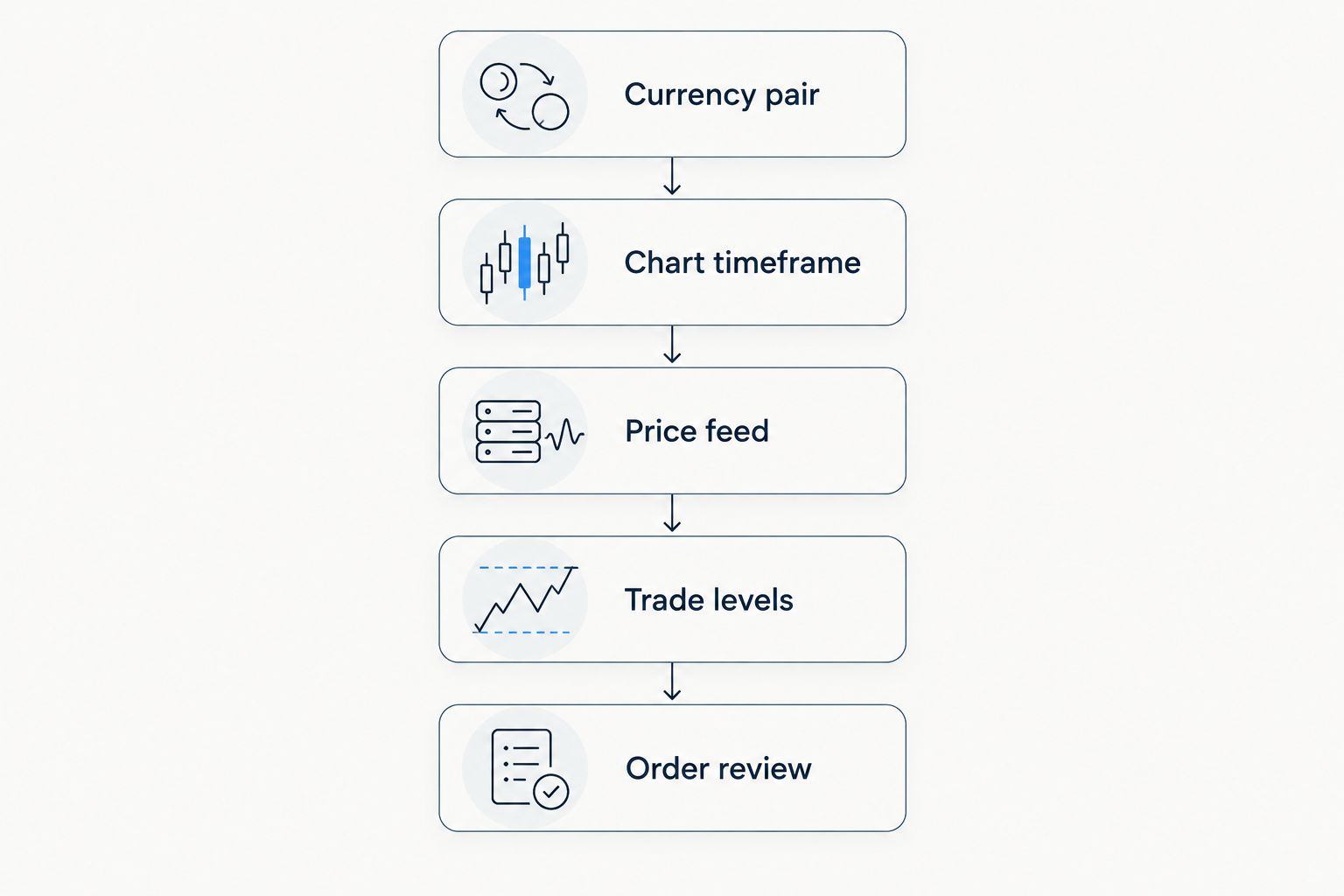
A useful comparison starts with matching inputs, not counting indicators. Follow this sequence whenever you review a trade idea:
- Currency pair: Confirm both charts show the same pair. EUR/USD and USD/EUR represent opposite quotation directions.
- Chart timeframe: Check whether the signal refers to a 15-minute chart, a 1-hour chart, or a 4-hour chart. Those views summarize different periods of price activity.
- Price feed: Identify the provider behind the chart. Retail forex quotes can differ across providers; there is no single consolidated retail forex price feed.
- Trade levels: Locate the entry, stop-loss, and target if supplied. Do not silently invent missing instructions.
- Order review: Check the broker’s current quote, spread, order type, and position size before submitting an order.
A candle summarizes price activity over its selected interval. Switching from a 15-minute chart to a 4-hour chart changes the view, not the underlying trade instructions.
Use the guide to checking forex trading app charts against a signal when building this routine. If the idea remains unclear after the comparison, do not place the trade just to stay aligned with a notification.
How the platforms are ranked
This ranking prioritizes chart readability, practical analysis tools, alerts, order preparation, and workflow fit. It does not rank trading returns, signal accuracy, broker safety, or execution speed.
TradingView leads for separate visual analysis. MetaTrader 5 leads for integrated desktop work; cTrader serves chart-based order preparation; MetaTrader 4 serves continuity. These are distinct use cases, not claims that every reader needs the same software.
Which forex charting platform should you choose?
Choose TradingView if you are undecided and your first task is understanding charts. Choose MetaTrader 5 when your broker supports it and you prefer analysis beside your order controls. Choose cTrader for its chart-based order workflow, or retain MetaTrader 4 for an established compatible setup.
For Tradeforex subscribers, forex signals arrive inside the Tradeforex web app. Keep the subscription decision separate from platform selection: choose charting software for analysis, assess signals as trade ideas, and use your broker for execution.
Your 2026 checklist should end with a practical demonstration: can you identify the instrument, explain the idea, and review the intended order without guessing? If not, more chart features are not the immediate solution.
FAQ
What’s the best forex trading platform for charting tools?
TradingView is the default choice in this comparison for visual analysis and chart alerts. MetaTrader 5 is better suited to readers who want desktop analysis beside broker trading controls.
Is TradingView better than MetaTrader 5 for beginners?
TradingView is the stronger starting point for separate visual analysis; MetaTrader 5 fits an integrated desktop trading workflow. Your broker support and preferred device should determine which setup you practice.
Can I use forex signals without changing my trading platform?
You do not need to change platforms simply to evaluate a trade idea. Match the currency pair, timeframe, and relevant levels, then review the order independently in your broker platform.
Does Tradeforex execute trades for subscribers?
Tradeforex provides forex signals inside its web app, not a broker trading platform. Treat the signals as trade ideas rather than guaranteed outcomes or executed orders.
Why does my forex chart show a different price from a signal?
Different data providers, timestamps, and bid or ask displays can produce different displayed prices. Check those inputs before assuming either the chart or the signal is wrong.
Do more chart indicators make forex signals safer?
More indicators do not establish that a forex signal is safer or more accurate. Use each indicator to answer a specific question, and assess position size and potential loss separately.
Should I practice chart-based orders before trading live?
Practice chart-based orders in a demo account before using them with real money. Demo practice teaches controls, but it does not guarantee identical live execution or trading results.
One last thing
A stop-loss is an order instruction, not a guaranteed exit price. Fast price changes and gaps can produce execution away from the level shown on your chart, so evaluate the potential loss rather than treating a neatly drawn line as protection against every outcome.