
Best overall for broker-connected demo practice: MetaTrader 5. Best for an existing MetaTrader 4 account: MetaTrader 4. Best for chart-first practice: TradingView Paper Trading. Best for a separate order-entry workflow: cTrader. This guide compares the best forex trading apps with demo accounts in 2026 and explains how to practice before following signals.
- MetaTrader 5 leads the best forex trading apps with demo accounts shortlist for broker-connected practice.
- MetaTrader 4 fits an existing broker account; TradingView Paper Trading suits chart-first practice.
- cTrader deserves a demo test when your chosen broker supports it and accepts your jurisdiction.
- Tradeforex delivers forex signals through its web app; it does not execute your trades.
- Demo results test your process, not future returns or live execution quality.
Why this matters
A demo account uses virtual funds to let you practice placing and managing orders. It helps you learn an app without putting real money into those practice trades, but simulated fills do not establish what will happen with real orders.
For a beginner considering signals, the useful question is not which app has the most indicators. It is whether you can translate a trade idea into the correct currency pair, direction, position size, and exit orders without confusion. Start with this guide to testing a forex trading app with a demo account before judging your practice returns.
US readers also need to separate platform access from broker eligibility. Installing software or opening a simulator does not establish that a connected broker can legally offer you a live forex account.
What makes the best forex trading apps with demo accounts
Use these criteria before choosing a platform in 2026:
- Broker fit: A broker-connected demo should resemble the platform you expect to use for live trading. Check the broker's legal entity and eligibility separately.
- Order clarity: You should understand the difference between an immediate order and an order that waits for a specified price.
- Risk visibility: Find position size, stop-loss settings, and account exposure before submitting an order.
- Practice relevance: Match the demo's currency pairs and settings to your intended workflow rather than chasing an impressive virtual balance.
- Reviewability: Use order history and your own notes to separate a correct decision from a lucky outcome.
These criteria rank practical fit, not investment performance. No demo platform makes a trading signal reliable simply by displaying it on a chart.
Demo trading apps at a glance
| App or platform | Best for | Standout capability | Key limitation |
|---|---|---|---|
| MetaTrader 5 | Broker-connected demo practice | Charts, orders, and account history within one trading platform | Broker settings determine the actual account conditions |
| MetaTrader 4 | Practicing for an existing MT4 broker account | Familiar forex-focused charts and order workflow | MT4 practice does not teach every MT5 interaction |
| TradingView Paper Trading | Chart-first practice | Simulated orders alongside TradingView charts | Paper Trading is not your broker's execution environment |
| cTrader | Practicing a different order-entry workflow | Demo trading through the cTrader platform | Broker and jurisdiction fit still require separate checks |
The order above is a workflow ranking, not a claim that one app produces better returns. For your 2026 shortlist, eliminate any option that does not match your intended broker or account access before comparing interface preferences.
1. MetaTrader 5: best demo trading app for broker-connected practice
MetaTrader 5 combines market charts, order entry, and account history. A broker-connected demo lets you practice within that platform while using virtual funds rather than placing live trades.
The main reason to choose MetaTrader 5 is continuity: learning the platform you expect to use matters more than winning a simulator contest. Start by identifying the account server and currency-pair symbols, then practice opening, modifying, and closing an order.
MetaTrader 5 pros:
- Charts and trade management sit within the same platform.
- Demo practice lets you rehearse order changes without risking money on those simulated orders.
- Account history supports a review of what you entered and closed.
MetaTrader 5 cons:
- The platform name alone does not establish a broker's regulatory status or account terms.
- Demo execution does not prove live fills, spreads, or order handling will match.
Best for: Beginners whose intended, eligible broker uses MetaTrader 5.
Before choosing MetaTrader 5, open an order ticket and explain each field aloud. If you cannot identify the currency pair, order direction, size, and protective exit, keep practicing rather than adding more indicators.
Verdict: Hold live funding until you can manage a complete MetaTrader 5 demo trade without guessing.
2. MetaTrader 4: best demo trading app for an existing MT4 account
MetaTrader 4 provides forex charts, order entry, and trade history. It is the practical choice when your intended broker account uses MT4 and you want practice that follows that platform's workflow.
Do not choose MetaTrader 4 merely because a signal screenshot shows it. A screenshot communicates a trade idea; it does not determine which broker, account, or platform is suitable for you.
MetaTrader 4 pros:
- Practice can align with an intended MT4 broker account.
- Charts and open positions are accessible within the trading platform.
- Demo orders let you rehearse closing and modifying trades before using real money.
MetaTrader 4 cons:
- Learning MT4 does not mean every MT5 control or account setting will be familiar.
- A working demo connection does not establish eligibility for a live account.
Best for: Beginners who have already confirmed an appropriate MT4 broker relationship.
For a signal-following exercise, copy the trade details into a written checklist before touching the order ticket. Compare that checklist with the submitted order afterward; a profitable mistake is still a mistake.
Verdict: Hold any platform switch unless MetaTrader 4 no longer matches your intended account workflow.
3. TradingView Paper Trading: best for chart-first forex practice
TradingView Paper Trading is a simulator used alongside TradingView charts. It suits learning how a chart idea becomes an order, without treating a connected broker account as the starting point.
Keep the distinction clear: TradingView's simulator and a broker's demo are different environments. Success in Paper Trading does not establish that your intended broker supports the same instruments, order settings, or execution conditions.
TradingView Paper Trading pros:
- Charts and simulated orders share a working environment.
- You can practice explaining an entry and exit visually.
- Chart-based review helps connect an order decision to the market movement you observed.
TradingView Paper Trading cons:
- Simulated fills are not evidence of a broker's live execution quality.
- A chart symbol or data feed is not automatically equivalent to your broker's quoted instrument.
Best for: Beginners learning chart interpretation before rehearsing a broker-specific workflow.
Use TradingView Paper Trading to practice a decision process, then repeat that process in your intended broker's demo. Treat any difference in symbols, prices, or order behavior as something to understand before placing a live trade.
Verdict: Hold broker decisions until you have tested a broker-specific demo as well.
4. cTrader: best for comparing order-entry workflows
cTrader is a trading platform with demo-account functionality. Include cTrader in your comparison when an eligible broker you are considering supports it and you want to assess its charts and order controls directly.
The reason to test cTrader is practical, not cosmetic. Compare whether you can locate and verify trade details more clearly than in another eligible platform, using the same practice task.
cTrader pros:
- Demo functionality supports practice without placing those orders with real funds.
- Charts and trading controls let you rehearse a complete order workflow.
- Testing a different platform helps you identify which controls you actually understand.
cTrader cons:
- Platform access does not establish that a broker accepts US residents.
- Familiarity with another platform does not remove the need to learn cTrader's account and order controls.
Best for: Beginners comparing interfaces after checking broker eligibility.
Do not reward cTrader for looking easier during a quick tour. Submit, modify, and close practice orders, then check the recorded details against your original plan.
Verdict: Hold a cTrader commitment until broker eligibility and the demo workflow both pass your checks.
How to compare the demos fairly
In 2026, compare workflows with a repeatable exercise rather than comparing virtual profits. Use 1 currency pair, complete 10 practice trades, and spread the exercise across at least 2 sessions. These are suggested practice targets, not evidence that you are ready for live trading.
Follow this sequence for each platform:
- Account check: Confirm the account is a demo and identify its settings.
- Order entry: Record the pair, direction, intended entry, size, and exit conditions before submitting.
- Risk check: Verify that the submitted order matches the plan and understand what would invalidate it.
- Trade review: Compare the order history with your notes, including errors and skipped trades.
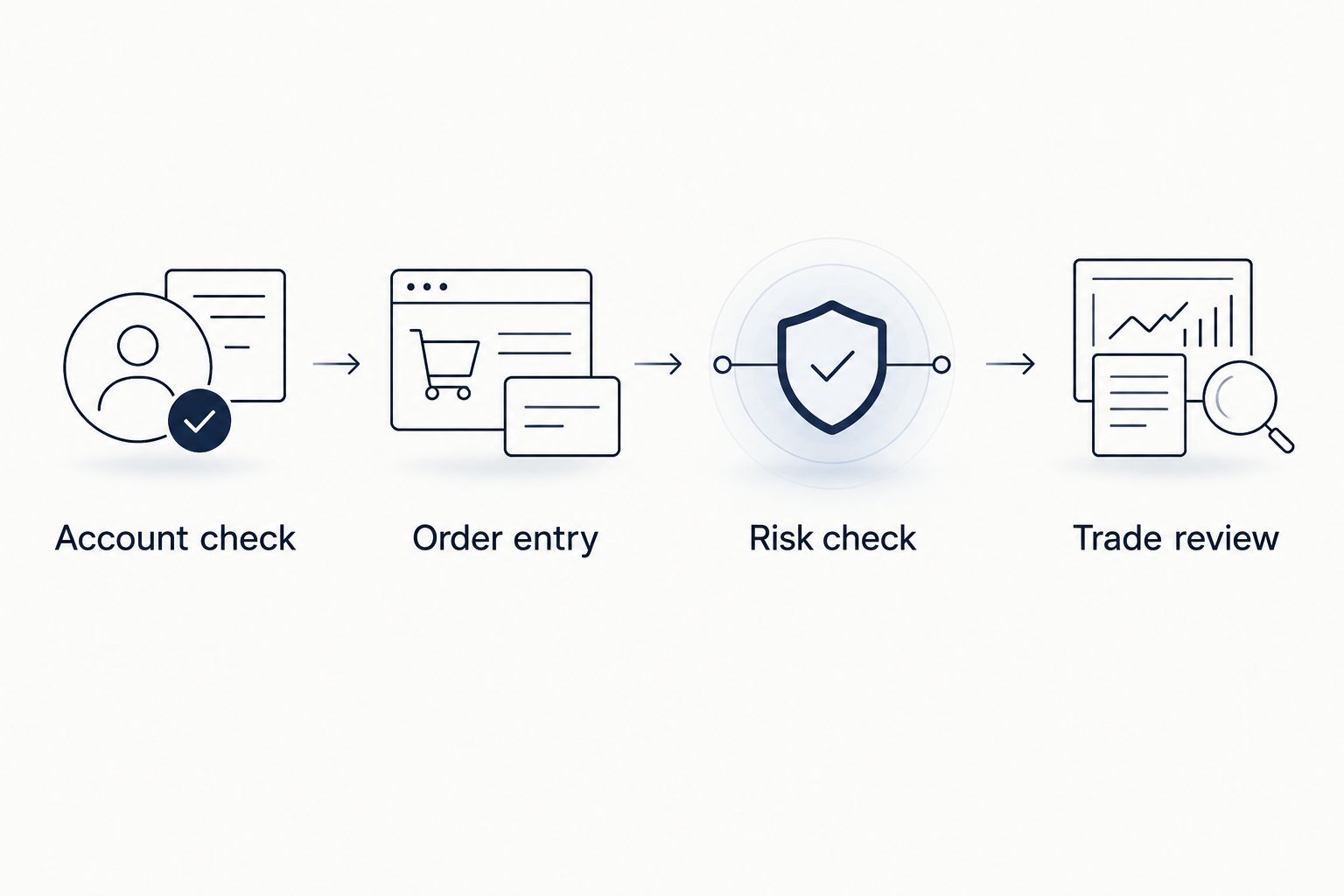
Record whether each task was correct, incorrect, or unclear. An app that helps you avoid an order-entry mistake serves a beginner better than one whose virtual account happened to finish higher.
Do not turn the exercise into a race. Practicing under self-imposed time pressure before you understand an order ticket teaches rushed behavior rather than control.
Where Tradeforex signals fit
Tradeforex is for beginners seeking forex signals delivered inside a web app, not a broker app that executes trades. Subscribers receive Tradeforex signals inside the Tradeforex web app; your trading platform remains a separate part of the workflow.
A signal is a trade idea, not a guaranteed outcome. Before acting on any provider's idea, establish whether you understand the proposed entry, exit, and risk; do not fill gaps with assumptions or treat desired details as verified service features.
Use Tradeforex to review its forex signals service before deciding whether to subscribe. Keep that subscription decision separate from choosing and funding a broker account.
Review the signals service
Tradeforex subscribers receive forex signals inside the web app; trade execution remains separate.
A demo can help you rehearse responding to a trade idea. It cannot establish a signal provider's future performance, and it does not remove the financial risk of trading currencies.
How we ranked
This 2026 ranking prioritizes broker-workflow fit, order clarity, risk visibility, practice relevance, and reviewability. MetaTrader 5 takes the default slot for broker-connected practice; the remaining choices serve existing MT4 users, chart-first learners, and interface comparisons respectively.
The ranking does not claim hands-on performance testing or audited execution comparisons. Choose by the task you need to learn, then validate the actual account settings yourself.
Which demo trading app should you choose?
Start with MetaTrader 5 if your intended, eligible broker uses it. Choose MetaTrader 4 instead when MT4 is the platform you will actually use, TradingView Paper Trading for chart-first learning, or cTrader to compare another eligible broker workflow.
For 2026, the deciding test is simple: can you place and manage the intended order correctly? If the answer is no, keep the account in practice mode rather than treating a good demo balance as permission to fund it.
FAQ
What's the best forex trading app with a demo account for beginners?
MetaTrader 5 is the default choice here for broker-connected practice, provided your intended broker supports it and accepts your jurisdiction. Choose the platform that matches your intended account rather than switching solely because of a ranking.
Is MetaTrader 4 better than MetaTrader 5 for demo trading?
MetaTrader 4 is the better fit when your intended broker account uses MT4. MetaTrader 5 is the default recommendation for beginners starting a compatible broker-connected workflow; neither platform guarantees better trading results.
Is TradingView Paper Trading the same as a broker demo?
No, TradingView Paper Trading is a separate simulation environment. Repeat your practice in the intended broker's demo to understand its symbols, account settings, and order controls.
Can I use a demo account to practice following forex signals?
Yes, a demo account lets you rehearse translating a signal into an order without risking real money on that simulated trade. Check that you understand the idea and risk before entering anything; the exercise does not prove future profitability.
Does Tradeforex execute the trades from its signals?
No, Tradeforex provides forex signals to subscribers inside its web app, not trade execution. Your broker and trading platform remain separate from the signals service.
Do profitable demo results mean I am ready to trade live?
No, profitable demo results do not establish live-trading readiness. Review order accuracy, risk understanding, and mistakes, and remember that real-money decisions and execution can differ from simulation.
Can US beginners use every platform on this list?
US beginners must check the specific broker's eligibility and legal entity rather than relying on the platform name. Software access and a demo account do not establish permission to open a live forex account.
One last thing
An intentionally skipped trade belongs in your practice journal. If the entry no longer matches the idea or you cannot explain the risk, recording why you did not trade is more useful than forcing an order to complete the exercise.