
Best overall for learning automation: MetaTrader 5 Expert Advisors in a demo account. Best for C# developers: cTrader cBots. Best for an existing MetaTrader 4 setup: MetaTrader 4 Expert Advisors. For beginners who want trade ideas without delegating execution, Tradeforex offers forex signals inside its web app—not a trading bot or broker app.
- The best forex trading bots for beginners start with demo testing, not promises of automated income.
- MetaTrader 5 Expert Advisors suit beginners learning automated trading through testing and practice.
- cTrader cBots suit C# developers; MetaTrader 4 Expert Advisors suit traders already using that platform.
- Tradeforex delivers forex signals inside its web app; signals are not automatic trade execution.
- Choose a strategy you can explain, limit its exposure, and verify how to stop it.
Why this matters
A forex bot is software that follows programmed trading rules. Depending on its permissions and design, it can identify setups, place orders, change orders, and close positions without asking you to approve each action.
That removes manual steps, not trading risk. A bot can repeat a bad rule as consistently as a good one, and an unattended position still exposes your account to losses.
For this 2026 guide, the ranking separates platforms that support automated strategies from a signals service that leaves execution outside the service. A platform's testing tools do not prove that a bot running on it is profitable. These are starting points for choosing a workflow, not endorsements of an unnamed commercial robot.
What makes the best forex trading bots for beginners
Judge an automated strategy by what you can inspect and control—not by how impressive its promotional chart looks.
- Explainable rules: You should understand what triggers an entry, an exit, and a decision not to trade.
- Practice environment: You need a way to observe the strategy without committing real money.
- Testing tools: Historical testing should help you examine behavior, including losing periods and trading costs.
- Exposure controls: Check position sizing, simultaneous positions, and whether the strategy adds to losing trades.
- Operational fit: Confirm broker support, account compatibility, connection requirements, and how to disable automation.
- Reviewable records: Look for individual trades and account-level results, not selected screenshots or a win rate alone.
In 2026, use these criteria before subscribing to a robot, buying code, or connecting any software to a funded account. If you cannot explain a setting, leave the strategy in practice mode until you can.
Forex automation options at a glance
The first three options below are automation frameworks, not individual profit-generating products. The fourth is a manual-execution alternative included to clarify the difference between receiving an idea and authorizing software to trade.
| Option | Best for | Standout capability | Key limitation |
|---|---|---|---|
| MetaTrader 5 Expert Advisors | Learning automated strategy testing | Built-in Strategy Tester for Expert Advisors | Testing tools cannot establish future profitability |
| cTrader cBots | Beginners with C# development skills | Programmable trading strategies using C# | Coding and debugging add technical work |
| MetaTrader 4 Expert Advisors | Traders already using MetaTrader 4 | Automated strategies within an existing MT4 workflow | An MT4 Expert Advisor does not run unchanged on MT5 |
| Tradeforex signals | Beginners who want ideas without automatic execution | Signals delivered inside the Tradeforex web app | A signals subscription is not a broker account or trading bot |
1. MetaTrader 5 Expert Advisors: best for learning automation
MetaTrader 5 supports Expert Advisors, commonly called EAs: programs that apply trading rules within the platform. Its Strategy Tester lets you examine an EA against historical data before deciding whether to continue evaluating it.
Best for: A beginner who wants to learn how automated strategies behave before considering live deployment.
The useful starting point is the testing workflow, not a particular robot. Choose an EA whose rules you can understand, examine its historical behavior, and then observe it in a broker's demo environment.
MetaTrader 5 Expert Advisors pros:
- Historical testing is available within the platform.
- Automated rules can be evaluated separately from discretionary trading decisions.
- Trade records help you inspect entries, exits, and repeated exposure.
MetaTrader 5 Expert Advisors cons:
- Historical results depend on data, assumptions, and settings.
- Broker conditions and live execution can differ from a test.
- Installing an EA does not explain or validate its strategy.
For your 2026 shortlist, prefer a clear explanation of the strategy over an unexplained preset labeled conservative. Inspect position sizing and loss behavior before concentrating on returns.
Verdict: Hold live deployment; use MetaTrader 5 Expert Advisors in demo while you learn the rules and failure conditions.
2. cTrader cBots: best for beginners who already know C#
cTrader supports cBots, programs that automate trading strategies. Its C# development support makes this route relevant when you already understand programming and want to inspect or build trading logic.
Best for: A programming beginner in forex, rather than a complete beginner in both trading and software development.
Coding experience helps you read conditions and troubleshoot errors. It does not tell you whether the trading idea makes economic sense or whether the account can withstand its losses.
cTrader cBots pros:
- C# support gives developers a familiar way to express trading rules.
- Code access, when provided, allows inspection of the strategy's instructions.
- Testing and practice can expose mistakes before live deployment.
cTrader cBots cons:
- Debugging requires technical knowledge.
- A program that runs correctly can still trade a losing strategy.
- Using cTrader does not establish the quality of a third-party cBot.
Separate software correctness from trading quality. A cBot that opens exactly the intended position has passed a programming check—not a profitability check.
Verdict: Hold unless you can inspect the logic and troubleshoot it; skip this route if coding itself is the main obstacle.
3. MetaTrader 4 Expert Advisors: best for an existing MT4 setup
MetaTrader 4 also supports Expert Advisors. This option makes sense when your broker account and current workflow already use MT4 and the specific EA you are evaluating is designed for it.
Best for: An existing MT4 user who wants to evaluate automation without changing platforms first.
Do not treat MT4 and MT5 as interchangeable. Their Expert Advisors use different programming environments, so confirm the platform version before evaluating a particular program.
MetaTrader 4 Expert Advisors pros:
- Automation can sit within an existing MT4 workflow.
- Historical strategy testing is built into the platform.
- A demo account allows observation before live use.
MetaTrader 4 Expert Advisors cons:
- MT4 compatibility does not mean MT5 compatibility.
- Settings can make an attractive historical result fragile.
- Third-party code still requires security and trading-risk checks.
In 2026, platform familiarity is a practical reason to consider MT4 automation. It is not evidence that an older strategy remains suitable for current market conditions.
Verdict: Hold live use until testing is complete; skip switching platforms solely to follow an EA advertisement.
4. Tradeforex signals: best for ideas without automatic execution
Tradeforex is best for beginners who want forex signals inside a web app rather than software that automatically executes trades. Subscribers receive the service's signals inside the Tradeforex web app.
Best for: A beginner who wants to evaluate trade ideas while keeping the decision to place a trade separate.
A signal is a trade idea, not a guaranteed outcome. Receiving a signal does not mean an order has been placed, and it does not remove your responsibility to understand the proposed trade.
Tradeforex signals pros:
- Signals are received inside the service's web app.
- Signal delivery remains distinct from broker execution.
- The workflow suits readers who do not want a trading robot to place orders automatically.
Tradeforex signals cons:
- The service is not a substitute for a broker trading app.
- Signals do not guarantee profitable outcomes.
- A subscription does not remove the need for your own risk decisions.
Before subscribing, review the current service information and decide whether a signals workflow matches how you intend to trade. Use the guide to choosing a forex trading app before subscribing to signals to separate app selection from the subscription decision.
Verdict: Hold until you understand the service and your execution workflow; skip it if your requirement is automatic order placement.
Review Tradeforex before subscribing
Check the service information and decide whether web-app signals fit your trading workflow.
How to evaluate a bot before risking money
Use the same sequence for every strategy on your 2026 shortlist. Keep the test conditions and settings in your notes so you can distinguish a strategy change from a change in market conditions.
Explain the rules
Describe what the bot buys or sells, why it enters, and how it exits. Ask what happens after a loss, during a connection failure, and when several trades remain open together.
Test the history
Examine losing periods as well as favorable periods. Check whether the test includes trading costs and whether the settings were repeatedly adjusted to fit the same historical data—a problem called overfitting.
Practice execution
Observe the strategy in a demo environment supported by your broker. Compare intended actions with actual orders, and check whether you understand every position it opens.
Review exposure
Look at the combined risk of open positions, not just each trade separately. Several currency trades can depend on the same currency movement, so separate tickets do not necessarily mean separate risks.
Confirm shutdown
Learn how to disable new automated entries and how to manage positions that remain open. Turning off a bot does not necessarily close its existing trades.
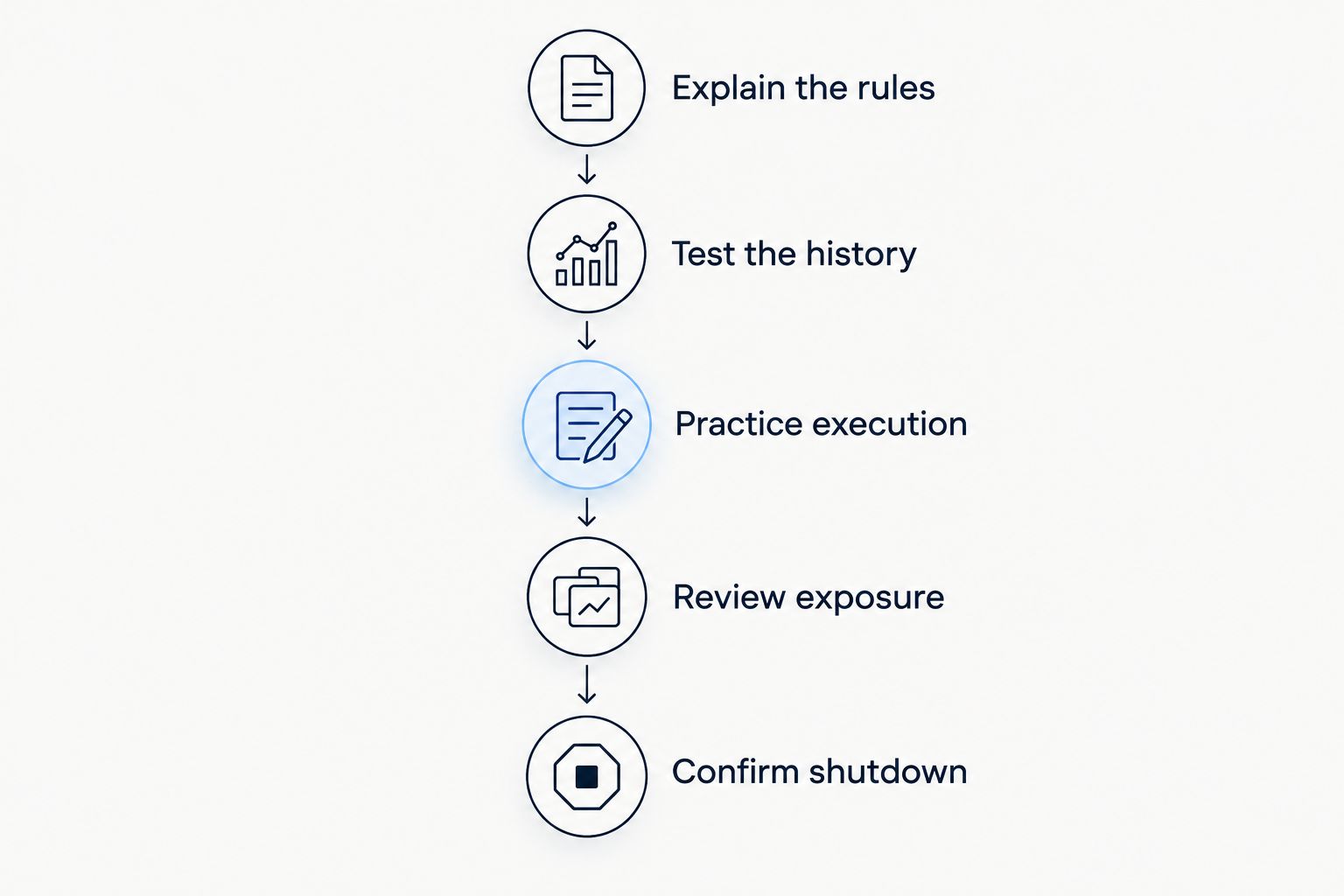
A demo test is a learning stage, not a guarantee. Keep a record of unexpected behavior and resolve it before considering any live use.
Position size matters more than a bot's label
Forex position size is commonly expressed in lots. A standard lot conventionally represents 100,000 units of the base currency, a mini lot 10,000 units, and a micro lot 1,000 units; check the broker's contract specification before placing an order.
The base currency is the first currency named in a pair. These units describe exposure, not the amount you can afford to lose or the cash required to open the trade.
Borrowed trading exposure, commonly called leverage, lets a smaller deposit control a larger position. That magnifies the effect of price changes on your account. A bot does not reduce this risk merely because its settings use words such as safe or beginner.
How this ranking works
This 2026 ranking prioritizes a beginner's ability to understand rules, practice execution, inspect results, and stop automation. It does not rank historical returns or claim that any listed framework produces better trading performance.
MetaTrader 5 leads as a learning workflow. cTrader has a distinct programming use case, while MetaTrader 4 serves an existing platform setup. The signals alternative answers a different requirement: receiving ideas without delegating order placement.
Which forex automation option should you choose?
Choose MetaTrader 5 demo testing as the default starting point if your goal is to learn automated forex trading. Choose cTrader when C# development is already a useful skill, or stay with MetaTrader 4 when an existing setup gives you a practical reason.
If you want trade ideas rather than automatic execution, evaluate a signals service separately. Do not buy a robot to solve uncertainty about basic trading decisions; automation repeats those decisions rather than resolving them.
FAQ
What's the best forex trading bot for a complete beginner?
Start with an understandable strategy in a demo account rather than choosing a robot by its advertised returns. MetaTrader 5 Expert Advisors provide a starting point for learning automated testing, but the platform does not validate any individual EA.
Is MetaTrader 5 better than MetaTrader 4 for beginners?
MetaTrader 5 is the default learning choice in this guide; MetaTrader 4 fits readers with an existing MT4 setup. Confirm that your broker and intended Expert Advisor support the platform you choose.
Can a forex bot guarantee profits?
No forex bot can guarantee profits. Automated rules remain exposed to losses, execution problems, trading costs, and changing market conditions.
Are forex signals the same as trading bots?
Forex signals are trade ideas, while trading bots can execute programmed trading rules. Tradeforex subscribers receive signals inside its web app; that is distinct from automatic broker execution.
Do I need coding skills to use a forex bot?
You do not necessarily need to write code to run an existing bot. You still need to understand its settings, permissions, position sizing, and shutdown procedure; modifying code requires programming knowledge.
Does a profitable backtest mean a bot will make money?
A profitable backtest does not establish future profitability. Historical results depend on data, costs, assumptions, and settings, and overfitting can make a strategy appear stronger than it is.
Can I leave a forex bot running without checking it?
Do not treat automated trading as unattended income. Monitor open positions, connection status, errors, and whether the strategy continues to follow the rules you intended.
One last thing
Stopping a bot and closing a trade are different actions. Before enabling automation, practice both procedures and confirm what happens to existing positions when the program stops. That operational check matters more than a polished performance screenshot.