
Best overall for a configurable forex trading bot: MetaTrader 5 Expert Advisors. Best for an existing MT4 setup: MetaTrader 4 Expert Advisors. Best for C# programmers: cTrader cBots. These are automation environments, not endorsements of individual bots or promises of trading returns; this 2026 guide explains what to check before allowing software to place orders.
- MetaTrader 5 Expert Advisors are the default forex trading bot option here for traders who need configurable automation.
- MetaTrader 4 Expert Advisors suit existing MT4 strategies; cTrader cBots suit C# programmers.
- Tradeforex delivers forex signals through its web app, not a broker app that executes trades.
- Choose understandable trading rules and demo testing over screenshots of winning trades.
Why this matters
A forex trading bot follows programmed rules to open, manage, or close currency trades. A signal is a trade idea you evaluate separately. Confusing those roles means choosing software before deciding who controls your orders.
Tradeforex provides its own forex signals service, with signals delivered inside its web app. That is a different option from installing an automated trading strategy, and it does not replace the broker account or trading platform you use to execute trades.
The central decision in 2026 is not which bot sounds smartest. It is whether you understand its rules, can restrict its actions, and can stop it when its behavior no longer matches your plan. A platform provides automation tools; the strategy determines the trading decisions.
What makes the best forex trading bot environment?
The ranking below prioritizes control and inspectability, not advertised returns. Use these criteria before evaluating any individual bot:
- Platform compatibility: The bot must match your broker's supported platform and the instruments you intend to trade.
- Understandable rules: You should know what triggers an entry, what ends a trade, and when the system does nothing.
- Risk controls: Check position sizing, stop instructions, exposure limits, and the procedure for disabling new trades.
- Testing tools: Historical testing and a demo account help you inspect behavior before considering live execution.
- Operational requirements: Establish which software must remain running, what permissions it needs, and what happens after a disconnection.
- Strategy transparency: Separate documented rules and complete results from selective screenshots or unexplained performance claims.
No platform makes an opaque strategy trustworthy. If the seller cannot explain how the bot handles losses or changing conditions, the platform's reputation does not fill that gap.
Forex trading bot options at a glance
These are 3 automation platforms, followed by a signals alternative for readers who do not want software making execution decisions. The order reflects the use cases below, not measured profitability.
| Option | Best for | Standout capability | Key limitation |
|---|---|---|---|
| MetaTrader 5 Expert Advisors | Building or configuring a new automated workflow | MQL5 automation and a built-in Strategy Tester | Each Expert Advisor still needs independent assessment |
| MetaTrader 4 Expert Advisors | Keeping an existing MT4 strategy | MQL4 automation within an established MT4 setup | MT4 programs are not interchangeable with MT5 programs |
| cTrader cBots | Programmers working in C# | C# strategy development and backtesting | Coding access does not establish strategy quality |
| Tradeforex signals | Beginners who want to evaluate trade ideas separately from execution | Signals delivered inside the Tradeforex web app | Signals are not automated execution or guaranteed outcomes |
Broker support is a prerequisite, not a detail to resolve afterward. Before selecting a bot, confirm that your intended account supports its platform and permits the proposed trading activity.
1. MetaTrader 5 Expert Advisors: best for configurable automation
MetaTrader 5 Expert Advisors are programs that automate trading rules within MT5. They use MQL5, the platform's programming language, and can be evaluated using its Strategy Tester. An Expert Advisor is often shortened to EA.
Best for: Traders starting a new automated workflow who want to inspect settings and test a strategy before considering live use.
MetaTrader 5 is the default pick in this 2026 comparison because it brings strategy configuration and historical testing into the same environment. That recommendation applies to the platform, not to every EA sold for it.
MetaTrader 5 Expert Advisors pros
- Programmed rules can define entries, exits, and trade management.
- The built-in Strategy Tester supports historical evaluation.
- Configurable inputs let you inspect the settings a particular EA exposes.
- Custom development is possible through MQL5.
MetaTrader 5 Expert Advisors cons
- Understanding the platform does not explain a third-party EA's strategy.
- A strong historical result does not establish future performance.
- Your broker's instruments and trading conditions still affect execution.
Before using an EA, identify which settings control trade size and which conditions stop it from opening another position. If those controls are absent or unclear, do not assume that the software has sensible defaults.
Verdict: Hold live deployment until the specific MT5 Expert Advisor passes your rule, risk, and demo checks.
2. MetaTrader 4 Expert Advisors: best for an existing MT4 setup
MetaTrader 4 Expert Advisors automate rules within MT4 using MQL4. This route fits traders who already have an MT4-compatible strategy and a broker account that supports it. Compatibility is the reason to choose it here, not an assumption that older software produces better trades.
Best for: Traders maintaining a documented MT4 strategy rather than rebuilding their workflow around another platform.
Treat MT4 and MT5 as separate environments. An EA written for one is not a drop-in replacement for the other; changing platforms requires a compatible implementation and fresh checks.
MetaTrader 4 Expert Advisors pros
- Supports rule-based trading within an existing MT4 workflow.
- Includes historical strategy-testing tools.
- Allows custom automation through MQL4.
- Lets you retain a compatible strategy without changing platforms solely for this comparison.
MetaTrader 4 Expert Advisors cons
- MT4 compatibility limits which implementations you can use.
- Moving an EA to MT5 is not simply changing its filename.
- A familiar interface can conceal unfamiliar or poorly explained trading logic.
For a 2026 evaluation, ask for documentation that matches the exact EA version you intend to run. Instructions for another version do not establish how your copy sizes positions or handles exits.
Verdict: Hold unless your broker, EA version, and documented strategy all match the MT4 setup you intend to use.
3. cTrader cBots: best for C# programmers
cTrader cBots are automated trading programs associated with the cTrader platform. C# provides a development route for defining trading logic, and cTrader supports backtesting. This makes cBots a relevant option when you want to work directly with strategy code.
Best for: Programmers who already understand C# and want to develop or inspect automated trading rules.
Programming skill helps you understand what software does. It does not tell you whether a trading hypothesis has an enduring advantage, or whether your historical test represents live conditions.
cTrader cBots pros
- C# offers a familiar development route for programmers who already use it.
- Custom code can make trading logic inspectable when source access is provided.
- Backtesting supports evaluation before live deployment.
- Strategy behavior can be separated into explicit entry, exit, and management rules.
cTrader cBots cons
- Source access depends on the particular bot; it is not guaranteed by the platform name.
- Coding and debugging create additional work for nonprogrammers.
- A technically correct program can still implement a losing strategy.
Choose a cBot because its development workflow fits your skills, not because code appears more credible than a signal. The same exposure, execution, and testing questions apply.
Verdict: Hold live deployment until both the implementation and the trading assumptions have been checked.
When signals fit better than a forex trading bot
Tradeforex is best for beginners seeking forex signals in a web app rather than a broker execution app. Subscribers receive signals inside the service's web app; execution belongs in a separate broker workflow.
That distinction matters if you want to examine a trade idea before placing an order. It also means a signal subscription is not a substitute for understanding position size, exits, or the risk of losing money.
Best for: Beginners comparing a signals-led approach with automated execution.
Signals approach pros
- Separates receiving a trade idea from placing an order.
- Gives you a decision point before following an idea manually.
- Does not require choosing a bot development language.
Signals approach cons
- Signals can be wrong and lead to losses.
- Manual review and execution require your attention.
- Your execution can differ from the conditions when a signal was issued.
Before subscribing, establish whether the information supplied is clear enough for you to understand the proposed trade and its risks. Do not infer entry explanations, exit instructions, or risk controls from the word signals alone.
Verdict: Hold a subscription decision until you understand the service and how you would evaluate its ideas.
Check a bot before giving it trading permission
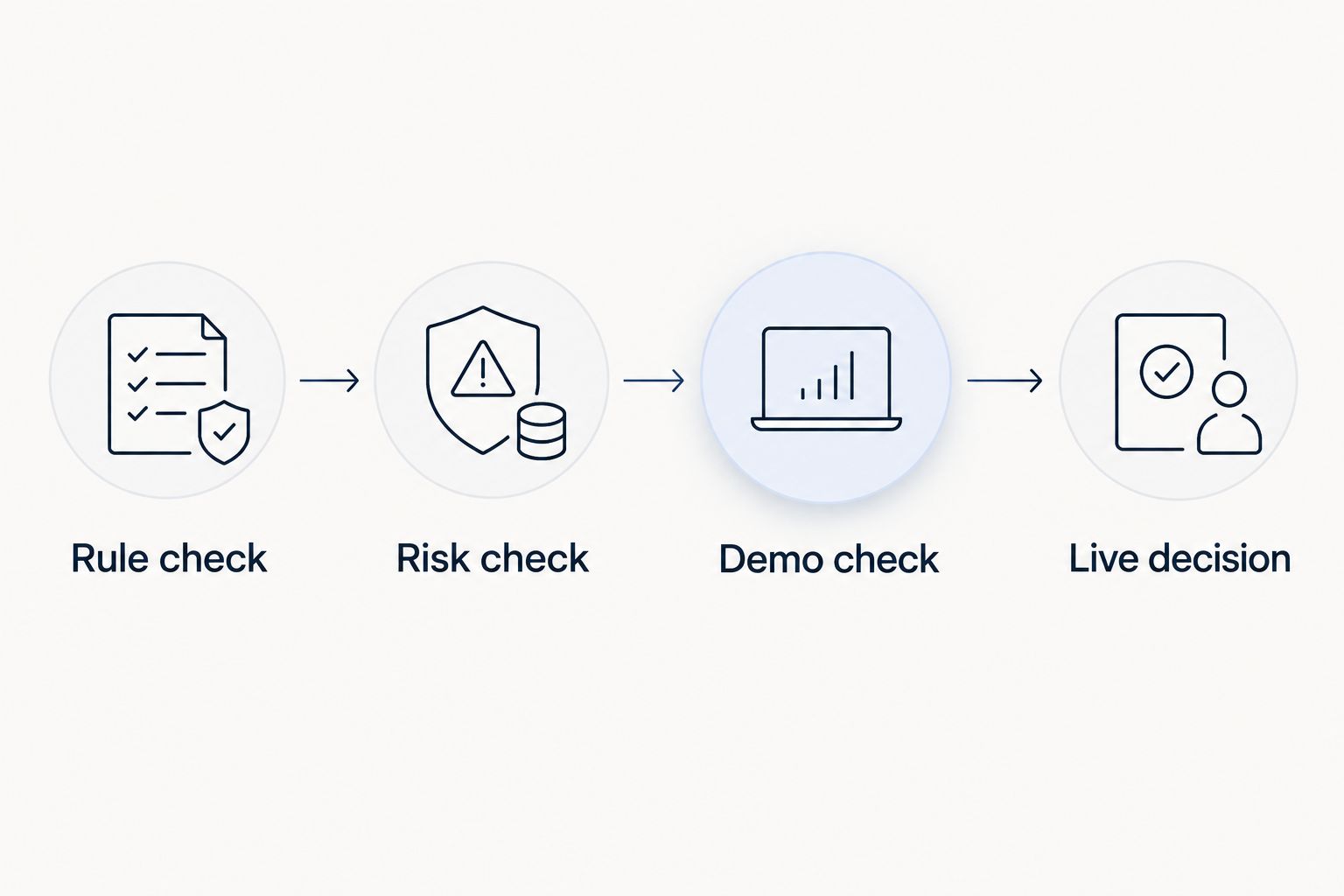
Use these 4 checks in order. A demo account is a practice environment, not proof that live trading will produce the same result.
Rule check
Explain the entry and exit logic in plain English. An entry opens a position; an exit closes it. If your explanation stops at a label such as smart algorithm, you have not identified the strategy.
Risk check
Identify how the bot sets position size and limits exposure. Exposure means how much market risk your open trades create. Check whether losing trades trigger larger positions or additional trades, and reject behavior you do not understand.
Demo check
Run the intended configuration in a demo environment and inspect individual trades. Compare what happened with the documented rules. Record errors and unexplained behavior rather than judging only the final account balance.
Live decision
Decide whether to proceed only after resolving discrepancies. If you proceed, understand how to disable new entries and manage positions already open. Switching off automation does not necessarily close an existing trade.
In 2026, the useful question remains whether a bot behaves as documented under the conditions you will actually use. A polished dashboard is not evidence of that behavior.
How this ranking works
This ranking uses platform compatibility, understandable rules, risk controls, testing tools, operational requirements, and transparency. MetaTrader 5 is the default for a new configurable workflow; MetaTrader 4 fits an existing compatible strategy; cTrader fits C# development.
These are workflow recommendations, not results from a live performance test. No individual commercial bot receives a profitability endorsement, and no historical return is presented as an expected outcome.
Which forex trading bot should you choose?
Choose MetaTrader 5 Expert Advisors as your starting point for comparing configurable automation, not as permission to buy an unknown EA. Keep an existing MT4 workflow when compatibility is the deciding factor. Choose cTrader cBots when C# development is central to your process.
If you are not ready to delegate execution, compare a signals-led approach instead. For any 2026 shortlist, eliminate options whose rules you cannot explain before comparing extra features.
Explore forex signals before subscribing
Tradeforex subscribers receive signals in its web app. Evaluate the service separately from broker execution.
FAQ
What's the best forex trading bot for a beginner?
MetaTrader 5 Expert Advisors are the default starting point in this guide for comparing configurable automation. That is a platform recommendation, not approval of a particular bot; inspect its rules and test its behavior before considering live use.
Is MetaTrader 5 better than MetaTrader 4 for bots?
MetaTrader 5 is the default here for a new automated workflow, while MetaTrader 4 fits an existing MT4-compatible strategy. Choose according to broker support and the exact program you intend to use, not the platform name alone.
Can a forex trading bot guarantee profits?
No forex trading bot can guarantee profits. Automated rules remain exposed to market losses, execution differences, software problems, and strategies that stop working.
Is a forex signal the same as a trading bot?
A forex signal is a trade idea, while a trading bot can place or manage orders according to programmed rules. Receiving a signal does not by itself execute a trade in your broker account.
Do I need programming skills to use a forex bot?
You do not necessarily need programming skills to operate a prebuilt bot. You still need to understand its settings, permissions, risk behavior, and shutdown procedure; changing its code requires appropriate technical knowledge.
Does a profitable backtest prove a bot works?
A profitable backtest does not prove future profitability. Backtesting applies rules to historical data, and results depend on the data, assumptions, and settings used.
What should I check before subscribing to forex signals?
Check what information the subscription provides and whether you can understand each trade idea and its risks. Keep the signal service separate from your broker selection, and reject promises of guaranteed outcomes.
One last thing
Disabling a bot and closing a position are different actions. Before enabling automation, find out exactly what its stop control does and how you would handle trades left open afterward. Your exit procedure deserves as much attention as the bot's entry rules.