Best overall: MetaTrader 5 for beginners whose broker supports it. Best for an existing MetaTrader 4 account: MetaTrader 4. Best for chart analysis: TradingView. The best forex trading apps for iPhone in 2026 depend on your broker, your account, and whether you need to study a trade or place one.
- MetaTrader 5 leads this best forex trading apps for iPhone shortlist when your broker supports it.
- MetaTrader 4 suits an existing MT4 account; TradingView suits chart analysis.
- Tradeforex delivers forex signals through its web app, not a broker trading app.
- Choose your broker and practice order entry before subscribing to forex signals.
Why this matters
A forex app is an interface, not proof that your money is safe or a trade is sensible. Your broker determines the account relationship and execution arrangements; a charting platform helps you analyze markets; a signals service supplies trade ideas.
Treat those as separate decisions. The guide to choosing a forex trading app before subscribing to signals explains the selection order: establish where you can trade, learn the interface, then evaluate outside ideas.
For a US reader in 2026, broker eligibility comes before app preference. Check the broker's registration and disciplinary history through official regulatory resources, including the National Futures Association's BASIC database. An App Store listing is not a substitute for checking the business behind the account.
What makes the best forex trading apps for iPhone?
Use these criteria before choosing an app. A familiar name is not enough.
- Broker compatibility: The app must support your actual broker and account type. An existing login does not automatically work across different platforms.
- Order clarity: You should understand the instrument, direction, position size, and order type before submitting a trade.
- Risk controls: Check how the app handles stop-loss orders, take-profit orders, and changes to open positions. Learn the limits of each order.
- Chart usability: You need readable prices and a manageable chart on an iPhone, not the largest collection of indicators.
- Practice access: A broker-supported demo account lets you rehearse the workflow without placing a live-money trade. Demo execution does not establish live results.
- Role separation: Keep chart analysis, broker execution, and signals evaluation distinct. A useful tool in one role is not automatically suitable for another.
The best choice is the app you can use correctly with an eligible broker—not the app with the busiest screen.
Best iPhone forex apps at a glance
These are use-case recommendations, not a ranking of broker safety or investment returns. Each app fills a different gap in a beginner's setup.
| App | Best for | Standout feature | Key limitation |
|---|---|---|---|
| MetaTrader 5 | Starting with a broker-supported MT5 account | Mobile charting and order management in one platform | Broker and account compatibility must be confirmed |
| MetaTrader 4 | Continuing with an existing MT4 account | Access to the MT4 trading environment on iPhone | An MT4 account is not interchangeable with an MT5 account |
| TradingView | Studying charts before placing a trade | Chart-focused analysis across markets | Direct trading depends on a supported broker connection |
For this 2026 shortlist, account fit takes priority over feature count. None of these recommendations establishes that a particular broker accepts your application or offers the instruments you want.
1. MetaTrader 5: best forex app for a supported new account
MetaTrader 5 is a trading platform with an iPhone app for charting, placing orders, and managing positions through compatible brokers. It is not itself your forex broker. The broker supplies the account and determines which instruments and account arrangements you can use.
MetaTrader 5 is the default pick when you are starting fresh and your chosen broker supports MT5. That recommendation rests on its role as a combined analysis and execution interface, not on any promise of better trading results.
MetaTrader 5 pros
- Charts and trading functions sit within the same mobile platform.
- You can manage open positions without switching to a separate charting app.
- A compatible broker demo account gives you a place to practice the order workflow.
MetaTrader 5 cons
- You must confirm the correct broker server and account compatibility.
- A small screen makes detailed analysis and order review harder than on a larger display.
- Mobile access does not reproduce every desktop workflow, including running desktop automated trading programs.
Before choosing MT5, ask your broker which account and server details you need. Then practice opening, modifying, and closing a demo position. Locating a button is not the same as understanding what the order will do.
For your 2026 setup, check the current iPhone requirements in the App Store and the broker's current platform instructions. Do not assume an older tutorial matches the interface you will use.
Best for: Beginners opening a compatible account who want charts and order management together.
Verdict: Buy into the MT5 workflow only after confirming broker support and rehearsing it in demo.
2. MetaTrader 4: best forex app for an existing MT4 account
MetaTrader 4 provides mobile charting and trading through brokers that support MT4. Its strongest reason for inclusion is account continuity: if your existing account uses MT4, choosing the corresponding iPhone app avoids an unnecessary platform change.
Do not choose between MT4 and MT5 by their names alone. They are separate platforms, and an account configured for one does not automatically become an account on the other.
MetaTrader 4 pros
- It fits an existing broker-supported MT4 account.
- Charts, orders, and position management share one mobile interface.
- You can practice the same platform family your broker account already uses.
MetaTrader 4 cons
- Moving to MT5 requires checking the broker's separate account arrangements.
- Desktop indicators and automated trading setups do not simply transfer to the iPhone app.
- Familiarity with MT4 does not establish that the underlying broker is suitable.
The practical question is whether MT4 meets your current needs. If you can review the order clearly, manage positions, and understand the broker's account terms, changing platforms solely because another name sounds newer adds work without proving a benefit.
If you depend on a desktop customization, identify exactly how it works before expecting it on mobile. A phone app should be evaluated as its own interface, not as a pocket-sized copy of every desktop function.
Best for: Beginners who already have a compatible MT4 account and want mobile access.
Verdict: Hold with MT4 when it fits your existing account; skip an unnecessary switch.
3. TradingView: best forex app for chart analysis
TradingView is a charting platform with an iPhone app. It lets you study markets using charts, drawing tools, and indicators. Trading through TradingView requires a supported broker connection; viewing a currency chart does not mean you can place that trade through your account.
Choose TradingView for analysis first. Confirm execution separately, particularly if you plan to move between a charting app and a broker's trading interface.
TradingView pros
- Its chart-focused interface supports visual market analysis.
- Drawing tools help you mark levels and record a trading idea.
- You can separate your analysis process from your broker's order-entry screen.
TradingView cons
- Your broker might not support the connection you need.
- Chart quotes and broker execution quotes can differ.
- Switching apps creates another opportunity to select the wrong instrument or enter an outdated idea.
For example, a chart's currency-pair name is not enough to confirm an exact match. Check the data source, instrument details, and broker quote before acting. A small difference matters when the proposed entry and exit levels are close together.
TradingView is not the default execution recommendation in this guide because broker compatibility remains a separate check. It is the specialist choice for readers whose main problem is understanding and organizing charts.
Best for: Beginners who want a dedicated chart-analysis interface alongside a broker account.
Verdict: Buy into TradingView for charting; wait on direct trading until compatibility is confirmed.
How this ranking works
This 2026 ranking prioritizes account compatibility, clear order handling, and a defined role in your trading process. MT5 is the conditional default for a new supported account, MT4 serves existing MT4 users, and TradingView fills the chart-analysis slot.
The ranking does not compare broker execution quality or claim hands-on performance results. Before committing, repeat the same demo task in your chosen setup: identify a pair, prepare an order, review it, and manage the resulting position.
Check a signal before turning it into an order
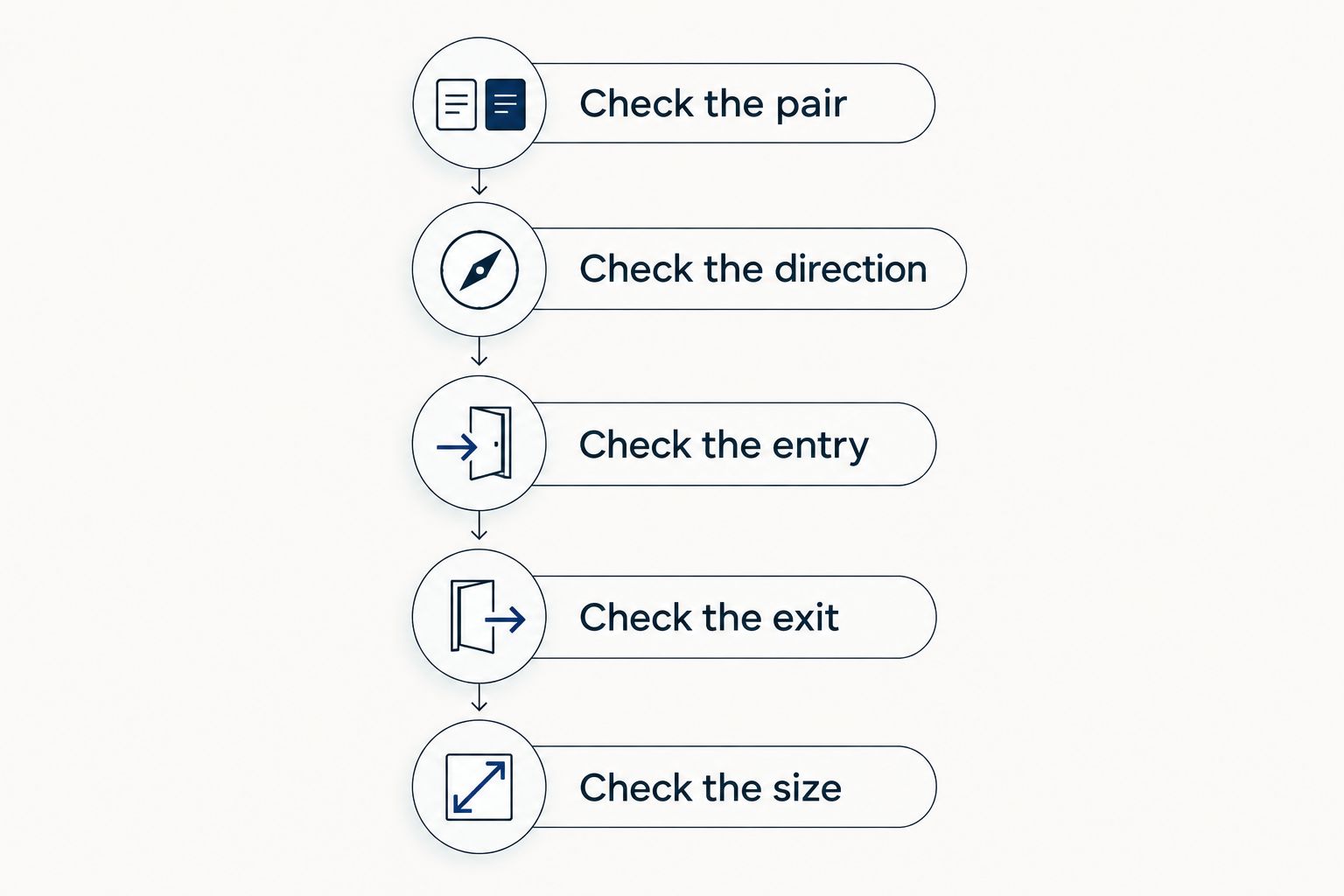
An app cannot repair an unclear trade idea. Use the following sequence whether an idea comes from your own analysis or a signals subscription.
- Check the pair. Match the currency pair and instrument to your broker's listing.
- Check the direction. A buy position generally benefits when the quoted pair rises; a sell position generally benefits when it falls.
- Check the entry. Establish whether the idea calls for acting at the current market or waiting for a specified condition.
- Check the exit. Understand the proposed loss limit and profit-taking approach. Do not assume missing instructions.
- Check the size. Work out the money at risk before submitting the order. Required margin is not the same as maximum possible loss.
Learn the units before copying an instruction. For most currency pairs, a conventional pip is 0.0001 quote-currency units; for many yen-quoted pairs, it is 0.01 quote-currency units. A standard forex lot conventionally represents 100,000 base-currency units, although your broker's instrument specifications determine the actual contract details.
A pip describes a price movement, not a fixed cash loss for every account. Your position size, currency pair, and account currency affect its monetary value. Check the broker's calculation rather than copying another trader's lot size.
A stop-loss order also does not guarantee the requested exit price. Fast markets and price gaps can produce a different execution price. Practice the mechanics, but do not mistake demo familiarity for protection against live-market losses.
Where Tradeforex signals fit
Tradeforex is for beginners seeking a separate forex signals service delivered through a web app, not a broker trading app. Subscribers receive Tradeforex signals inside the Tradeforex web app; the service does not replace choosing a broker or learning order entry.
A signals subscription supplies outside trade ideas to evaluate. It does not turn an uncertain outcome into a guaranteed one. Check a representative signal and the current subscription terms before deciding whether the service fits your process.
The benefit of a separate signals service is access to trade ideas outside your own analysis. The limitation is equally clear: you still need to decide whether an idea is understandable, suitable for your risk limits, and executable through your broker.
If that separation fits your needs, review Tradeforex before subscribing. Do not assume the service includes automatic execution, personalized advice, or a particular signal format unless its current materials explicitly confirm those details.
Review the signals service
Subscribers receive signals inside the web app. Review the service before deciding whether to subscribe.
Which iPhone forex app should you choose?
Choose MetaTrader 5 if you are starting with a broker-supported MT5 account. Choose MetaTrader 4 if your existing account runs on MT4. Choose TradingView when chart analysis is the gap you need to fill.
In 2026, start with the broker and account, not the app's popularity. Complete a demo workflow before adding a signals subscription. If you cannot explain the instrument, order, exit, and position size, wait before placing a live trade.
FAQ
What's the best forex trading app for iPhone for a beginner?
MetaTrader 5 is this guide's default for beginners whose chosen broker supports an MT5 account. MetaTrader 4 suits existing MT4 accounts, while TradingView is the chart-analysis recommendation. Confirm broker eligibility and account compatibility first.
Is MetaTrader 5 better than MetaTrader 4 on iPhone?
MetaTrader 5 is not automatically better for every iPhone user. An existing MT4 account is a practical reason to use MT4, while a new broker-supported MT5 account fits MT5. Choose the platform your account actually supports.
Can I place forex trades through TradingView on my iPhone?
Trading through TradingView requires a supported broker connection. Confirm the broker, account type, instruments, and current mobile connection instructions before relying on it for execution.
Does Tradeforex have its own broker trading app?
Tradeforex provides a forex signals service through its web app, not a broker trading app. Subscribers receive signals there; choosing a broker and arranging execution remain separate decisions.
Do forex signals guarantee profitable trades?
Forex signals do not guarantee profitable trades. Market conditions, execution differences, transaction costs, and position sizing all affect results. Reject any claim that removes the possibility of loss.
Can I use an iPhone demo account before trading live?
You can practice on an iPhone when your chosen broker supports a demo account on the app. Rehearse order entry, modification, and closing positions. Demo results do not establish what you will achieve with live money.
What should I check before subscribing to forex signals?
Check a representative signal, the subscription terms, and whether you can understand and execute the idea through your broker. Look for enough information to evaluate entry, exit, and risk without assuming that any particular provider supplies those details.
One last thing
A correct prediction can still become a losing trade if position size or execution is wrong. Before subscribing to any signal service, write a short explanation of how you would handle an idea that moves against you. If that explanation depends on receiving another message in time, your trading process is not yet self-contained.