Best overall: MetaTrader 5 for broker-connected trading. Best for chart analysis: TradingView. Best for order management: cTrader. This 2026 guide compares the best forex trading apps for day traders, with MetaTrader 4 for existing setups and Tradeforex as a separate signals companion—not a broker or trade-execution app.
- Among the best forex trading apps for day traders, MetaTrader 5 is the default demo shortlist pick.
- TradingView suits chart-first analysis; cTrader suits traders prioritizing order management.
- Tradeforex suits beginners seeking forex signals in a web app, not broker execution.
- Choose your broker and test order controls before paying for a signals subscription.
Why this matters
A charting app, a broker platform, and a signals service solve different problems. Your chart helps you analyze prices; your broker account handles orders; a signal supplies a trade idea. Confusing those roles makes comparison harder and leaves important checks unfinished.
Tradeforex is a forex signals companion for beginners who want trade ideas delivered inside a web app. Subscribers receive signals inside the Tradeforex web app, but the service does not execute trades. You still need a suitable broker platform and an independent decision about each position.
For a beginner, the best setup is the one you can explain and operate—not the one with the most indicators.
What makes the best forex trading app?
Use these criteria for your 2026 shortlist before comparing screenshots or downloading platforms:
- Broker suitability: Check the broker's legal entity, regulatory registration, account terms, and supported platform. An app name does not establish broker legitimacy.
- Order clarity: You should understand how to enter, change, and close an order without guessing which control applies.
- Risk visibility: Check where the platform shows position size, stop-loss instructions, and margin requirements. Margin is money set aside to support a position, not your maximum possible loss.
- Chart usability: Currency pairs, timeframes, drawing tools, and prices must remain readable on your actual device.
- Practice workflow: Use a demo account to rehearse the same actions you expect to perform with real money.
- Signals compatibility: Check whether you can interpret a trade idea and enter it accurately without assuming an alert places an order.
The guide to choosing a forex trading app before subscribing to signals explains why platform selection comes before a subscription decision.
Forex trading apps at a glance in 2026
These rankings describe different use cases, not measured execution-speed results. Platform functions also differ between desktop, mobile, and web versions.
| Rank and option | Best for | Standout capability | Key limitation |
|---|---|---|---|
| 1. MetaTrader 5 | A broker-connected starting point | Charts and order management in one platform | Broker support and account conditions still need checking |
| 2. TradingView | Chart-first analysis | Charting, drawing tools, and alerts | Trading connections depend on broker integration |
| 3. cTrader | Order-management practice | Trading interface with chart-based order controls | Requires a broker that supports cTrader |
| 4. MetaTrader 4 | An existing MT4 broker setup | Established chart-and-order workflow | Familiarity does not establish broker suitability |
| 5. Tradeforex | A separate forex signals companion | Subscriber signals delivered inside its web app | Does not execute trades or guarantee outcomes |
1. MetaTrader 5: best forex trading app for a starting shortlist
MetaTrader 5 combines market charts and trading orders through a connected broker account. It belongs at the top of a beginner's demo shortlist because you can assess analysis and order handling in the same environment.
Start with basic tasks. Find a currency pair, change the chart interval, open an order ticket, and locate the controls for modifying or closing a position.
MetaTrader 5 pros:
- Combines charts and trading controls.
- Supports different order types for different entry instructions.
- Provides desktop and mobile workflows to evaluate separately.
MetaTrader 5 cons:
- Your broker determines account conditions; the platform name does not.
- Learning the interface does not establish that a strategy works.
Best for: Beginners who want a broker-connected platform to practice analysis and order entry together.
Verdict: Hold—start with a demo account before funding a connected broker account. MetaTrader 5 is the default shortlist choice, not an endorsement of every broker offering it.
2. TradingView: best forex trading app for chart-first analysis
TradingView is a charting platform with drawing tools, indicators, and alerts. Broker connections support trading where an appropriate integration exists, so do not assume a chart automatically gives you access to your intended account.
Use TradingView when your main challenge is reading a setup clearly. Compare how easily you can identify the currency pair, timeframe, and price level before moving to order entry.
TradingView pros:
- Centers the workflow on chart analysis.
- Provides drawing tools for marking relevant price areas.
- Supports alerts that can prompt you to review a setup.
TradingView cons:
- Broker integration needs a separate compatibility check.
- An alert is not proof that an order was submitted or filled.
Best for: Traders who prioritize chart organization and keep a clear boundary between analysis and execution.
Verdict: Hold—confirm your broker connection or rehearse the handoff to your execution platform. Choose TradingView for charting, not because an attractive chart removes trading risk.
3. cTrader: best forex trading app for order-management practice
cTrader is a broker-connected platform with charting and trading controls. Its chart-based order workflow makes it a useful comparison when you want to inspect how entering and adjusting a position feels in practice.
Test the actual version you intend to use. A desktop demonstration cannot establish that the phone interface fits your hands, screen, or routine.
cTrader pros:
- Brings charts and order management into one environment.
- Offers chart-based controls for working with orders.
- Gives you another interface to compare against MetaTrader workflows.
cTrader cons:
- You need a broker that supports the platform.
- Convenient controls still require careful checks of size and direction.
Best for: Beginners comparing how clearly different platforms display and manage orders.
Verdict: Hold—practice modifying and closing demo positions before choosing cTrader for live use. Interface preference matters only after broker suitability and account terms pass your checks.
4. MetaTrader 4: best forex trading app for an existing MT4 setup
MetaTrader 4 provides forex charts and order handling through a connected broker. Keep it on your shortlist when your existing broker account or established learning materials already use MT4.
Do not switch platforms just to follow a ranking. First identify a specific task your current setup cannot handle clearly, then test whether another platform actually improves that task.
MetaTrader 4 pros:
- Combines currency charts and order entry.
- Supports indicators and chart-analysis tools.
- Lets existing users retain a familiar workflow.
MetaTrader 4 cons:
- An established setup still needs a fresh broker and security check.
- Familiarity can hide gaps in your understanding of order behavior.
Best for: Traders whose existing broker workflow already uses MT4 and meets their practical requirements.
Verdict: Hold—retain MetaTrader 4 only after checking the account and rehearsing essential controls. A platform change should solve an identified problem, not substitute for learning risk management.
5. Tradeforex: best forex signals companion for a separate workflow
Tradeforex provides its own forex signals service, with subscriber signals delivered inside the Tradeforex web app. It belongs in this comparison as a companion to a trading platform, not as an alternative place to execute orders.
A signal is a trade idea. Before acting, establish whether you understand the proposed trade, whether it still applies, and what loss you are prepared to accept.
Tradeforex pros:
- Provides a dedicated forex signals service.
- Delivers subscriber signals inside a web app.
- Keeps signal delivery separate from broker order execution.
Tradeforex cons:
- You still need a separate broker platform to execute trades.
- Receiving a signal does not establish its suitability or guarantee its outcome.
Best for: Beginners seeking a signals subscription while keeping responsibility for broker selection and trade decisions.
Verdict: Wait—review the service and subscription terms before subscribing. Confirm that you can interpret the signals you receive without filling gaps with assumptions.
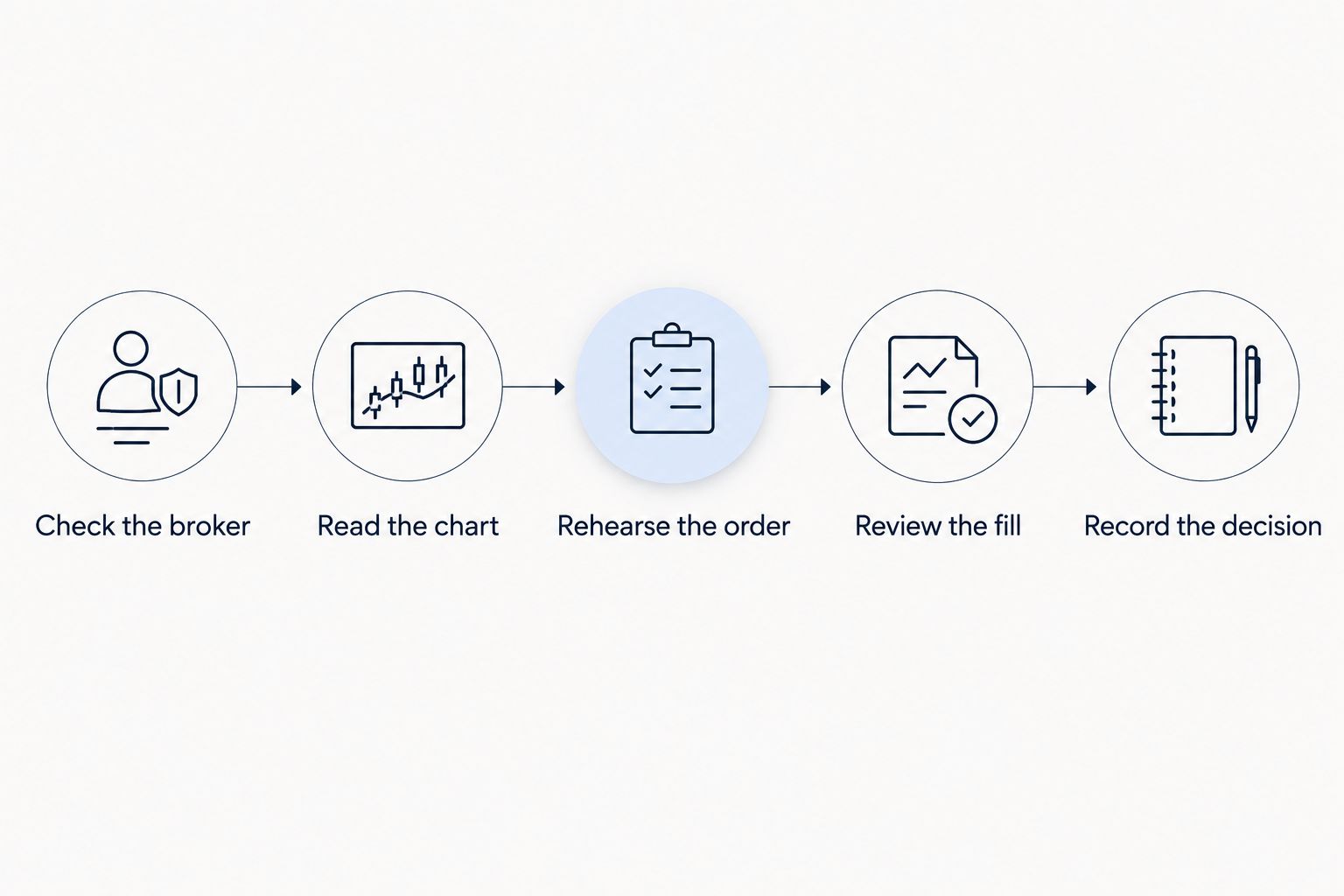
How to test your day-trading workflow
For your 2026 comparison, use the same rehearsal on each shortlisted platform. Keep the currency pair and task consistent so you compare usability rather than unrelated market movements.
Check the broker
Find the legal entity responsible for your account and verify its registration with the relevant regulator. For a US retail forex account, check the applicable CFTC and NFA records rather than relying on an app-store listing.
Read the chart
Compare 1-minute, 5-minute, and 15-minute chart intervals. These are viewing intervals, not promises about how long a trade should last. Check that changing the interval does not leave you confused about the setup you are assessing.
Rehearse the order
Use a demo account to enter, modify, and close a position. Confirm the currency pair, buy or sell direction, and position size before submitting the order.
Review the fill
Compare the requested instruction with the recorded execution. A market order seeks execution at the available market price; it does not lock in the price you saw earlier.
Record the decision
Write down why you entered, where the idea would be invalidated, and why you exited. Record mistakes as well as successful actions so the journal remains useful.
A demo rehearsal checks whether you understand the controls. It does not reproduce every condition of live trading or prove that a strategy will make money.
Evaluate signals without confusing ideas with orders
Before following any signal, identify the currency pair and direction. Then determine whether the information explains when the idea applies and when you should stop treating it as valid.
Do not assume every service supplies the same instructions. If an entry, exit, timing condition, or risk explanation is unclear, leave the trade alone rather than inventing the missing rule.
Keep these distinctions explicit:
- Entry: The instruction or condition for opening a position.
- Stop-loss: An order intended to close a position at a specified loss threshold; execution can differ from the requested level.
- Take-profit: An instruction to close at a specified favorable price, subject to the order's execution conditions.
- Position size: The amount of currency exposure you take; copying another trader's size does not copy their financial circumstances.
Read how to assess a forex signals track record beyond win rate before treating a percentage of winning trades as evidence of suitability. Winning frequency alone leaves out the size of losses and trading costs.
Review the signals service
Check the service and subscription terms before deciding whether signals fit your trading workflow.
How the ranking works
This 2026 ranking prioritizes broker-connected order handling, chart clarity, and the ability to rehearse a complete workflow. Distinct use cases determine the order; this is not a performance test or a ranking of broker safety.
MetaTrader 5 is the default demo starting point. TradingView takes the chart-analysis slot, cTrader the order-management slot, and MetaTrader 4 the existing-setup slot. The signals companion remains separate because receiving an idea and executing a trade are different functions.
Which forex trading app should you choose?
Start with MetaTrader 5 on demo if you have no established preference and a suitable broker supports it. Compare TradingView when charting is your priority, or cTrader when you want another order-management interface to test.
For a 2026 beginner, the decisive question is not which app offers the most activity. It is whether you can explain and control the next order without rushing. Add a signals subscription only after that workflow makes sense.
FAQ
What's the best forex trading app for a beginner day trader?
MetaTrader 5 is the default demo shortlist choice in this comparison because it combines charts and broker-connected order handling. Broker suitability, account terms, and your ability to use the controls still require separate checks.
Is TradingView better than MetaTrader 5 for forex?
TradingView fits chart-first analysis, while MetaTrader 5 fits a broker-connected chart-and-order workflow. Check the broker connections and device versions you intend to use before choosing.
Can I execute forex trades through Tradeforex?
No. Tradeforex supplies subscriber forex signals inside its web app; you need a separate broker platform to execute trades.
Do forex signals guarantee profitable day trades?
No, forex signals do not guarantee profitable trades. A signal is a trade idea, and its outcome depends on market movement, execution, costs, and your position size.
Should I choose a broker or a signals service first?
Check the broker and practice your execution workflow before subscribing to signals. You need to understand how to enter, manage, and close a position independently of any trade idea.
Can a stop-loss guarantee my exact maximum loss?
A standard stop-loss does not guarantee execution at the exact requested price. Market gaps and execution conditions can change the fill, so position sizing remains important.
Can I day trade forex using only my phone?
A mobile trading platform can support forex order management, but you must test the actual workflow on your device. Check chart readability, order confirmation, connection interruptions, and how you access existing positions.
One last thing
An alert arriving on time does not mean the trade idea is still appropriate when you open it. Check the current price and the idea's conditions before entering; never chase a missed entry just to stay involved. Choosing not to place an order is a valid decision.