Best overall: MetaTrader 5. Best for chart-first analysis: TradingView. Best for an execution-focused interface: cTrader. Best for an existing MetaTrader 4 account: MetaTrader 4. The best forex trading app for Android in 2026 is the one your broker supports and you can operate confidently before placing a live trade.
- MetaTrader 5 is the default forex trading app for Android to shortlist, provided your broker supports it.
- TradingView suits chart-first analysis; confirm Android trading support separately from chart access.
- cTrader suits an execution-focused workflow; MetaTrader 4 suits existing MT4 accounts.
- Tradeforex delivers forex signals through its web app, not a broker-owned Android trading app.
- Practice entering, changing, and closing orders before using signals with real money.
Why this matters
An Android trading platform, a broker account, and a signals subscription do different jobs. The platform displays markets and accepts trading instructions; the broker holds your trading account and executes orders. A signals service supplies trade ideas, not guaranteed outcomes.
Tradeforex provides its own forex signals service, with signals delivered inside its web app. You still need a suitable broker and trading platform if you decide to act on a signal. Choose the execution setup before subscribing to trade ideas, so you understand how to place and manage the trades yourself.
What makes the best forex trading app for Android?
Use these criteria for your 2026 shortlist. A familiar interface matters less than knowing what happens when you submit an order.
- Broker compatibility: Your broker must support the platform and account type you intend to use.
- Order clarity: You should understand the selected currency pair, direction, trade size, and order type before confirming.
- Risk controls: Find the stop-loss, take-profit, and close-position controls without searching through unfamiliar menus.
- Practice access: Use a broker-supported demo account or simulation before risking money.
- Chart usability: Check whether you can read prices, change timeframes, and inspect levels comfortably on your phone.
- Workflow fit: Moving between a signal and your trading app should not leave you guessing about which details to enter.
Android forex apps at a glance
| App | Best for | Standout capability | Key limitation |
|---|---|---|---|
| MetaTrader 5 | A default platform shortlist | Forex trading, charts, and order management through supporting brokers | An MT4 account cannot simply be used as an MT5 account |
| TradingView | Chart-first analysis | Interactive charts, drawing tools, and watchlists | Chart access does not establish Android broker-trading compatibility |
| cTrader | An execution-focused workflow | Mobile charting and trade management through supporting brokers | Requires a broker account that supports cTrader |
| MetaTrader 4 | Keeping an existing MT4 account | Access to an established MT4 trading setup from Android | Desktop automated trading does not run inside the Android app |
These are platform choices, not broker endorsements. Your broker determines account conditions, available instruments, and execution arrangements; the platform name alone does not establish those facts.
1. MetaTrader 5: best Android forex app for a default shortlist
MetaTrader 5 connects you to a supporting broker account and provides charts, trading orders, and position management. It is the default starting point for this comparison because you can evaluate market analysis and execution in the same Android platform.
Start with your broker, not the download button. Confirm the account is specifically an MT5 account, then sign into the correct broker server and inspect the currency pairs you intend to trade.
MetaTrader 5 pros:
- Combines chart analysis and order management in one mobile platform.
- Supports market and pending orders through compatible accounts.
- Provides mobile access to open positions and account activity.
MetaTrader 5 cons:
- Does not turn an existing MT4 account into an MT5 account.
- Desktop Expert Advisors do not run inside the Android app.
- Available instruments and trading conditions depend on the broker.
Expert Advisors are automated trading programs for the desktop platform. Installing MT5 on your phone does not mean those programs run on the phone or that a signal will execute automatically.
Best for: Beginners choosing a broker-supported platform without an existing MT4 requirement.
Verdict: Buy into the MT5 workflow only after a successful demo rehearsal. Do not choose a broker solely because its account connects to MT5.
2. TradingView: best Android forex app for chart-first analysis
TradingView is a charting platform with an Android app, drawing tools, indicators, and watchlists. It suits readers who want to examine a proposed trade before deciding whether to enter it through their broker.
Keep analysis and execution separate in your decision. Seeing a currency pair on a TradingView chart does not prove that your broker supports trading that instrument through the Android app.
TradingView pros:
- Lets you inspect price charts and mark levels visually.
- Supports watchlists for organizing the markets you follow.
- Provides a chart-focused workspace for reviewing trade ideas.
TradingView cons:
- Broker connections and mobile trading support require separate checks.
- Chart prices and your broker's executable prices can differ.
- Using a separate execution app creates another handoff to check.
A chart feed is a source of displayed market prices. Your broker's quote is the price relevant to the order you submit, so use the broker's order screen for the final decision.
Best for: Beginners who want to understand a chart before placing a trade elsewhere.
Verdict: Buy into TradingView for analysis; hold off on treating it as your execution app until compatibility is confirmed.
3. cTrader: best Android forex app for an execution-focused workflow
cTrader provides mobile charting and trading through brokers that support the platform. Put it on your shortlist when you want to evaluate how clearly a phone app handles order entry and open-position management.
Use the demo to inspect the actual workflow rather than judging screenshots. Place a practice order, change its protective levels, and close the position; each action should make sense before you repeat it with live funds.
cTrader pros:
- Combines charts and trading controls in a mobile platform.
- Supports reviewing and managing positions through compatible accounts.
- Gives you an alternative to the MetaTrader workflow to compare directly.
cTrader cons:
- Requires a supporting broker rather than an arbitrary forex account.
- Switching from another platform means learning different controls.
- Broker-specific trading conditions still require a separate assessment.
Do not assume a platform change transfers your account, settings, or trading history. Ask the broker how the proposed account works before making a switch.
Best for: Beginners prioritizing understandable order entry and position management.
Verdict: Buy into cTrader when its demo workflow is clearer to you than the alternatives and your broker supports it.
4. MetaTrader 4: best Android forex app for an existing MT4 account
MetaTrader 4 provides Android access to supported MT4 broker accounts, including charts and trading controls. It is the practical choice when you already have an MT4 account and want to manage that account from your phone.
Keeping a familiar account structure removes an unnecessary platform change. That does not remove the need to learn the mobile interface: desktop habits do not automatically translate to a smaller screen.
MetaTrader 4 pros:
- Connects to an existing compatible MT4 broker account.
- Combines mobile charts with order and position management.
- Avoids switching platforms solely to obtain Android access.
MetaTrader 4 cons:
- Cannot connect to an account designated for MT5 instead.
- Desktop Expert Advisors do not run inside the Android app.
- A desktop indicator or workflow is not automatically available on mobile.
Best for: Traders whose existing broker account specifically uses MT4.
Verdict: Hold onto MT4 when it fits your existing account; skip choosing it solely because a signals provider mentions MetaTrader. Check which platform and account the provider actually means.
How these Android apps are ranked
This 2026 ranking separates use cases rather than claiming one interface wins every task. MetaTrader 5 takes the default shortlist position; TradingView takes chart-first analysis; cTrader takes execution-workflow evaluation; MetaTrader 4 takes existing-account continuity.
The criteria are broker compatibility, order clarity, risk controls, practice access, chart usability, and workflow fit. This is not a measured execution-speed test, a broker safety assessment, or a ranking of trading returns.
The deciding test is whether you can manage the complete trade in a compatible account. An attractive chart does not compensate for uncertainty about closing a position.
Check these details before subscribing to signals
Tradeforex is a forex signals service to evaluate if you want trade ideas delivered through a web app rather than another broker trading app. That makes it a separate decision from choosing your Android execution platform.
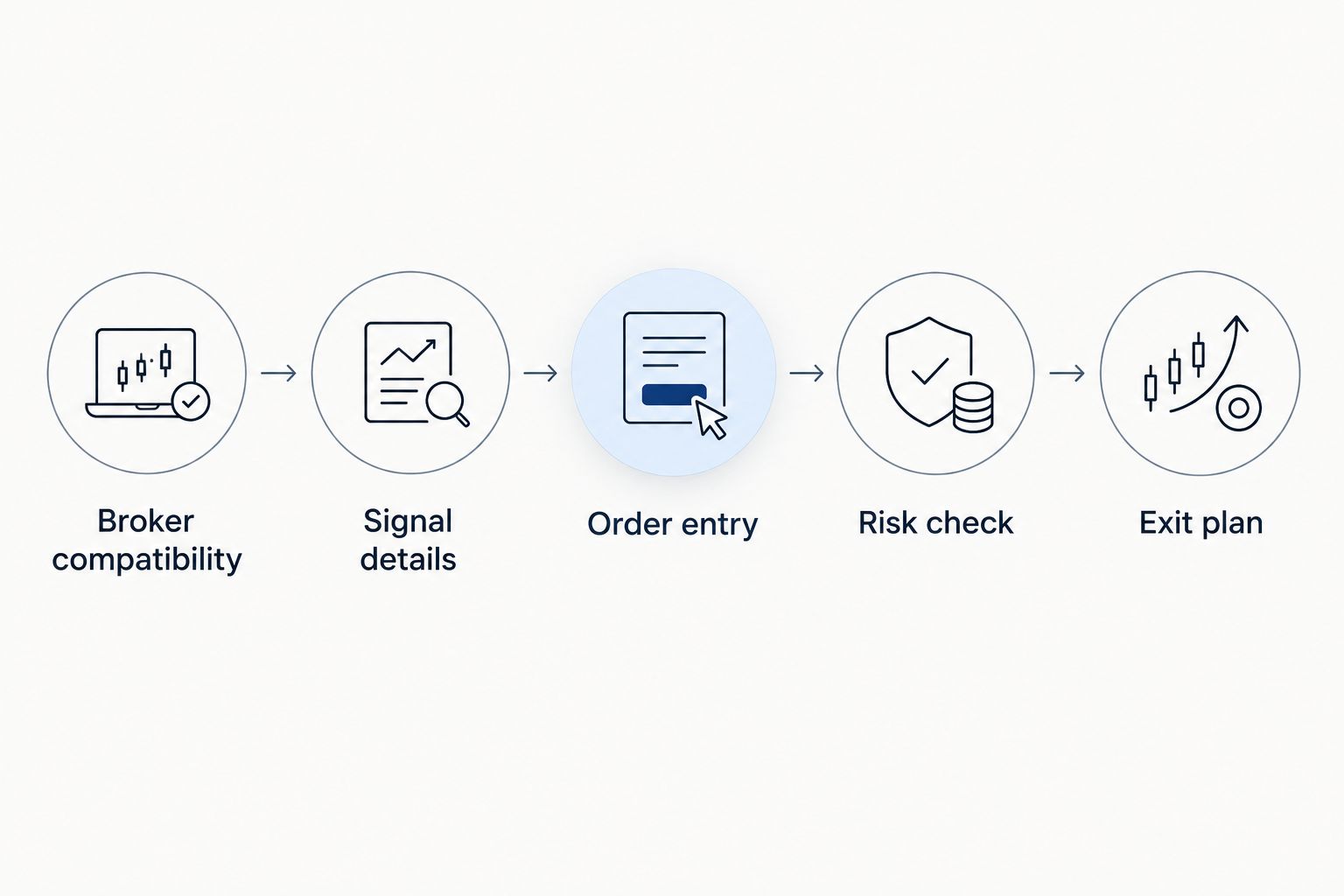
For your 2026 setup, work through these checks in order:
- Broker compatibility: Confirm the account connects to your selected app and includes the intended currency pair.
- Signal details: Examine what the service actually supplies. Do not assume every idea includes an entry, stop-loss, target, or explanation.
- Order entry: Learn the difference between entering immediately and placing an order that waits for a specified price.
- Risk check: Understand the trade size, protective orders, and possible loss before submitting anything.
- Exit plan: Know how to close the position yourself and what would make you reject the idea entirely.
A signal is not an instruction you must follow. If its terms are unclear, the market has moved beyond your intended entry, or the possible loss exceeds your limit, skip the trade rather than improvising.
The guide to choosing a forex trading app before subscribing to signals expands this app-first decision. Keep the subscription decision separate from the decision to place any individual trade.
Review Tradeforex before subscribing
Evaluate the signals service separately from the broker and Android app you use to trade.
Understand trade size before copying an entry
A pip is a conventional unit used to describe a currency pair's price movement. For most currency pairs, 1 pip equals 0.0001 quote-currency units; for many Japanese yen pairs, 1 pip equals 0.01 yen. A platform can display an additional decimal place, so do not confuse every displayed increment with a full pip.
A standard forex lot conventionally represents 100,000 units of the base currency, the currency named first in the pair. That convention does not mean you must trade a standard lot, and brokers differ in the sizes they permit.
These distinctions matter because the same price movement produces different cash gains or losses at different position sizes. Copying another person's lot size does not copy a suitable risk level for your account.
A stop-loss requests an exit when the market reaches a specified level; it does not guarantee an exact execution price. Fast movement and price gaps can produce a different fill. Borrowed exposure, often called leverage, also magnifies the effect of market movements on your account.
Which Android forex app should you choose?
For a new 2026 shortlist, start with MetaTrader 5 and a compatible demo account. Choose TradingView when chart analysis is the main need, cTrader when its execution workflow makes more sense to you, and MetaTrader 4 when you already need an MT4 account.
Then rehearse the complete process: identify the pair, review the idea, choose a trade size, enter the order, manage it, and close it. Do this without depending on someone else's screenshot or an unexplained instruction.
Tradeforex supplies signals inside its web app; your broker platform remains the place where you manage execution. Subscribe only after you understand that separation and have evaluated the service's actual information.
FAQ
What's the best forex trading app for Android in 2026?
MetaTrader 5 is the default shortlist choice in this comparison, provided your broker supports it. TradingView suits chart-first analysis, cTrader suits execution-workflow evaluation, and MetaTrader 4 suits an existing MT4 account.
Is MetaTrader 5 better than MetaTrader 4 for beginners?
MetaTrader 5 is the starting recommendation for a new shortlist, but broker compatibility comes first. An existing MT4 account requires MT4 access rather than simply signing into MT5.
Can I use TradingView as my only Android forex app?
Only if your required broker connection and trading functions are supported on Android. Access to forex charts alone does not establish that you can place and manage your broker's trades there.
Does Tradeforex execute trades through an Android broker app?
Tradeforex provides forex signals inside its web app, not a broker trading app. You need a separate suitable broker and execution platform if you choose to act on a signal.
Can MetaTrader robots run inside the Android app?
Desktop MetaTrader Expert Advisors do not run inside the Android app. Mobile access to an account is different from running an automated trading program on the phone.
Should I subscribe to forex signals before choosing an app?
Choose and practice with your broker-supported app first. You need to understand order entry, trade size, and exits before evaluating how signals fit that workflow.
Do forex signals or stop-loss orders guarantee my results?
Neither forex signals nor stop-loss orders guarantee your results. Signals are trade ideas, and stop orders can execute at a different price during gaps or fast markets.
One last thing
Practice closing a trade before practicing finding one. Being able to open an order is not the same as being able to control an existing position. Before putting real money behind your 2026 app choice, find the difference between closing a position and placing a new order in the opposite direction; the result depends on the account's position-handling rules.